Working with Whole Genome Data
R2026bThis example shows how to create a memory mapped file for sequence data and work with it without loading all the genomic sequence into memory. Whole genomes are available for human, mouse, rat, fugu, and several other model organisms. For many of these organisms one chromosome can be several hundred million base pairs long. Working with such large data sets can be challenging as you may run into limitations of the hardware and software that you are using. This example shows one way to work around these limitations in MATLAB®.
Large Data Set Handling Issues
Solving technical computing problems that require processing and analyzing large amounts of data places significant demands on computer resources. Large data sets can require substantial memory during processing and many computational operations to analyze. Accessing information stored in large files can also take time. Although modern computers provide significantly more memory and processing power than earlier systems, genomic data sets can still be large enough that loading an entire data set into memory is inefficient or impractical. Memory mapping provides an efficient way to work with large data sets by enabling MATLAB® to access data stored on disk as though it were in memory. This approach allows you to process large genomic data sets without loading the entire data set into memory at one time.
For more details on memory management and large data sets, see Profile and Improve Performance.
Whole Genome Data Sets
Whole-genome sequence data sets can be downloaded from the Ensembl website. The data are available in several formats and are updated as new genome assemblies and annotations become available. This example uses human DNA sequence data stored in FASTA format. Chromosome-scale FASTA files can be large, and loading an entire chromosome sequence into memory can require substantial system resources. Memory mapping provides an efficient alternative by allowing MATLAB® to access the sequence data directly from disk. This example assumes that you have already downloaded and uncompressed a chromosome FASTA file into your local directory. Update the value of FASTAfilename as needed to match the file that you downloaded.
FASTAfilename = 'Homo_sapiens.GRCh37.56.dna.chromosome.1.fa';
fileInfo = dir(which(FASTAfilename));
Memory Mapped Files
Memory mapping allows MATLAB to access data in a file as though it is in memory. You can use standard MATLAB indexing operations to access data. See the documentation for memmapfile for more details.
You could just map the FASTA file and access the data directly from there. However the FASTA format file includes new line characters. The memmapfile function treats these characters in the same way as all other characters. Removing these before memory mapping the file will make indexing operations simpler. Also, memory mapping does not work directly with character data so you will have to treat the data as 8-bit integers (uint8 class). The function nt2int in the Bioinformatics Toolbox™ can be used to convert character information into integer values. int2nt is used to convert back to characters.
First open the FASTA file and extract the header.
fidIn = fopen(FASTAfilename,'r');
header = fgetl(fidIn)
header =

    '>1 dna:chromosome chromosome:GRCh37:1:1:249250621:1'
Open the file to be memory mapped.
[fullPath, filename, extension] = fileparts(FASTAfilename);
mmFilename = [filename '.mm']
fidOut = fopen(mmFilename,'w');
mmFilename =

    'Homo_sapiens.GRCh37.56.dna.chromosome.1.mm'
Read the FASTA file in blocks of 1MB, remove new line characters, convert to uint8, and write to the MM file.
newLine = sprintf('\n');
blockSize = 2^20;
while ~feof(fidIn)
    % Read in the data
    charData = fread(fidIn,blockSize,'*char')';
    % Remove new lines
    charData = strrep(charData,newLine,'');
    % Convert to integers
    intData = nt2int(charData);
    % Write to the new file
    fwrite(fidOut,intData,'uint8');
end
Close the files.
fclose(fidIn);
fclose(fidOut);
The new file is about the same size as the old file but does not contain new lines or the header information.
mmfileInfo = dir(mmFilename);
Accessing the Data in the Memory Mapped File
The command memmapfile constructs a memmapfile object that maps the new file to memory. In order to do this, it needs to know the format of the file. The format of this file is simple, though much more complicated formats can be mapped.
chr1 = memmapfile(mmFilename, 'format', 'uint8');
The MEMMAPFILE Object
The memmapfile object has various properties. Filename stores the full path to the file. Writable indicates whether or not the data can be modified. Note that if you do modify the data, this will also modify the original file. Offset allows you to specify the space used by any header information. Format indicates the data format. Repeat is used to specify how many blocks (as defined by Format) to map. This can be useful for limiting how much memory is used to create the memory map. These properties can be accessed in the same way as other MATLAB data. For more details see type help memmapfile or doc memmapfile.
chr1.Data(1:10)
ans =

  10×1 uint8 column vector

   15
   15
   15
   15
   15
   15
   15
   15
   15
   15
You can access any region of the data using indexing operations.
chr1.Data(10000000:10000010)'
ans =

  1×11 uint8 row vector

   1   1   2   2   2   2   3   4   2   4   2
Remember that the nucleotide information was converted to integers. You can use int2nt to get the sequence information back.
int2nt(chr1.Data(10000000:10000010)')
ans =

    'AACCCCGTCTC'
Or use seqdisp to display the sequence.
seqdisp(chr1.Data(10000000:10001000)')
ans =

  17×71 char array

    '   1  AACCCCGTCT CTACAATAAA TTAAAATATT AGCTGGGCAT GGTGGTGTGT GCTTGTAGTC'
    '  61  CCAGCTACTT GGCGGGCTGA GGTGGGAGAA TCATCCAAGC CTTGGAGGCA GAGGTTGCAG'
    ' 121  TGAGCTGAGA TTGTGACACT GCACTCCAGC CTGGGAGACA GAGTGAGACT CCTACTCAAA'
    ' 181  AAAAAACAAA AAACAAAAAA CAAACCACAA AACTTTCCAG GTAACTTATT AAAACATGTT'
    ' 241  TTTTGTTTGT TTTGAGACAG AGTCTTGCTC TGTCGCCCAG GCTGGAGTGC AGTGGAGCAA'
    ' 301  TCTCAGCTCA CTGCAAGCTC CGCCTCCCGG GTTCACACCA TTCTCCTGCC TCAGCCTCCC'
    ' 361  GAGTAGCTAG GACTATAGGC ACCCGCCACC ACGCCCAGCT TATTTTTTTT GTATTTTTTA'
    ' 421  GTAGAGACGG GGTTTCATCG TGTTAGCCAG GATGGTCTCG ATCTCCTGAC CTCGTGATCC'
    ' 481  GCCCACCTCA GCCTCCCAAA GTGCTGGGAT TACAGGCGTG AGCCACTGCA CCCGGCCTAG'
    ' 541  TTTTTGTATA TTTTTTTTAG TAGAGACAGG GTTTCACCAT GTTAGCCAGG ATGGTCTCAA'
    ' 601  TCTCCTGACC TCGTGATCCG CCCGCCTCGG CCTCCCAAAG TGCTGGGGTT ACAGGCGTGA'
    ' 661  GCCACCGCAC ACAGCATTAA AGCATGTTTT ATTTTCCTAC ACATAATGAA ATCATTACCA'
    ' 721  GATGATTTGA CATGTGTACT TCATTGGAGA GGATTCTTAC AGTATATTCA AAATTAAATA'
    ' 781  TAATGACAAA AAATTACTAC CTAATCTATT AAAATTGGCA TAAGTCATCT ATGATCATTA'
    ' 841  ATGATATGCA AACATAAACA AGTATTATAC CCAGAAGTGT AATTTATTGT AGCTACATCT'
    ' 901  TATGTATAAT AGTTTAGTGG ATTTTTCCTG GAAATTGTCC ATTTTAATTT TTCTCTTAAG'
    ' 961  TCTGTGGAAT TTTCCAGTAA AAGTCAAGGC AAACCCAAGA T                    '
Analysis of the Whole Chromosome
Now that you can easily access the whole chromosome, you can analyze the data. This example shows one way to look at the GC content along the chromosome.
You extract blocks of 500000bp and calculate the GC content.
Calculate how many blocks to use.
numNT = numel(chr1.Data);
blockSize = 500000;
numBlocks = floor(numNT/blockSize);
One way to help MATLAB performance when working with large data sets is to "preallocate" space for data. This allows MATLAB to allocate enough space for all of the data rather than having to grow the array in small chunks. This will speed things up and also protect you from problems of the data getting too large to store. For more details on pre-allocating arrays, see: https://www.mathworks.com/matlabcentral/answers/99124-how-do-i-pre-allocate-memory-when-using-matlab
An easy way to preallocate an array is to use the zeros function.
ratio = zeros(numBlocks+1,1);
Loop over the data looking for C or G and then divide this number by the total number of A, T, C, and G. This will take about a minute to run.
A = nt2int('A'); C = nt2int('C'); G = nt2int('G'); T = nt2int('T');

for count = 1:numBlocks
    % calculate the indices for the block
    start = 1 + blockSize*(count-1);
    stop = blockSize*count;
    % extract the block
    block = chr1.Data(start:stop);
    % find the GC and AT content
    gc = (sum(block == G | block == C));
    at = (sum(block == A | block == T));
    % calculate the ratio of GC to the total known nucleotides
    ratio(count) = gc/(gc+at);
end
The final block is smaller so treat this as a special case.
block = chr1.Data(stop+1:end);
gc = (sum(block == G | block == C));
at = (sum(block == A | block == T));
ratio(end) = gc/(gc+at);
Plot of the GC Content for the Homo Sapiens Chromosome 1
xAxis = [1:blockSize:numBlocks*blockSize, numNT];
plot(xAxis,ratio)
xlabel('Base pairs');
ylabel('Relative GC content');
title('Relative GC content of Homo Sapiens Chromosome 1')
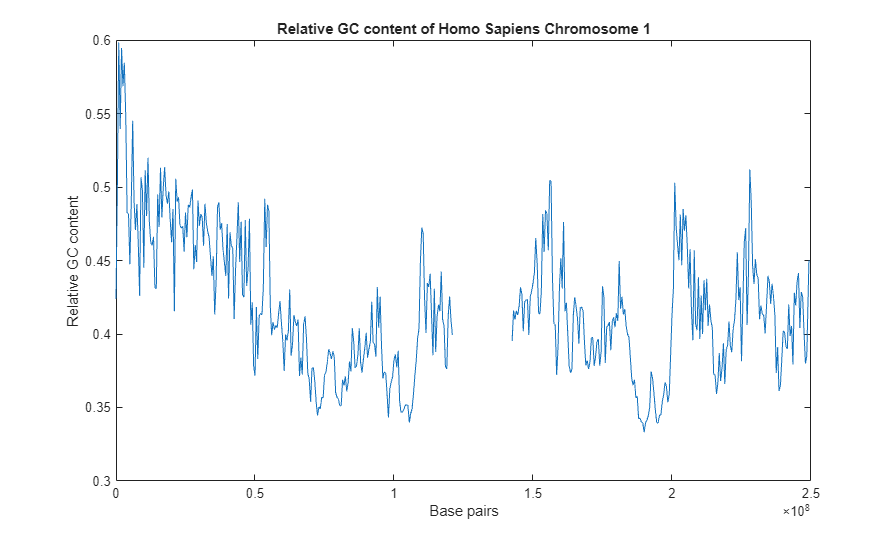
The region in the center of the plot around 140Mbp is a large region of Ns.
seqdisp(chr1.Data(140000000:140001000))
ans =

  17×71 char array

    '   1  NNNNNNNNNN NNNNNNNNNN NNNNNNNNNN NNNNNNNNNN NNNNNNNNNN NNNNNNNNNN'
    '  61  NNNNNNNNNN NNNNNNNNNN NNNNNNNNNN NNNNNNNNNN NNNNNNNNNN NNNNNNNNNN'
    ' 121  NNNNNNNNNN NNNNNNNNNN NNNNNNNNNN NNNNNNNNNN NNNNNNNNNN NNNNNNNNNN'
    ' 181  NNNNNNNNNN NNNNNNNNNN NNNNNNNNNN NNNNNNNNNN NNNNNNNNNN NNNNNNNNNN'
    ' 241  NNNNNNNNNN NNNNNNNNNN NNNNNNNNNN NNNNNNNNNN NNNNNNNNNN NNNNNNNNNN'
    ' 301  NNNNNNNNNN NNNNNNNNNN NNNNNNNNNN NNNNNNNNNN NNNNNNNNNN NNNNNNNNNN'
    ' 361  NNNNNNNNNN NNNNNNNNNN NNNNNNNNNN NNNNNNNNNN NNNNNNNNNN NNNNNNNNNN'
    ' 421  NNNNNNNNNN NNNNNNNNNN NNNNNNNNNN NNNNNNNNNN NNNNNNNNNN NNNNNNNNNN'
    ' 481  NNNNNNNNNN NNNNNNNNNN NNNNNNNNNN NNNNNNNNNN NNNNNNNNNN NNNNNNNNNN'
    ' 541  NNNNNNNNNN NNNNNNNNNN NNNNNNNNNN NNNNNNNNNN NNNNNNNNNN NNNNNNNNNN'
    ' 601  NNNNNNNNNN NNNNNNNNNN NNNNNNNNNN NNNNNNNNNN NNNNNNNNNN NNNNNNNNNN'
    ' 661  NNNNNNNNNN NNNNNNNNNN NNNNNNNNNN NNNNNNNNNN NNNNNNNNNN NNNNNNNNNN'
    ' 721  NNNNNNNNNN NNNNNNNNNN NNNNNNNNNN NNNNNNNNNN NNNNNNNNNN NNNNNNNNNN'
    ' 781  NNNNNNNNNN NNNNNNNNNN NNNNNNNNNN NNNNNNNNNN NNNNNNNNNN NNNNNNNNNN'
    ' 841  NNNNNNNNNN NNNNNNNNNN NNNNNNNNNN NNNNNNNNNN NNNNNNNNNN NNNNNNNNNN'
    ' 901  NNNNNNNNNN NNNNNNNNNN NNNNNNNNNN NNNNNNNNNN NNNNNNNNNN NNNNNNNNNN'
    ' 961  NNNNNNNNNN NNNNNNNNNN NNNNNNNNNN NNNNNNNNNN N                    '
Finding Regions of High GC Content
You can use find to identify regions of high GC content.
indices = find(ratio>0.5);
ranges = [(1 + blockSize*(indices-1)), blockSize*indices];
fprintf('Region %d:%d has GC content %f\n',[ranges ,ratio(indices)]')
Region 500001:1000000 has GC content 0.501412
Region 1000001:1500000 has GC content 0.598332
Region 1500001:2000000 has GC content 0.539498
Region 2000001:2500000 has GC content 0.594508
Region 2500001:3000000 has GC content 0.568620
Region 3000001:3500000 has GC content 0.584572
Region 3500001:4000000 has GC content 0.548137
Region 6000001:6500000 has GC content 0.545072
Region 9000001:9500000 has GC content 0.506692
Region 10500001:11000000 has GC content 0.511386
Region 11500001:12000000 has GC content 0.519874
Region 16000001:16500000 has GC content 0.513082
Region 17500001:18000000 has GC content 0.513392
Region 21500001:22000000 has GC content 0.505598
Region 156000001:156500000 has GC content 0.504446
Region 156500001:157000000 has GC content 0.504090
Region 201000001:201500000 has GC content 0.502976
Region 228000001:228500000 has GC content 0.511946
If you want to remove the temporary file, you must first clear the memmapfile object.
clear chr1
delete(mmFilename)

