Generate MATLAB Interface for HackRF SDR
R2026bThis example shows how to generate a MATLAB® interface for a HackRF One software-defined radio (SDR) by using clibgen to wrap the hackrf C library. The generated interface lets you connect to the radio and configure it for transmission and reception from MATLAB.
The example workflow uses two input files: the hackrf.h header from the HackRF source code, and the hackrf_mw.hpp wrapper header included with this example. The wrapper header supports parts of hackrf.lib that clibgen cannot bind directly, such as streaming callbacks and ring buffers for receive, transmit, and sweep operations.
Prerequisites
To run this example, you need a HackRF One radio, a source build of hackrf library, and a Microsoft® Visual C++® compiler. Before building, configure MEX to use the Microsoft® Visual C++ compiler by running mex -setup. After the build succeeds, run hackrf_info command to verify that your HackRF One radio is detected.
Build hackrf.lib from source before you generate the MATLAB interface. This example requires both the hackrf.h header file and the hackrf.lib import library. Prebuilt HackRF installers typically include only the run-time dynamic-link library (DLL), so they do not provide all files required to generate and build the interface.
For source code and build instructions, see the Great Scott Gadgets documentation for Installing HackRF Software and the HackRF GitHub repository. Use a Visual Studio Release build. After the build finishes, the paths in this example are relative to the host folder of your libhackrf checkout.
Interface Build Workflow
The build workflow generates a MATLAB library definition, applies required edits to the generated definition file, and builds the interface DLL.
The workflow generates these files and folders on your machine:
definehackrf.m— Generated MATLAB library definitionhackrfInterface.dll— Compiled interface DLL+clib/+hackrf— Generated MATLAB package folder
After the build succeeds, you can run the example scripts, which demonstrate how to open the radio, configure it, receive samples, transmit samples, and sweep a band: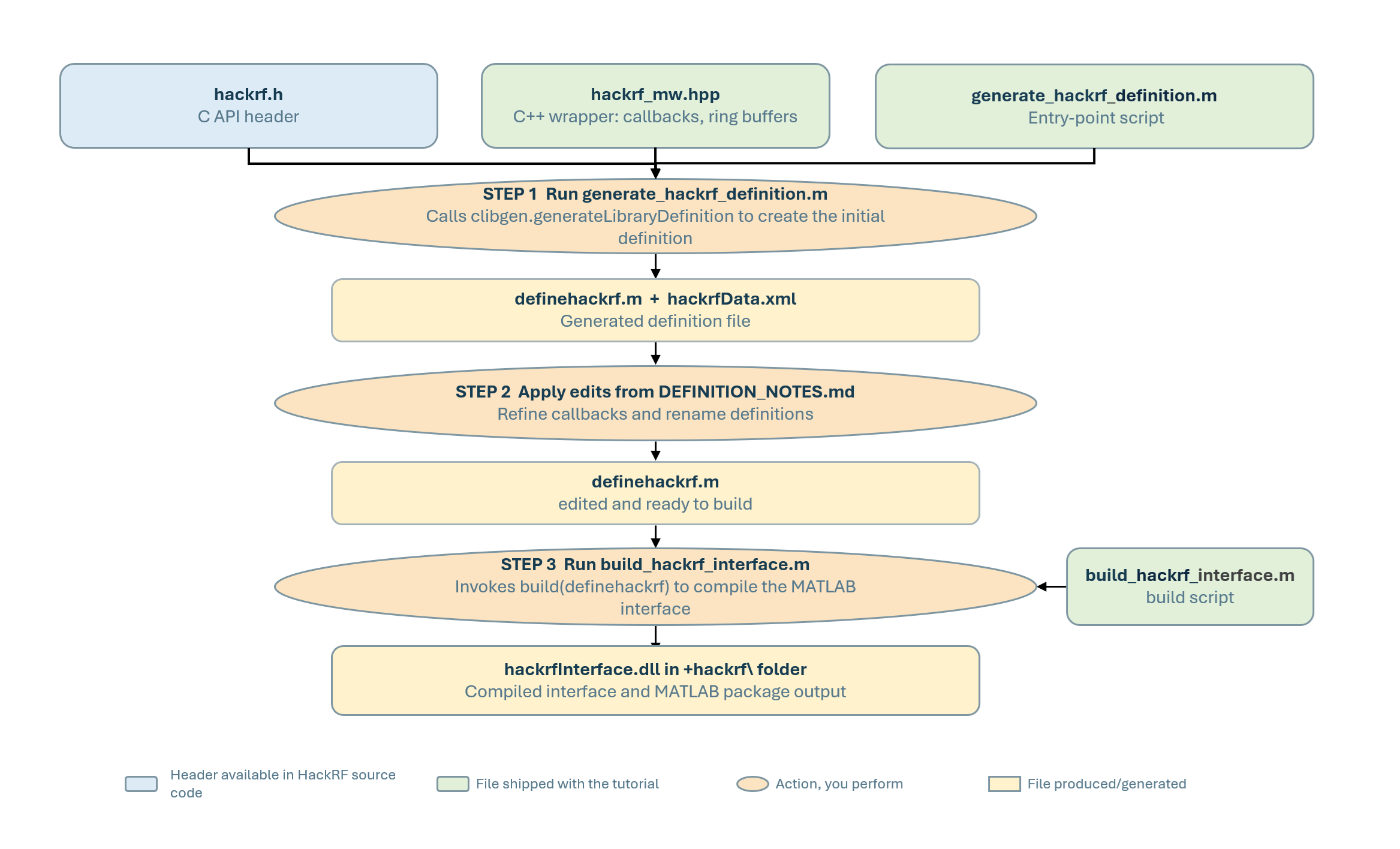
clibgen.generateLibraryDefinition reads hackrf.h and hackrf_mw.hpp and creates definehackrf.m. After you apply the edits listed in DEFINITION_NOTES.md, build the library definition file to obtain hackrfInterface.dll. When the DLL is on the MATLAB path, you can call the generated functions from the clib.hackrf namespace.
You must generate the definehackrf.m file on your own machine because clibgen writes absolute paths into the generated definition file and its supporting XML data. Since these paths depend on your local hackrf library installation, the file cannot be shared across machines.
HackRF Interface Components
hackrf.h— ThehackrfC API header provides the radio configuration functions such ashackrf_set_freq,hackrf_set_sample_rate,hackrf_set_lna_gain,hackrf_set_vga_gain,hackrf_set_amp_enable, andhackrf_set_txvga_gain. It also provides streaming entry points, such ashackrf_start_rx,hackrf_start_tx,hackrf_start_rx_sweep,hackrf_stop_rx, andhackrf_stop_tx.hackrf_mw.hpp— The C++ wrapper header adds wrapper functions for API patterns that MATLAB cannot bind directly. These wrappers support receive, transmit, and sweep callbacks; ring-buffer access functions such ashackrf_rx_pop,hackrf_tx_push, andhackrf_sweep_pop; and helper functions for listing HackRF devices.generate_hackrf_definition.m— This script runsclibgen.generateLibraryDefinitionby using paths specified insettingLibraryPaths, and generates a newdefinehackrf.mfile corresponding tohackrfData.xmlin the example directory
Configure libhackrf Path
Open settingLibraryPaths.m and set hackrfRoot to the host folder of your libhackrf checkout. The folder must contain these files.
Required File | Relative Path Under |
|---|---|
|
|
|
|
|
|
|
|
settingLibraryPaths checks these files each time the example uses the paths. If a path is incorrect, the script stops and reports the missing file.
Generate Library Definition
Run generate_hackrf_definition.m to create the MATLAB library definition for your local libhackrf build. The script removes any earlier generated files, changes to the example folder, and calls clibgen.generateLibraryDefinition with the required options.
The generate_hackrf_definition.m script performs these actions:
Reads paths from
settingLibraryPathsRemoves previously generated definition files such as
definehackrf.,hackrfData., and stale+clib/folder in the example.Changes to the example folder so that relative paths of the generated file resolve.
Calls
clibgen.generateLibraryDefinitionwithTreatObjectPointerAsScalarandTreatConstCharPointerAsCStringset totrue.
When the script generate_hackrf_definition.m is run, definehackrf.m is generated in the current folder. Do not build the interface yet. First, apply the required edits described in the DEFINITION_NOTES.md file.
Edit Generated Definition File
Open DEFINITION_NOTES.md and apply each listed edit to definehackrf.m. These edits are required because clibgen cannot infer some callback, pointer, and shape information from the C application programming interface (API). If you skip an edit, the build can fail or the generated interface can omit required streaming functions.
Use DEFINITION_NOTES.md as the authoritative checklist. For example, the notes describe how to enable the hackrf_start_rx, hackrf_start_tx, and hackrf_start_rx_sweep functions by setting the callback context argument type. They also describe how to remove unsupported hackrf_device_list bindings and how to bind hackrf_tx_push with the required buffer shape.
Edit Step | Action | Result If Skipped |
|---|---|---|
Set the callback context type | Uncomment the three |
|
Drop the | Comment out the | Build fails with " |
Bind | Uncomment the |
|
Review DEFINITION_NOTES.md for the complete list of required edits. The file includes the exact before-and-after changes and explains why clibgen cannot automatically handle each pattern. You can apply the same techniques when you create bindings for other C libraries.
Build Interface
Run build_hackrf_interface.m to compile the edited definition file into hackrfInterface.dll. The script loads definehackrf.m, sets the output folder to the example folder, calls build() to compile the interface, and prints a summary of the generated interface. It also verifies that the required generated files are available before starting the build.
After the build completes, look for these messages in the command window.
"Interface file HackRFInterface.dll is built
Next: run connectAndCheckVersionExample.m."
The script displays summary of generated interface after the build. Verify that hackrf_start_rx, hackrf_start_tx, and hackrf_start_rx_sweep appear in the generated interface. If any of these functions are missing, review the callback context edits in DEFINITION_NOTES.md and rebuild the interface.
For expected build output and troubleshooting information, see BUILD_NOTES.md.
Run-time Architecture
At run time, MATLAB calls functions in the clib.hackrf namespace, which then calls hackrfInterface.dll, before invoking hackrf.dll. The hackrf.dll library communicates with the HackRF One radio over USB through libusb-1.0.dll.
For receive and sweep operations, hackrf library calls a callback for each USB transfer. The callback stores bytes in a ring buffer, and MATLAB reads those bytes by calling hackrf_rx_pop or the corresponding sweep helper function. For transmit operations, MATLAB writes bytes to a ring buffer, and the transmit callback reads from that buffer.

The interface contains these layers:
MATLAB layer — Your script calls functions in the
clib.hackrfnamespace. MATLAB checks the argument types before calling the interface.Interface layer — The
hackrfInterface.dllconverts MATLAB calls into C calls and converts return values back to MATLAB.Helper layer — Functions in
hackrf_mw.hppmanage ring buffers and callback logic for receive, transmit, and sweep operations.Device layer — The
hackrf.dllcommunicates with the HackRF One radio over USB.
Helper Function Naming Pattern
The generated interface keeps the original libhackrf function name when clibgen can bind the function directly. For example, MATLAB calls hackrf_init, hackrf_open, hackrf_set_freq, and hackrf_stop_rx by using their original names in the clib.hackrf namespace.
Regenerate Interface After libhackrf Upgrade
If you upgrade libhackrf, run generate_hackrf_definition.m again with the new hackrf.h file. The generator overwrites definehackrf.m, so you must reapply every edit from DEFINITION_NOTES.md before you rebuild the interface.
After you reapply the edits, run build_hackrf_interface.m to rebuild hackrfInterface.dll.
Run HackRF Examples
Run the example scripts after you build the interface. Each script calls addHackRFPath, which adds the generated interface and required run-time DLLs to the MATLAB path.
Start with running example connectAndCheckVersionExample.m. If this script opens the radio and prints the expected status, then the generated interface is working correctly.Then, run the remaining examples to configure the radio, receive samples, transmit samples, sweep a band, and acquire GPS samples.
Troubleshooting
definehackrf.m not found
You have not run generate_hackrf_definition.m yet. Run that script first to produce the definition file for your local libhackrf installation.
hackrf_start_rx************************, hackrf_start_tx, or hackrf_start_rx_sweep missing from the summary output
Edit 1 in DEFINITION_NOTES.md was not applied. Open definehackrf.m, locate the commented-out block for the missing function, uncomment it, and pin rx_ctx and tx_ctx to int32 scalar.
Build error mentioning hackrf_device_list_t
Edit 2 was not applied. In definehackrf.m, replace all occurrences of hackrf_device_list_t with hackrf_device_list and rebuild.
LNK1181: cannot open input file hackrf.lib'
The hackrfImportLib variable in settingLibraryPaths points to a file that does not exist. Confirm that you built hackrf.lib in the Release configuration and that the path in the setup script matches the actual build output location.
loadlibrary error or "DLL not found" at runtime
hackrf.dll or libusb-1.0.dll is not on the system PATH. Call addHackRFPath before invoking any HackRF function to add the required DLL directories.
MEX_INSTALL error or "no supported compiler found"
MEX is not configured with a C++ compiler. Run mex -setup cpp and select the Microsoft Visual C++ compiler from the list of installed compilers.

