Add Fault Behaviors to Buses
R2026bYou can create fault behaviors that affect one or multiple elements of the bus. You can add a fault behavior that affects one element, several elements, or all elements in the bus.
Add Fault Behavior That Affects One Bus Element
Since R2026a
To create a fault and add fault behavior that affects one bus element:
In your model, select the bus.
In the Fault Analyzer tab, in the Prepare Faults section, click Add Fault.
In the Add Fault window, set the Fault library property, then set the Fault behavior property to the behavior you want to model. Bus elements support fault behaviors in the default fault library,
mwfaultlib, and custom fault behaviors that you specify in other libraries. However, if you assign fault behavior from a custom library, Simulink® Fault Analyzer™ creates an unlinked copy of the fault behavior. For more information on adding behaviors to faults, see Add Predefined and Custom Fault Behaviors.Specify the bus element. Select the Fault specific bus element property and set the Bus element property to the bus element.
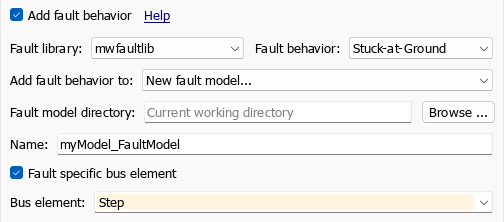
Click OK.
To add fault behavior that affects one bus element to an existing fault:
Click the fault badge next to the bus.
Click the Add fault behavior icon in the preview window.
In the Add Fault Behavior window, set the Fault library property, then set the Fault behavior property to the behavior you want to model.
Specify the bus element. Select the Fault specific bus element property and set the Bus element property to the bus element.

Click OK.
The fault behavior affects only the specified bus
element. To view the fault behavior, click the fault badge and click the preview window.
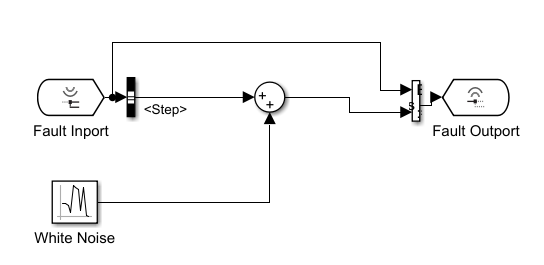
The behavior uses a Bus Selector block to retrieve the bus element,
applies the fault behavior, and assigns the updated signal to the bus by using a
Bus Assignment block. This image shows fault behavior that adds noise
to only the Step bus element.
Note
If the bus or one of the bus elements is a virtual bus, simulating the fault produces an error during model compilation. See Simulate Faults on Nonvirtual Buses.
Programmatically Add Behavior That Affects One Bus Element
To programmatically add fault behavior to a bus element, retrieve the
Fault object from the fault, use addBehavior function, and specify the BusElement
name-value argument.
Add Fault Behavior That Affects Multiple Bus Elements
You can define behaviors for individual bus elements, or apply the behavior that affects the entire bus.
Define Fault Behaviors for Individual Bus Elements
To define fault behaviors for individual bus elements:
Add fault behavior to the fault.
Update the model. The fault behavior registers the fault.
Open the fault behavior. In your model, click the fault badge and click the preview window.
Split the signal from the Fault Inport block by using a Bus Selector block and select the bus elements to output.
Add blocks to model the fault behavior for each of the bus elements.
Reassign the bus elements to the bus by using a Bus Assignment block.
For example, this fault behavior selects three bus elements from a bus, applies a distinct offset to each bus element, and assigns the updated values to the bus by using a Bus Assignment block.

The bus elements of the input ports to the Bus Assignment block must match the bus elements output by the Bus Selector block.
Add a Fault Behavior That Affects All Bus Elements
To add a fault behavior that affects
all the bus elements, the blocks in the fault
behavior must support buses. See Bus-Capable Blocks. Consequently, if you want to use behaviors
in the default behavior library mwfaultlib, you can only use the
stuck-at-ground fault behavior.

