Cross-Platform FMU Simulation for Vehicle Electrical and Climate Control Systems
R2026bThis example demonstrates how to use Simulink® to simulate a Functional Mock-up Unit (FMU) with a Linux® binary on Windows®. This example uses a model that simulates the interaction between a vehicle's electrical system and its climate control system. For detailed explanation of the model, see Vehicle Electrical and Climate Control Systems.
Prerequisites
To run this example, you must ensure that you are on a Windows machine and WSL(Windows Subsystem for Linux) (version 2.0.9.0 or later) is installed on your machine. To resolve issues with cross-platform setup, see Fix System Configuration Issues for Cross-Platform FMU Workflow.
Model Overview
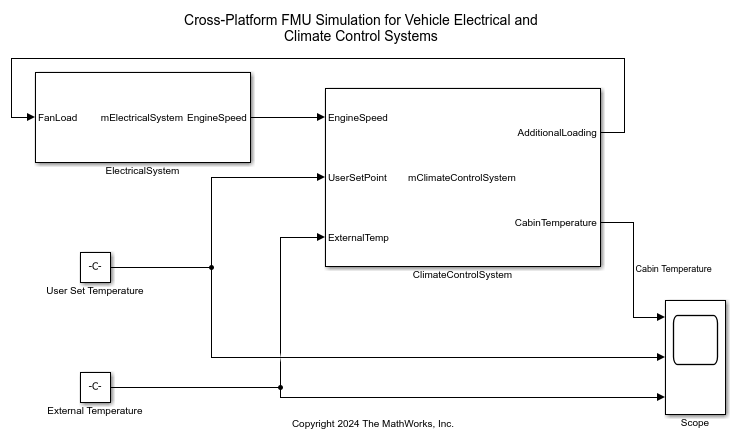
The model sldemo_fmu_vehicle_electrical_climate_control_system, incorporates two FMU Import blocks:
ElectricalSystem imports
ElectricalSystem.fmuto model the behavior of the vehicle's electrical system.ClimateControlSystem imports
ClimateControlSystem.fmu, which contains only Linux binaries, to model the climate control system's behavior.
In this setup, ElectricalSystem functions as a controller, while ClimateControlSystem serves as the plant.
The climate control system accepts three inputs:
UserSetPointis the desired temperature, specified by Constant blockUser Set Temperature.ExternalTempis the external temperature, specified by Constant blockExternal Temperature.EngineSpeedis the engine speed, provided byElectricalSystem.
Feedback from the ClimateControlSystem is used by the ElectricalSystem to adjust the engine speed accordingly.
The model visualizes how cabin temperature changes based on user settings, external temperature, and adjustments made by the electrical system.
Simulating Model Using Linux Binary Inside FMU on Windows Operating System
To open the sldemo_fmu_vehicle_electrical_climate_control_system model.
open_system('sldemo_fmu_vehicle_electrical_climate_control_system');
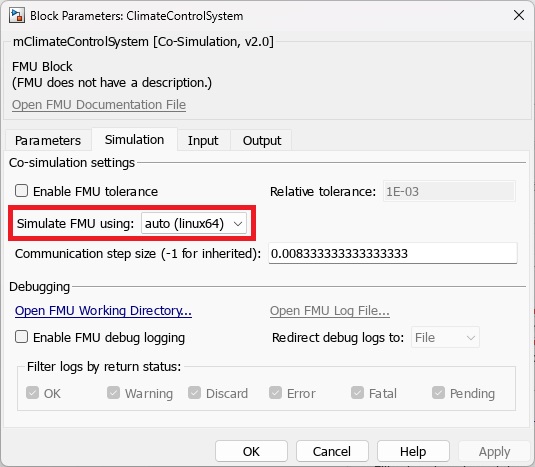
To enable the use of the Linux binary of ClimateControlSystem.fmu for simulation, double click the ClimateControlSystem block to open the block dialog box and under the Simulation tab specify the Simulate FMU Using parameter as auto (linux64).
Simulate the model using this command:
sim('sldemo_fmu_vehicle_electrical_climate_control_system');

