Estimate Spectral Model
R2026bEstimate spectral model using time-domain data in the Live Editor
Description
The Estimate Spectral Model task lets you interactively estimate and plot a spectral model using time data. You can specify one of three estimation algorithms and modify the size of the window size that determines frequency resolution. You can also specify the frequency vector, including the number of frequencies and whether those frequencies are evenly spaced on a linear or a logarithmic scale. The task automatically generates MATLAB® code for your live script. For more information about Live Editor tasks in general, see Add Interactive Tasks to Live Scripts.
A frequency-response model is the frequency response of a linear
system evaluated over a range of frequency values. The model is represented by an idfrd model object that stores the frequency response, sample time, and
input-output channel information. For more information about frequency-response models, see
What Is a Frequency-Response Model?
The Estimate Spectral Model task is independent of the more general System Identification app. Use the System Identification app when you want to compute and compare estimates for multiple models.
To get started, load experiment data that contains input and output data into your MATLAB workspace and then import that data into the task. Then, specify a model structure to estimate. The task gives you controls and plots that help you experiment with different model parameters and compare how well the output of each model fits the measurements.

Open the Task
To add the Estimate Spectral Model task to a live script in the MATLAB Editor:
On the Live Editor tab, select Task > Estimate Spectral Model.
In a code block in your script, type a relevant keyword, such as
spectralorestimate. SelectEstimate Spectral Modelfrom the suggested command completions.
Examples
Use the Estimate Spectral Model Live Editor Task to estimate a frequency-response model and plot the response.
Set Up Data
Load the measurement data tt2 into your MATLAB workspace.tt2 is a timetable that contains one input variable u and one output variable y.
load sdata2 tt2
Import Data into Task
In the Select data section, for Data type, select Timetable. For Estimation data, select Input-output data. In Timetable, select tt2.
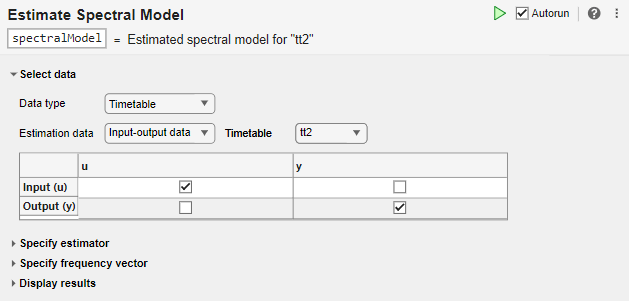
The task displays a table that contains the tt2 input and output variable names.
Estimate Model Using Default Settings
The default algorithm is SPA (Blackman-Tukey).
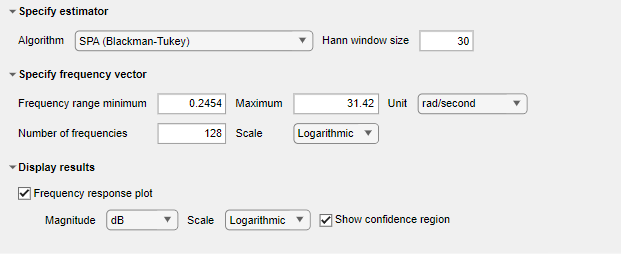
Because Autorun is selected, the task automatically performs the estimation, using this algorithm and the default settings for Specify frequency vector and Display results.
Examine Plot
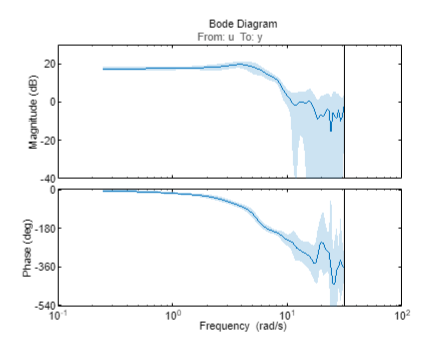
The task displays a Bode plot that includes a confidence region of three standard deviations.
View Code
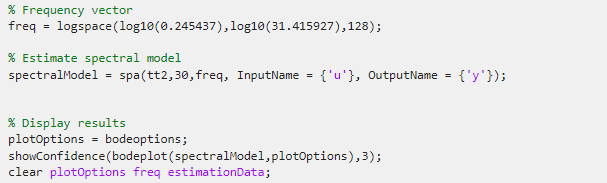
To display the code that the task generates, click  at the bottom of the parameter section. The code that you see reflects the current parameter configuration for the task.