Contenido principal

ACIM Slip Speed Estimator

Calculate slip speed of AC induction motor

Libraries:
Motor Control Blockset / Controls / Control Reference
Motor Control Blockset HDL Support / Controls / Control Reference

Description

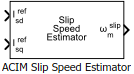
The ACIM Slip Speed Estimator block computes the mechanical slip speed (difference between the synchronous speed and rotor speed) of the induction motor.

The block accepts the reference values of d- and q-axis currents and outputs the computed slip speed of the induction motor.

Equations

These equations describe the utilization of the slip speed value for field-oriented control (FOC) of the induction motor:

τr= (LrRr)

ωe_slip= (Lmisqrefτrλrd)

ωe= ωr+ωe_slip

θe= ωe dt=(ωr+ωe_slip)dt=θr+θslip

If we keep the rotor flux as constant and the d-axis is aligned to the rotor flux reference frame, then we can imply:

λrd=Lmisd

This block implements the preceding calculations as:

ωslip= (1p)(1τr)(isqrefisdref)

For detailed set of equations and assumptions, see Mathematical Model of Induction Motor.

where:

  • ωe_slip is the electrical slip speed of the rotor (Radians/ sec).

  • ωslip is the mechanical slip speed of the rotor (Radians/ sec).

  • ωe is the electrical speed corresponding to frequency of stator voltages (Radians/ sec).

  • ωm is the rotor mechanical speed (Radians/ sec).

  • ωr is the rotor electrical speed (Radians/ sec).

  • Lm is the magnetizing inductance of the motor (Henry).

  • Rr is the rotor resistance referred to stator (Ohms).

  • isdref and isqref are the reference stator d- and q-axis currents (Amperes).

  • τr is the rotor time constant (sec).

  • λrd is the d-axis flux linkage of the rotor (Weber).

Examples
Ports

Input

expand all

Reference d-axis stator current.

Data Types: single | double | fixed point

Reference q-axis stator current.

Data Types: single | double | fixed point

Output

expand all

Mechanical slip speed of the rotor that the block computes.

Data Types: single | double | fixed point

Parameters

expand all

Number of pole pairs available in the induction motor.

Since R2026a

Specify the type of motor parameters that the block uses to estimate the slip speed.

  • Lumped motor parameters — Generate slip estimates using lumped circuit values.

  • Slip-Based LUT — Generate slip estimates using reference slip lookup data.

Rotor resistance of the induction motor in Ohms.

Dependencies

To enable this parameter, set the Slip estimation method parameter to Lumped motor parameters.

Inductance due to leakage flux linked to the rotor winding (in Henry).

Dependencies

To enable this parameter, set the Slip estimation method parameter to Lumped motor parameters.

Inductance due to the magnetizing flux (in Henry).

Dependencies

To enable this parameter, set the Slip estimation method parameter to Lumped motor parameters.

Saturation value for the block output (in rpm).

Dependencies

To enable this parameter, set the Slip estimation method parameter to Lumped motor parameters.

Since R2026a

The d-axis current lookup vector to use in the slip speed lookup tables (in Amperes). The vector can have any number of elements.

Dependencies

To enable this parameter, set the Slip estimation method parameter to Slip-Based LUT.

Since R2026a

The q-axis current lookup vector to use in the slip speed lookup tables (in Amperes). The vector can have any number of elements.

Dependencies

To enable this parameter, set the Slip estimation method parameter to Slip-Based LUT.

Since R2026a

Slip lookup table data (in rad/s).

Dependencies

To enable this parameter, set the Slip estimation method parameter to Slip-Based LUT.

Unit of the input values.

Base speed (in rpm) for per-unit system.

Dependencies

To enable this parameter, set Input units to Per-Unit (PU).

Since R2026a

Base current (in Amperes) for per-unit system.

Dependencies

To enable this parameter, set Slip estimation method to Slip-Based LUT and Input units to Per-Unit (PU).

Extended Capabilities

expand all

C/C++ Code Generation
Generate C and C++ code using Simulink® Coder™.

Fixed-Point Conversion
Design and simulate fixed-point systems using Fixed-Point Designer™.

Version History

Introduced in R2020b

expand all