Use memcpy for vector assignment
R2026bOptimize code generated for vector assignments
Model Configuration Pane: Code Generation / Optimization
Description
The Use memcpy for vector assignment parameter specifies whether to optimize code generated for vector assignment by replacing for loops with memcpy.
Pointer assignments avoid expensive data copies. Therefore, they use less stack space
and offer faster execution speed than for loop controlled element
assignments and memcpy function calls. If you assign large data sets
to vector signals, this optimization can result in significant improvements to code
efficiency.
Dependencies
When you select this parameter, the associated parameter Memcpy threshold (bytes) is enabled.
Settings
on | off- On
Enables use of
memcpyfor vector assignment based on the associated threshold parameter Memcpy threshold (bytes).memcpyis used in the generated code if the number of array elements times the number of bytes per element is greater than or equal to the specified value for Memcpy threshold (bytes). One byte equals the width of a character in this context.- Off
Disables use of
memcpyfor vector assignment.
Examples
This example shows how to eliminate data copies by converting vector signal assignments to pointer assignments.
Configure Model to Optimize Generated Code for Vector Signal Assignments
To apply this optimization:
Verify that your target supports the
memcpyfunction.Determine whether your model uses vector signal assignments (such as
Y=expression) to move large amounts of data. For example, your model could use a Selector block to select input elements from a vector, matrix, or multidimension signal.On the Optimization pane, the Use memcpy for vector assignment parameter, which is on by default, enables the associated Memcpy threshold (bytes) parameter.
Examine the setting of Memcpy threshold (bytes). By default, it specifies 64 bytes as the minimum array size for which
memcpyfunction calls or pointer assignments can replaceforloops in the generated code. Based on the array sizes in your application's vector signal assignments, and target environment considerations on the threshold selection, accept the default value or specify another array size.
Example Model
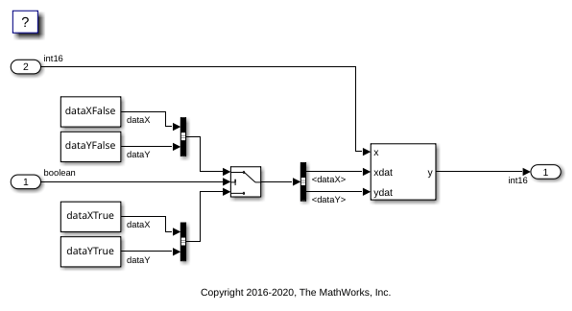
Open the example model rtwdemo_pointer_conversion. This model uses a Switch block to assign data to a vector signal. This signal then feeds into a Bus Selector block.
model='rtwdemo_pointer_conversion';
open_system(model);
Generate Code Without Optimization
In the Configuration Parameters dialog box, clear the Use memcpy for vector assignment parameter. Alternatively, use the command-line.
set_param(model, 'EnableMemcpy','off');
Press Ctrl+B to generate code. Alternatively, use the command-line.
slbuild(model);
### Searching for referenced models in model 'rtwdemo_pointer_conversion'.
### Total of 1 models to build.
### Starting top model code generation target build for: rtwdemo_pointer_conversion
### Successful completion of build procedure for: rtwdemo_pointer_conversion

Build Summary

Top model targets:

Model                       Build Reason                                          Status                        Build Duration
==============================================================================================================================
rtwdemo_pointer_conversion  Target (rtwdemo_pointer_conversion.c) did not exist.  Code generated and compiled.  0h 0m 11.786s

1 of 1 models built (0 models already up to date)
Build duration: 0h 0m 12.539s
View the generated code without the optimization. Here is a portion of rtwdemo_pointer_conversion.c.
cfile = fullfile('rtwdemo_pointer_conversion_ert_rtw','rtwdemo_pointer_conversion.c');
coder.example.extractLines(cfile,'/* Model step','/* Model initialize',1, 0);
/* Model step function */
void rtwdemo_pointer_conversion_step(void)
{
  int32_T i;
  int16_T rtb_dataX[100];
  int16_T rtb_dataY[100];

  /* Switch generated from: '<Root>/Switch' incorporates:
   *  Constant: '<Root>/Constant'
   *  Constant: '<Root>/Constant1'
   *  Constant: '<Root>/Constant2'
   *  Constant: '<Root>/Constant3'
   *  Inport: '<Root>/In1'
   */
  for (i = 0; i < 100; i++) {
    if (rtU.In1) {
      rtb_dataX[i] = rtCP_Constant_Value[i];
      rtb_dataY[i] = rtCP_Constant1_Value[i];
    } else {
      rtb_dataX[i] = rtCP_Constant2_Value[i];
      rtb_dataY[i] = rtCP_Constant3_Value[i];
    }
  }

  /* End of Switch generated from: '<Root>/Switch' */

  /* S-Function (sfix_look1_dyn): '<Root>/Lookup Table Dynamic' incorporates:
   *  Inport: '<Root>/In2'
   *  Outport: '<Root>/Out1'
   */
  /* Dynamic Look-Up Table Block: '<Root>/Lookup Table Dynamic'
   * Input0  Data Type:  Integer        S16
   * Input1  Data Type:  Integer        S16
   * Input2  Data Type:  Integer        S16
   * Output0 Data Type:  Integer        S16
   * Lookup Method: Linear_Endpoint
   *
   */
  LookUp_S16_S16( &(rtY.Out1), &rtb_dataY[0], rtU.In2, &rtb_dataX[0], 99U);
}
Without the optimization, the generated code contains for loop controlled element assignments.
Enable Optimization and Generate Code
In the Configuration Parameter dialog box, select the Use memcpy for vector assignment parameter.
set_param(model, 'EnableMemcpy','on')
Generate code.
slbuild(model);
### Searching for referenced models in model 'rtwdemo_pointer_conversion'.
### Total of 1 models to build.
### Starting top model code generation target build for: rtwdemo_pointer_conversion
### Successful completion of build procedure for: rtwdemo_pointer_conversion

Build Summary

Top model targets:

Model                       Build Reason                                                      Status                        Build Duration
==========================================================================================================================================
rtwdemo_pointer_conversion  Model or library rtwdemo_pointer_conversion has unsaved changes.  Code generated and compiled.  0h 0m 8.6976s

1 of 1 models built (0 models already up to date)
Build duration: 0h 0m 9.4466s
View the generated code with the optimization. Here is a portion of rtwdemo_pointer_conversion.c.
cfile = fullfile('rtwdemo_pointer_conversion_ert_rtw','rtwdemo_pointer_conversion.c');
coder.example.extractLines(cfile,'/* Model step','/* Model initialize',1, 0);
/* Model step function */
void rtwdemo_pointer_conversion_step(void)
{
  const int16_T *rtb_dataX_0;
  const int16_T *rtb_dataY_0;

  /* Inport: '<Root>/In1' */
  if (rtU.In1) {
    /* Switch generated from: '<Root>/Switch' incorporates:
     *  Constant: '<Root>/Constant'
     */
    rtb_dataX_0 = &rtCP_Constant_Value[0];

    /* Switch generated from: '<Root>/Switch' incorporates:
     *  Constant: '<Root>/Constant1'
     */
    rtb_dataY_0 = &rtCP_Constant1_Value[0];
  } else {
    /* Switch generated from: '<Root>/Switch' incorporates:
     *  Constant: '<Root>/Constant2'
     */
    rtb_dataX_0 = &rtCP_Constant2_Value[0];

    /* Switch generated from: '<Root>/Switch' incorporates:
     *  Constant: '<Root>/Constant3'
     */
    rtb_dataY_0 = &rtCP_Constant3_Value[0];
  }

  /* End of Inport: '<Root>/In1' */

  /* S-Function (sfix_look1_dyn): '<Root>/Lookup Table Dynamic' incorporates:
   *  Inport: '<Root>/In2'
   *  Outport: '<Root>/Out1'
   */
  /* Dynamic Look-Up Table Block: '<Root>/Lookup Table Dynamic'
   * Input0  Data Type:  Integer        S16
   * Input1  Data Type:  Integer        S16
   * Input2  Data Type:  Integer        S16
   * Output0 Data Type:  Integer        S16
   * Lookup Method: Linear_Endpoint
   *
   */
  LookUp_S16_S16( &(rtY.Out1), &rtb_dataY_0[0], rtU.In2, &rtb_dataX_0[0], 99U);
}
Because the setting of the Memcpy threshold (bytes) parameter is below the array sizes in the generated code, the optimized code contains pointer assignments for the vector signal assignments.
bdclose(model)
Tips
If the destination of a
memcpyis not changed, the code generator can further optimize the code by replacing thememcpyfunction call with pointer assignments.
Recommended Settings
| Application | Setting |
|---|---|
| Debugging | No impact |
| Traceability | No impact |
| Efficiency | On |
| Safety precaution | No impact |
Programmatic Use
Parameter: EnableMemcpy |
| Type: character vector |
Value: 'on' | 'off' |
Default: 'on' |
Version History
Introduced in R2008b

