Parameterize Battery Cell Using Custom Part Collection
R2026bThis example shows how to create a part collection from a Simscape block, install the collection, and use it to parameterize a cell in a battery pack. Part collections store and reuse validated parameterizations across projects and teams.
In this example, you:
Extract parameters from a configured Battery Equivalent Circuit block into a block data set.
Package the block data set into a part collection.
Use the collection and use it to parameterize a battery cell.
Build a battery module and generate a Simulink® library.
Verify that the custom parameterization is applied in the generated model.
Create Part Collection
A part collection packages block parameters so they can be shared and reused. In this section, you extract parameters from a configured Simscape™ block, assign metadata, and install the collection.
Extract Parameters from Simscape Block
Open the CellCustomParameters model. This model contains a Battery Equivalent Circuit block with custom parameter values. This block represents a 60 Ah high-energy nickel-manganese-cobalt (NMC) cell. The cell has a higher cutoff voltage and lower internal resistance than the default parameterization.
To extract the block parameters into a BlockDataSet object, use the partrepo.simscape.dataSetFromBlock function.
open_system("CellCustomParameters");

blockPath = "CellCustomParameters/Battery Equivalent" + newline + "Circuit";
cellDataSet = partrepo.simscape.dataSetFromBlock(blockPath, ...
    EvaluateParameters=true);
Assign Metadata
Assign the metadata to identify this parameterization. You use these fields to select the part when parameterizing a cell:
Manufacturer -Identifies the source of the parameters.PartNumber -A catalog or model identifier.CustomIdentifier -An additional label to distinguish variants.
cellDataSet.Metadata.Manufacturer = "ExampleCellCo";
cellDataSet.Metadata.PartNumber = "ECC-60";
cellDataSet.Metadata.CustomIdentifier = "HighEnergy";
cellDataSet.validate();
Inspect Extracted Parameters
To confirm a successful extraction of the parameters, examine them from the block data set.
capacityParameter = cellDataSet.Parameters.BatteryCapacity;
disp("Battery capacity: " + capacityParameter.ValueExpr + " " + capacityParameter.Unit)
Battery capacity: 60 A*hr
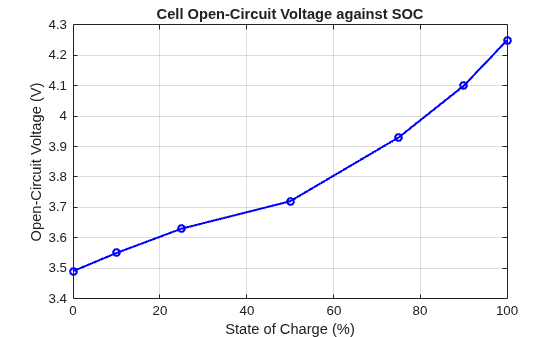
Visualize the open-circuit voltage curve as a function of state of charge. This curve defines the equilibrium voltage of the cell.
socBreakpoints = eval(cellDataSet.Parameters.SOCBreakpoints.ValueExpr);
ocv = eval(cellDataSet.Parameters.OpenCircuitVoltage.ValueExpr);

figure
plot(socBreakpoints*100, ocv, "b-o", MarkerSize=5, LineWidth=1.5)
xlabel("State of Charge (%)")
ylabel("Open-Circuit Voltage (V)")
title("Cell Open-Circuit Voltage against SOC")
grid on
Export and Install Collection
Create the collection folder structure. A collection has a name and an organization identifier that together form a unique collection ID.
collectionName = "ExampleBatteryParts";
orgID = "MyOrg";
partrepo.collection.new(collectionName, orgID);
Export the block data set into the Datasets sub-folder of the collection. The software stores each block data set as a JSON part file that can be version-controlled and shared.
datasetFolder = fullfile(collectionName, "Datasets", ...
    cellDataSet.Metadata.CustomIdentifier);
partrepo.exportDataSetsToJSON(cellDataSet, datasetFolder);
Package the collection folder into an archive and register it with the part repository system.
partrepo.collection.build(collectionName);
archivePath = fullfile(collectionName, "Build", ...
    collectionName + "_1.0.0.mldatx");

partrepo.collection.install(archivePath, Overwrite=true);
Successfully installed part collection. Details:

   Collection ID: MyOrg.ExampleBatteryParts
   Version: 1.0.0

   Data set IDs:
      ExampleCellCo|ECC-60|HighEnergy

   Blocks with data sets from this collection:
      batt_lib/Cells/Battery Equivalent Circuit
To uninstall the part collection when you no longer need it, at the MATLAB® Command Window, run:
partrepo.collection.uninstall("MyOrg.ExampleBatteryParts")
Parameterize Battery Cell
Parameterize a battery cell with the installed collection and build a module.
Create Battery Cell
Create a Cell object and configure it to use the Battery Equivalent Circuit block. Navigate the parameterization hierarchy to select the part.
cell = simscape.battery.builder.Cell;
cell.CellModelOptions.CellModelBlockPath = ...
    "batt_lib/Cells/Battery Equivalent Circuit";
cell.CellModelOptions.BlockParameters.ThermalModel = "TemperatureIndependent";
Select the part collection by its ID.
cell.AvailableParameterizationCollectionIDs
ans = 1×3 string
    "None"    "MW.SimscapeBattery"    "MyOrg.ExampleBatteryParts"
cell.ParameterizationCollectionID = orgID + "." + collectionName;Select the manufacturer, part number, and custom identifier. Each selection narrows the available options at the next level.
cell.ParameterizationManufacturer = "ExampleCellCo";
cell.ParameterizationPartNumber = "ECC-60";
cell.ParameterizationCustomID = "HighEnergy";

disp("Cell parameterization configured successfully.")
Cell parameterization configured successfully.
Build Battery Module
Use the parameterized cell to build a parallel assembly. Then, combine multiple parallel assemblies in series to build a module. This example creates a module with 4 series-connected cells. Each parallel assembly contains 1 cell.
pAssembly = simscape.battery.builder.ParallelAssembly(Cell=cell);
module = simscape.battery.builder.Module( ...
    ParallelAssembly=pAssembly, ...
    NumSeriesAssemblies=4);

disp("Module configuration: " + module.NumSeriesAssemblies + ...
    "s" + pAssembly.NumParallelCells + "p")
Module configuration: 4s1p
Generate Simulink Library
Build a Simulink library that contains the parameterized battery module block. You can then use this block in any Simulink model.
simscape.battery.builder.buildBattery(module, ...
    LibraryName="CustomBatteryLib",Verbose="off");
Verify Parameterization
Open the generated library and confirm that the custom parameters from the part collection are applied to the battery block. The generated block contains the parameterization from the part collection.
libraryName = "CustomBatteryLib_lib";
open_system(libraryName);
batteryBlockPath = libraryName + "/Module1";
open_system(batteryBlockPath);
Query the BatteryCapacity parameter from one of the cells in the generated module to verify it matches the 60 Ah value from the collection.
capacity = get_param(batteryBlockPath, "BatteryCapacityCell");
disp("Battery capacity in generated model: " + capacity + " A*hr")
Battery capacity in generated model: 60 A*hr
See Also
partrepo.simscape.dataSetFromBlock

