Phase-Change Thermal Mass
R2026bPhase-Change Thermal Mass block

To add a block to a model, double-click the canvas and start typing the block name. Then, select the block from the list.
Libraries:
Simscape /
Foundation Library /
Thermal /
Thermal Elements
Description
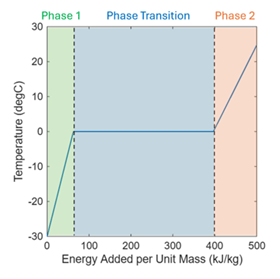
The Phase-Change Thermal Mass block represents a mass of two-phase material in a thermal network. In each phase, the rate of temperature increase is proportional to the heat flow rate into the material and inversely proportional to the mass and the specific heat of the phase. Phase 1 has lower energy than phase 2. The material absorbs or releases latent heat during phase transition while maintaining its temperature at the phase transition temperature.
For example, this plot illustrates the phase change process for water, from the solid to the liquid state.
The block uses the equations
where:
m is the mass.
Q is the heat flow rate into the mass.
T is the temperature of the mass.
Tt is the Phase transition temperature.
c1 and c2 represent the Phase 1 specific heat and Phase 2 specific heat, respectively.
L is the Latent heat of phase transition.
F2 is the phase 2 mass fraction.
Use this block to model systems like ice storage air conditioners that freeze water at night, during off-peak hours, and then use this stored ice during the day to provide cooling. You can also use this block to model phase-change materials in electronics and battery cooling applications.
By default, the block has one thermal conserving port. Because the block positive direction is from the port toward the block, the heat flow is positive if it flows into the block.
In some applications, it is customary to display mass in series with other elements in the block diagram layout. To support this use case, the Number of thermal ports parameter lets you display a second port on the opposite side of the block icon. The two-port variant is purely graphical: the two ports have the same temperature, so the block functions the same whether it has one or two ports.
The physical signal port F2 outputs the mass fraction of phase 2 during simulation. If you start the simulation when the material is in transition between phase 1 and phase 2, you must specify the initial mass fraction of phase 2 by using the Initial mass fraction of Phase 2 parameter. If you start the simulation when the material is either in phase 1 or phase 2, you must specify the temperature at the start of simulation by using the Initial temperature parameter. Depending on the initial phase, the initial temperature must be either lower or higher than the phase transition temperature.
Ports
Output
Conserving
Parameters
Extended Capabilities
Version History
Introduced in R2026b

