Airframe Trim and Linearize
R2026bThis example shows how to trim and linearize an airframe model using Simulink® Control Design™, Control System Toolbox™, and Aerospace Blockset™.
Designing an autopilot using classical control design techniques requires linear models of the airframe dynamics about specified operating (trim) conditions. MATLAB® can compute these trim conditions and derive linear state space models directly from a nonlinear Simulink model. The resulting linear models can then be used to analyze the airframe dynamics in the time or frequency domain.
Open the Airframe Model
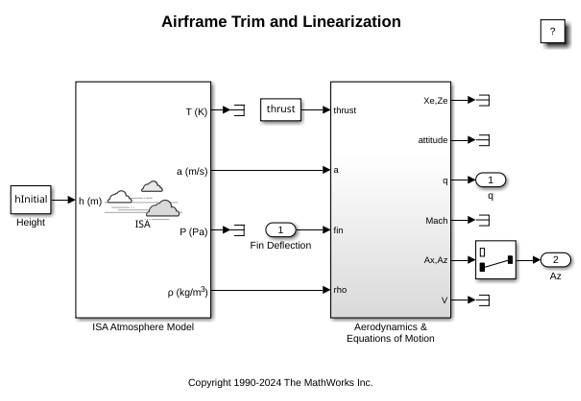
The model consists of the ISA Atmosphere Model to compute speed of sound and air density at the operational altitude. The airframe consists of two main subsystems: the Aerodynamics subsystem, which computes aerodynamic forces (Fx, Fz) and pitching moment (M), and the 3DOF (Body Axes) block, which implements the rigid body equations of motion in body axes.
open_system('AirframeTrim');
Define Initial Condition
Specify the desired flight condition about which the system needs to be trimmed and linearized.
hInitial     = 10000/m2ft;      % Trim Height [m]
MInitial     = 3;               % Trim Mach Number
alphaInitial = -10*d2r;         % Trim Incidence [rad]
thetaInitial = 0*d2r;           % Trim Flight path Angle [rad]
vInitial     = MInitial*(340+(295-340)*hInitial/11000); 	% Total Velocity [m/s]
qInitial     = 0;               % Initial pitch Body Rate [rad/sec]
Set Operating Point Specifications
Use an operspec object to specify which states are known at the operating point and which must satisfy steady state conditions. The first state, inertial positions, and second state, pitch angle, are specified as known values but are not required to be at steady state. The third state, body-axis velocities, is also specified as known, with only the vertical velocity component required to be at steady state to avoid net vertical acceleration.
opspec = operspec('AirframeTrim');
opspec.States(1).Known = [1;1];
opspec.States(1).SteadyState = [0;0];
opspec.States(2).Known = 1;
opspec.States(2).SteadyState = 0;
opspec.States(3).Known = [1 1];
opspec.States(3).SteadyState = [0 1];
Linearize the Model
Compute the operating point that satisfies the trimming constraints.
op = findop('AirframeTrim',opspec);
 Operating point search report:
---------------------------------

opreport =


 Operating point search report for the Model AirframeTrim.
 (Time-Varying Components Evaluated at time t=0)

Operating point search completed successfully using optimization.
States:
----------
   Min         x         Max       dxMin        dx       dxMax
__________ __________ __________ __________ __________ __________

(1.) AirframeTrim/Aerodynamics & Equations of Motion/3DOF (Body Axes)/Position
    0          0          0         -Inf     967.6649     Inf
-3047.9999 -3047.9999 -3047.9999    -Inf    -170.6254     Inf
(2.) AirframeTrim/Aerodynamics & Equations of Motion/3DOF (Body Axes)/Theta
    0          0          0         -Inf     -0.21604     Inf
(3.) AirframeTrim/Aerodynamics & Equations of Motion/3DOF (Body Axes)/U,w
 967.6649   967.6649   967.6649     -Inf     -14.0977     Inf
-170.6254  -170.6254  -170.6254      0      -7.439e-08     0
(4.) AirframeTrim/Aerodynamics & Equations of Motion/3DOF (Body Axes)/q
   -Inf     -0.21604     Inf         0      3.3582e-08     0

Inputs:
----------
  Min      u      Max
_______ _______ _______

(1.) AirframeTrim/Fin Deflection
 -Inf   0.13615   Inf

Outputs:
----------
   Min         y         Max
__________ __________ __________

(1.) AirframeTrim/q
   -Inf     -0.21604     Inf
(2.) AirframeTrim/Az
   -Inf    -7.439e-08    Inf
Define the elevator deflection as the input and select normal acceleration and pitch rate as outputs so the linearization captures the key longitudinal response to elevator commands.
io(1) = linio('AirframeTrim/Fin Deflection',1,'input');
io(2) = linio('AirframeTrim/Selector',1,'output');
io(3) = linio(sprintf(['AirframeTrim/Aerodynamics &\n', ...
                    'Equations of Motion']),3,'output');
Linearize the airframe dynamics about the trimmed operating point.
sys = linearize('AirframeTrim',op,io);
Analyze Linearized Model
Extract the longitudinal pitch axis states associated with the short period dynamics and construct a reduced order state space model.
airframe = ss(sys.A(3:4,3:4),sys.B(3:4,:),sys.C(:,3:4),sys.D);

set(airframe,'inputname',{'Elevator'}, ...
             'outputname',[{'az'} {'q'}]);
Analyze the linearized airframe model in the frequency domain using the Linear System Analyzer.
linearSystemAnalyzer('bode',airframe);
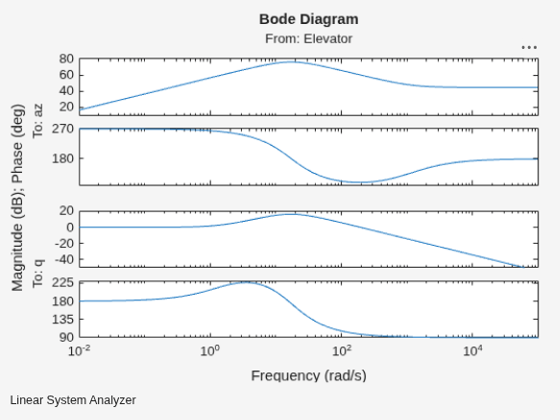
The Bode plot shows that the airframe responds most strongly to elevator inputs at mid frequencies, where the short period dynamics dominate.
See Also
Topics
- Aerospace Blockset
- Create Aerospace Models (Aerospace Blockset)

