Manual Variant Source
R2026bSwitch between multiple variant choices at input
Manual Variant Source block

To add a block to a model, double-click the canvas and start typing the block name. Then, select the block from the list.
Libraries:
Simulink /
Signal Routing
Description
The Manual Variant Source block is a toggle switch that activates one of its variant choices at the input to pass through to the output.
A Manual Variant Source block can have two or more input ports and has one output port. Each input port is associated with a variant control. To change the number of input ports, right-click the block and select Edit Mask > Mask Parameters, then type a value in the Number of choices box.
To toggle between the variant choices at input, double-click the block. The block displays the active choice with a line connecting the input to the output. The block propagates the active variant choice at input directly to the output and discards the blocks connected to inactive input ports during simulation.
Note
Double-clicking the Manual Variant Source block does not open the block dialog box instead it toggles the output choice.
Changing the active choice during compile, simulation, or paused states is not supported.
Examples
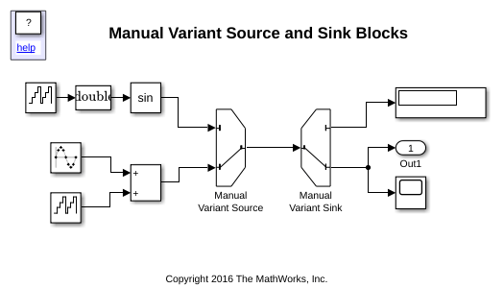
Provide Variation in Signal Source and Destination Using Manual Variant Source and Manual Variant Sink Blocks
Use the inline variant blocks Manual Variant Source and Manual Variant Sink. The Manual Variant Source Block provides variation on the source of a signal. The block is a switch that can have two or more input ports and one output port. Each input port is associated with a variant choice. Only one input port is active during simulation. The active input port determines the active variant region. Similarly, the Manual Variant Sink block provides variation on the destination of a signal. The block can have two or more output ports and one input port. Only one output port can be active during simulation, and the blocks connected to that port determine the active variant.
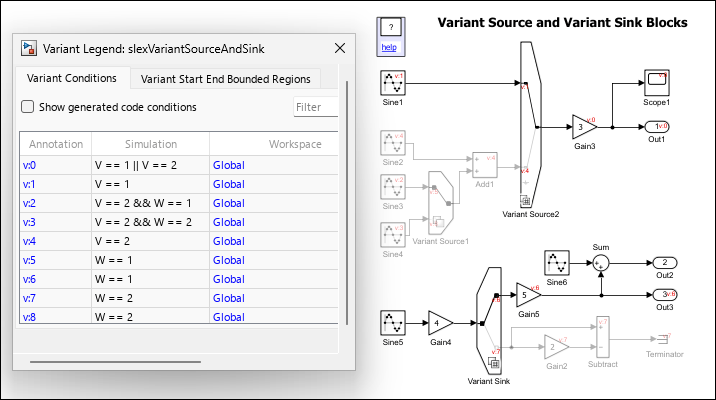
Variant Source and Variant Sink Blocks
Consider the slexVariantSourceAndSink model containing two Variant Source blocks Variant Source1 and Variant Source2, and a Variant Sink block. The variant conditions at the inports and the outports of the Variant Source and the Variant Sink blocks determine the activation and deactivation of the blocks connected to them. V and W are the variant control variables and are defined in the PostLoadFcn callback of the model.
Ports
Input
Output
Parameters
Block Characteristics
Data Types |
|
Direct Feedthrough |
|
Multidimensional Signals |
|
Variable-Size Signals |
|
Zero-Crossing Detection |
|
Programmatic Use: Add Block
To add the block programmatically, use the add_block function with one of these library block paths as the source.
"simulink/Signal Routing/Manual Variant Source"
Example: add_block("simulink/Signal Routing/Manual Variant Source","myModel/myBlock",MakeNameUnique="on")
Extended Capabilities
Version History
Introduced in R2016b

