Specify Breakpoint and Table Data with Variable Size and Symbolic Dimensions
R2026bThis topic describes how you can specify breakpoint and table data that change size during simulation or represented by symbolic dimensions.
Use Variable Size Breakpoint and Table Data
Lookup tables consist of breakpoint and table arrays that lookup table blocks use
to look up inputs and interpolate table data. These arrays have fixed sizes once the
simulation starts. They appear as arrays in generated C/C++ code. Tunable sizes
enable you to work with a smaller range of active breakpoints, also known as
active region, within the larger fixed size of the
breakpoint array. Use tunable sizes when you need to tune or calibrate your lookup
table without needing to resize the arrays and regenerate code. With this feature,
the generated C/C++ code includes a tunable size variable, whose value you can
change, between compile runs or during program execution by writing into its memory
location. To use the tunable size feature, select the Support tunable
size check box on the Advanced tab of the
Simulink.LookupTable property dialog box.
In this example, the breakpoint array of the lookup table is of size 10. N denotes the tunable size.
Use Breakpoint and Table Data Represented by Symbolic Dimensions
Symbolic dimensions let you create breakpoint and table arrays using sizes
represented by symbolic values in simulation and generated C/C++ code. Symbolic
dimensions allow you to easily change the size of your lookup table data between
compile runs. In generated C/C++ code, these symbolic values appear as macros used
to declare the breakpoint and table C arrays. The symbolic values represent the
larger fixed sizes of the breakpoints and table. Use the tunable size feature with
symbolic dimensions to choose a smaller active region within the symbolic size in
the generated C/C++ code. To use symbolic dimensions, see the
Dimensions parameter on the Table and
Breakpoints tab of the Simulink.LookupTable property
dialog box.
In this example, the breakpoint and table arrays of the lookup table are of size S. S is a macro that can represent different sizes between compile runs.
Use Struct Data Types for Different Breakpoint and Table Array Sizes
Simulink.LookupTable objects let you
create struct data types with fields to represent breakpoint and table data. Lookup
table objects also provide for customization of the struct data type definition. The
reusable struct data types feature lets you use the same struct data type to
represent multiple lookup table objects, each with different lookup table array
sizes.
In simulation, you can have multiple n-D Lookup Table blocks, each with objects having different table and breakpoint sizes with the same struct data type name. You can also pass these differently sized array objects via model arguments in a model reference hierarchy, setting up a size-independent interface between models for your lookup table data types. In the generated C/C++ code, the struct data type represents the breakpoint and table fields as pointer data types instead of array data types.
Without this feature, achieving the same behavior requires padding the differently sized arrays to the maximum size of the arrays of the participating lookup table objects. Padding in this manner has several disadvantages, such as wasted memory and slower breakpoint search speed.
Starting in R2022b, to work with different breakpoint and table array sizes, use
the Allow multiple instances of this type to have different table and
breakpoint sizes check box on the Advanced tab
of the Simulink.LookupTable property dialog box.
As an example, the Two Lookup Table Objects with Differently Sized Arrays graphic shows two lookup table objects, each with different breakpoint and table array sizes.
LUT object 1 has breakpoint and table arrays of size [1x4].
LUT object 2 has breakpoint and table arrays of size [1x6].
We would like to have the same struct data type, lookup_type, represent both objects. As presented, the configuration issues an error during model update diagram.
Two Lookup Table Objects with Differently Sized Arrays
![Two lookup table objects, each having different breakpoint and table array sizes. LUT object 1 has breakpoint and table arrays of size [1x4]. LUT object 2 has breakpoint and table arrays of size [1x6].](lut_tunable_size_reusable1.png)
To resolve the sizing discrepancy, in releases before R2022b, the workaround was to use padding to match the array sizes of the participating lookup table objects. This approach is not optimal.
The Lookup Table Object with Padding Applied graphic shows
the padding workaround. Breakpoint and table arrays of LUT object
1 are padded to match the size of the breakpoint and table arrays of
LUT object 2. Notice how the struct data type,
lookup_type, generated in the C/C++ code, has breakpoint and
table fields as arrays of size 6. With this, the struct data type can represent both
LUT object 1 and LUT object 2 using
padding.
Lookup Table Object with Padding Applied
![Two lookup tables, where the table array of size [1x4] has padding applied.](lut_tunable_size_reusable2.png)
Starting in R2022b, to solve the size discrepancy, use the Allow
multiple instances of this type to have different table and breakpoint
sizes check box in the Simulink.LookupTable object.
This feature allows the same struct data type to represent different breakpoint and
table sizes.
The Lookup Table Object with Differently Sized Tables and Breakpoints
Enabled graphic shows the same lookup table object configuration, but
with the Allow multiple instances of this type to have different table and
breakpoint sizes check box selected. The struct data type,
lookup_type, in the generated C/C++ code, has breakpoint and
table fields as pointers instead of arrays. As a result, the struct data type can
represent LUT object 1 and LUT object 2
without requiring any padding.
Lookup Table Object with Differently Sized Tables and Breakpoints Enabled

Use Variant Parameters for Different Sets of Breakpoint and Table Data with Varying Sizes
You can conditionally vary the values of block parameters in a Simulink® model by using a variant parameter object. To create a variant
parameter object, use the Simulink.VariantVariable class. This object defines a set of values,
known as choices, and variant condition expressions associated with the choices. To
specify the variant condition corresponding to each choice of the variant parameter,
use a variant control variable of type Simulink.VariantControl. The Simulink.VariantControl
object lets you specify an ActivationTime for the variant parameter and a Value that is used to evaluate the variant conditions and determine
the active choice of the variant parameter. During simulation, the choice associated
with the variant condition that evaluates to true becomes the active value of the
variant parameter. For an overview of variant parameters, see Use Variant Parameters to Reuse Block Parameters with Different Values.
You can specify the breakpoints and table data of a lookup table using
Simulink.VariantVariable objects, which provides these advantages:
You can define multiple sets of values for the breakpoints and table data of a lookup table object, with each set having different dimensions. Based on variant conditions, you can switch the active value set to be used for simulation and code generation.
Symbolic dimensions allow you to propagate varying dimensions of variant parameters as symbols in the generated code. Representing dimensions as symbols enables the code to flexibly switch between dimension values for the active choice without needing to regenerate the code each time the active variant changes.
You can use the
Specificationproperty of a variant parameter object to set properties such as data type, dimensions, and storage class applicable to all the choice values, specified as aSimulink.Parameterobject. Using a storage class allows you to control the placement, definition, and declaration of variant parameter variables in the generated code. You can override the specification when explicitly setting the value of a choice.The variant activation time of a variant parameter allows you to choose when Simulink determines the active variant choice. This parameter also determines how the active and inactive choices participate in the simulation and code generation workflows. For example, with
code compileactivation time, the active and inactive values of the variant parameters are enclosed in C preprocessor conditionals#ifand#elifin the generated code. These preprocessor conditionals enable you to conditionally compile the code based on a given variant control value. Before code compilation, you can specify the value of the variant control variable to select the required active choice. You do not need to regenerate the code to activate different variant parameter choices.
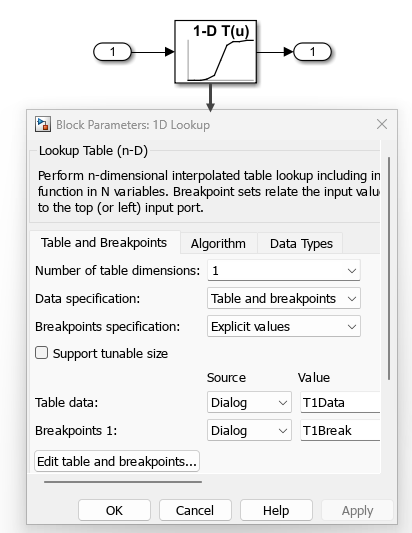
In this example, the 1-D Lookup Table block uses the variant
parameters T1Break and T1Data to store the
breakpoints and table data.
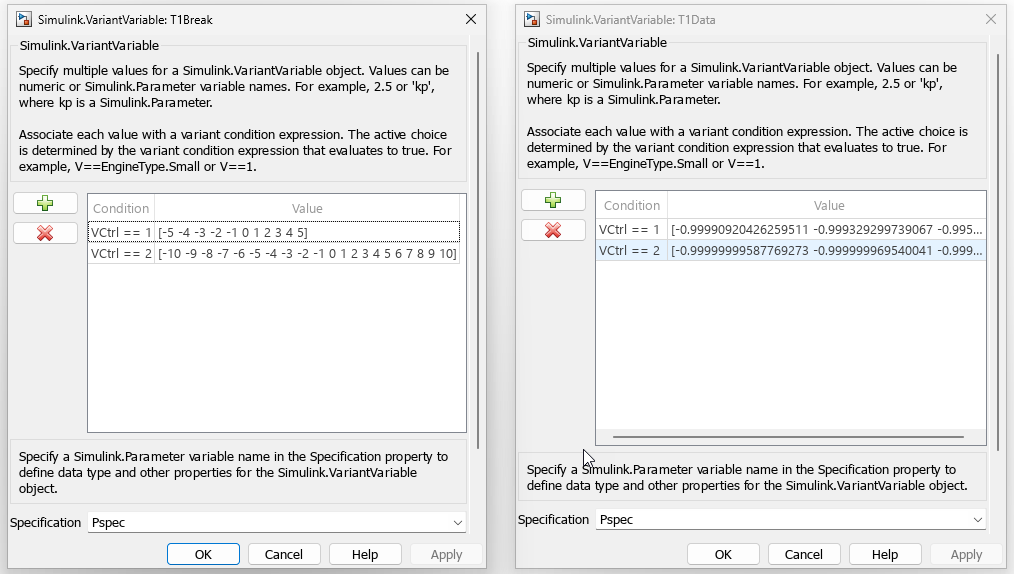
This image shows the dialog boxes for the variant parameters
T1Break and T1Data. The variant parameters
have two sets of values, each with different dimensions. The
Specification property of these objects is set to a
Simulink.Parameter object with the
ExportedGlobal storage class. The activation time of the
variant control VCtrl is set to code
compile.
In the generated code, the variant parameters are represented as global variables and are initialized according to the value of the variant control variable. To represent dimensions as symbols in the generated code, enable the model configuration parameter Allow symbolic dimension specification. All values of variant parameters are enclosed in C preprocessor conditional statements. When you compile this code, Simulink evaluates the preprocessor conditionals and compiles the code only for the active values of variant parameters.
#if VCtrl == 1
real_T T1Break[T1Break_dim0] = { -5.0, -4.0, -3.0, -2.0, -1.0, 0.0, 1.0,
2.0, 3.0, 4.0, 5.0 } ;

real_T T1Data[T1Data_dim0] = { -0.99990920426259511, -0.999329299739067,
-0.99505475368673046, -0.9640275800758169, -0.76159415595576485, 0.0,
0.76159415595576485, 0.9640275800758169, 0.99505475368673046,
0.999329299739067, 0.99990920426259511 } ;

#elif VCtrl == 2
real_T T1Break[T1Break_dim0] = { -10.0, -9.0, -8.0, -7.0, -6.0, -5.0,
-4.0, -3.0,-2.0, -1.0, 0.0, 1.0, 2.0, 3.0, 4.0, 5.0, 6.0, 7.0, 8.0,
9.0, 10.0 } ;                    /* Variable: T1Break
                                  * Referenced by: '<Root>/1D Lookup'
                                  */
real_T T1Data[T1Data_dim0] = { -0.99999999587769273, -0.999999969540041,
-0.99999977492967584, -0.99999833694394469, -0.99998771165079559,
-0.99990920426259511, -0.999329299739067, -0.99505475368673046,
-0.9640275800758169, -0.76159415595576485, 0.0, 0.76159415595576485,
0.9640275800758169, 0.99505475368673046, 0.999329299739067,
0.99990920426259511, 0.99998771165079559, 0.99999833694394469,
0.99999977492967584, 0.999999969540041, 0.99999999587769273 } ;
#endif
In the code, the dimensions of variant parameters are represented as symbols.
#if VCtrl == 1
#define T1Break_dim0                   11
#define T1Data_dim0                    11
#elif VCtrl == 2
#define T1Break_dim0                   21
#define T1Data_dim0                    21
#endif
#endif
For an example, see Compile Code Conditionally for All Values of Variant Parameters with Same and Different Dimensions (Embedded Coder).

