Validate Input and Output Port Signals Using Port Constraints
R2026bYou can use port constraints to validate compile-time signal attributes on the input and output ports of a masked block. Compile-time signal attributes include data type, complexity, and dimensions. You can define the rules to validate the data types, complexity (real or complex), and dimensions (scalar, vector, or 2-D matrix) of port signals. You can also add parameter conditions to the constraint. The port constraints are active on the associated port only when all the parameter conditions are satisfied. Port constraints enable you to check that signal attributes satisfy the specified rules without having to write validation code.
Use Port Constraints to Validate Input and Output Signals
This example shows how to use port constraints to validate compile-time signal attributes on the input and output ports of a masked block.
Explore Model
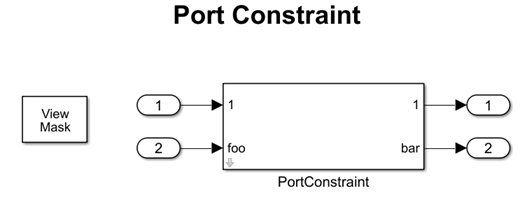
In the model slexMaskPortConstraints, the block PortConstraint has two input ports, two output ports and associated port constraints. The port constraints mypc, mypc2, and mypc3 validate input and output signals.
Create Port Identifiers
The mask identifies each port with port identifiers. To associate the port constraints with port identifiers:
1. Create a mask on the Subsystem block PortConstraint.
2. In the Mask Editor, select the Constraints tab. In the Constraint Gallery pane, click Port. In the Association pane, under Ports, click Define Ports.
3. Specify the names of the ports as pn, pn2, and pi1. Each name uniquely identifies the port identifier in the mask. Multiple ports can have the same port identifier.
4. Select Type as either Input or Output.
5. Set Identifier Type as name or index. Select name if you want to identify the ports using names. Select index, if you want to identify the ports using numbers.
6. If you set Identifier Type as name, then in the Identifier(s) column, specify the name of each port. Each port name in a block is unique. If you set Identifier Type as index, then in the Identifier(s) column, enter indices. You can map multiple ports to one port identifier when the identifier type is index.
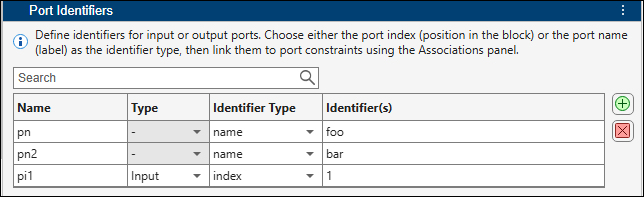
If you set Identifier Type as name, then you do not need to select the Type of port, because each port name is unique.
Create Port Constraints
To create the port constraints mypc, mypc2, and mypc3, follow these steps:
1. In the Mask Editor, select the Constraints tab. In the Constraint Gallery pane, click Port.
2. Specify the name of the constraint as mypc.
3. Set the rules for the constraint. You can set the permitted Data Type, Complexity, and Dimension for the port values. When you set the Data Type as fixed point, you can also set Signedness, Scaling, and Word length. To set the Bias property, set Scaling to non-binary.
4. Set mask parameter conditions for the constraints. The port constraints are active on the associated port only when all the parameter conditions are satisfied. To add parameter conditions, in the Parameter Conditions section, click Add. In Parameter Name, select the parameter name. In Parameter Values, specify the permitted values as comma-separated list.
5. If the port constraint is not satisfied, you can display an error or a warning message during compile time. In Diagnostics select error. In the Diagnostic Message box, enter a message for the software to display if the port constraint validation fails.
6. In the Associations pane, select the port from the list. The list of port identifiers created appears here. You can select any port identifier to associate it with the constraint.
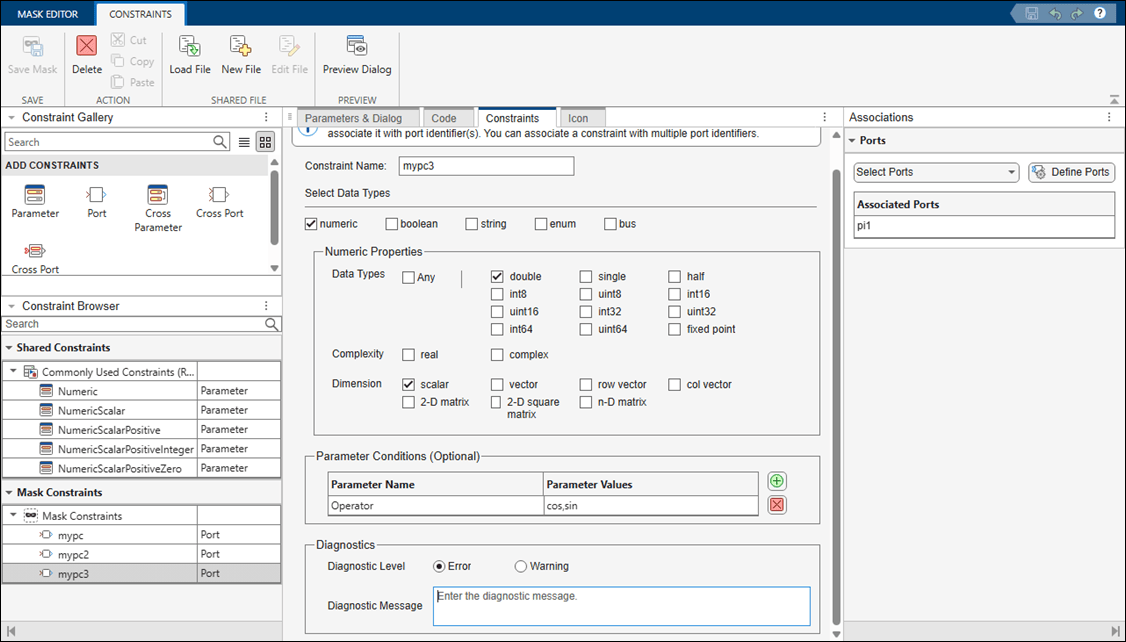
Follow the same steps to create the port constraints mypc2 and mypc3.
Validate Port Constraints
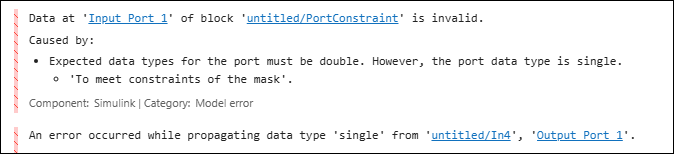
Simulate the model. During the compilation stage, the compile process validates the specified port constraints for the associated port. If the port constraint validation fails, then the specified error or warning message is displayed in the Diagnostic Viewer.
Port Constraint Options
Port constraints support multiple data types, including numeric,
boolean, string, enum, and
bus. Numeric data type includes additional properties that you can use
to define and validate constraints.
| Numeric Property | Property Values | Description |
|---|---|---|
| Data Types | Any, double, single,
half, int8, uint8,
int16, uint16, int32,
uint32, int64, uint64,
fixed point | Specify the acceptable data type of the port signal value of the masked block. Fixed-point data type includes additional properties like Signedness, Word Length, Scaling, and Bias. |
| Complexity | real, complex | Specify whether the masked block port signal value can be a real or complex number. |
| Dimension | scalar, vector, row vector, col vector, 2-D matrix, 2-D square matrix,
n-D matrix | Specify the acceptable dimensions for the port signal of the masked block. |
The Parameter Conditions section and the Diagnostics section are available for all data types and let you define additional validation logic for any port.
| Port Constraint Settings | Property | Property Values | Description |
|---|---|---|---|
| Parameter Conditions (Optional) | Parameter Name, Parameter Values |
| Specify a parameter condition to execute the constraint only when the mask parameter has a specific value. |
| Diagnostics | Diagnostic Level | Error, Warning | Choose whether the diagnostic issues an error or a warning. |
| Diagnostic Message | Character vector | Enter the diagnostic message to display when validation fails. |

