Diagnose Issues When Merging Coverage Data
R2026bThis example shows how to diagnose conditions in your test cases that cause coverage aggregation to fail by using the slcoverage.showDataMergeIssues function.
Open Test Cases in Simulink® Test™ Manager
Open Simulink Test Manager and load the test cases.
sltest.testmanager.view;
testFile = sltest.testmanager.load("slcovRbMergeTests.mldatx");
The slcovRbMerge model contains two Constant blocks and a Relational Operator block. The model compares the constants and outputs the result as a Boolean value. The slcovRbMergeTests test file contains two tests in one test suite. Both test cases analyze decision and relational boundary coverage for the model. The first test case, RelBound with doubles, analyzes coverage with the default data type of double, and the second test case, RelBound with int8, changes the two Constant blocks to output an integer data type.
Run the Test Suite
Run the test cases by clicking the test suite Relational Boundary Test Suite and clicking Run. Alternatively, enter:
testResults = run(testFile);
In the Simulink Test Manager, on the Results and Artifacts pane, expand the results and select slcovRbMergeTests. In the Aggregated Coverage Results section, there are two rows for the slcovRbMerge model.
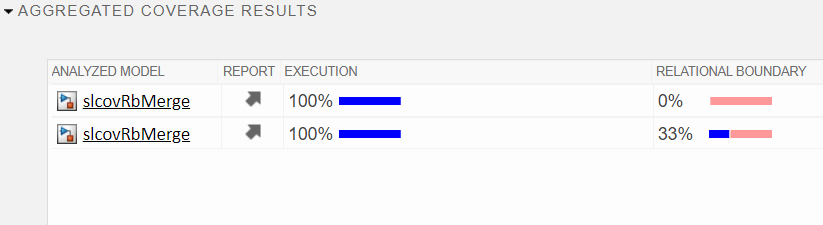
Diagnose Coverage Aggregation Issue in Simulink Test Manager
When you run multiple tests for one model, Simulink Test Manager attempts to merge the coverage data for the two tests. When the coverage data is not compatible and the coverage data merge fails, the Aggregated Coverage Results section displays two or more rows for the same model. Simulink Test Manager displaying two rows for the same model means the coverage data for these test cases is incompatible for aggregation. To diagnose why these test cases generate incompatible coverage data, use the slcoverage.showDataMergeIssues function. You can call this function with no input arguments to analyze the results loaded in Simulink Test Manager, or provide the result set object as an input argument to the function.
slcoverage.showDataMergeIssues(testResults);
-----------------------------------------------------------
-- Simulink Test Manager Coverage Incompatibility Report --
-----------------------------------------------------------

RESULT SET: 'Results: 2026-Aug-07 02:35:25'

SUMMARY
The analyzed result set contains duplicate coverage rows for the following items:
  (1) Analyzed Model: 'slcovRbMerge', Sim Mode: 'Normal', Release: 'R2026b'

-----------------------------------------------------------
DETAILS for slcovRbMerge - Normal - R2026b

 2 coverage results were found with the same AnalyzedModel/SimMode/Release but different checksums.

 Source of each aggregated coverage result:
 The following tests contributed to cov result version 1:
   * Results: 2026-Aug-07 02:35:25/slcovRbMergeTests/Relational Boundary Test Suite/RelBound with doubles

 The following tests contributed to cov result version 2:
   * Results: 2026-Aug-07 02:35:25/slcovRbMergeTests/Relational Boundary Test Suite/RelBound with int8

 Cause of differences:
 Coverage result version 1 is incompatible with version 2 due to the following:

 [Issue 1]
    Block: slcovRbMerge/Relational Operator
     ➔ Different number of Relational Boundary objective outcomes.
         Counts (this item only): 2 vs 3
         Counts (including descendants): 2 vs 3
Because the two tests used different data types, the number of relational boundary objectives in the two tests is different. As a result, you cannot aggregate the coverage data for these two test cases. For more information about relational boundary coverage, see Relational Boundary Coverage. Some solutions include:
Change the test cases so that the data type does not change.
Turn off the relational boundary coverage metric if you do not need the results for that metric.
If multiple test cases contribute to a single row of the coverage results in Simulink Test Manager, they appear as a list in the slcoverage.showDataMergeIssues report. If there are more than two rows for the same model, the analysis compares the first row with each additional row. For example, if there are three rows, the analysis does not compare rows two and three.
Diagnose Coverage Aggregation Issue in cvdata Objects
You can also use slcoverage.showDataMergeIssues with cvdata object input arguments. First, set up coverage analysis by using Simulink.SimulationInput objects and analyze coverage by using the sim function. This example does not use a test harness. If you are using a test harness, you must change the coverage settings on the test harness, not on the system under test.
load_system("slcovRbMerge")
simIn1 = Simulink.SimulationInput("slcovRbMerge");
simIn1 = setModelParameter(simIn1,"CovEnable","on");
simIn1 = setModelParameter(simIn1,"CovSaveSingleToWorkspaceVar","on");
simIn1 = setModelParameter(simIn1,"CovMetricRelationalBoundary","on");
simOut1 = sim(simIn1);
Get the coverage data from the Simulink.SimulationOutput object.
covData1 = simOut1.covdata;
In a second simulation, change the Constant blocks to output an integer, and simulate the model again.
simIn2 = simIn1;
simIn2 = setBlockParameter(simIn2,"slcovRbMerge/Constant1","OutDataTypeStr","int8");
simIn2 = setBlockParameter(simIn2,"slcovRbMerge/Constant2","OutDataTypeStr","int8");
simOut2 = sim(simIn2);
covData2 = simOut2.covdata;
Now, call slcoverage.showDataMergeIssues with the two cvdata objects as input arguments.
slcoverage.showDataMergeIssues(covData1,covData2);
-----------------------------------
-- CVDATA Incompatibility Report --
-----------------------------------

 [Issue 1]
    Block: slcovRbMerge/Relational Operator
     ➔ Different number of Relational Boundary objective outcomes.
         Counts (this item only): 2 vs 3
         Counts (including descendants): 2 vs 3
The analysis reports that the two tests have different numbers of relational boundary objective outcomes.
See Also
slcoverage.showDataMergeIssues | cvdata

