
Ahora está siguiendo esta publicación
- Verá actualizaciones en las notificaciones de contenido en seguimiento.
- Podrá recibir correos electrónicos, en función de las preferencias de comunicación que haya establecido.
Nota del editor: This file was selected as MATLAB Central Pick of the Week
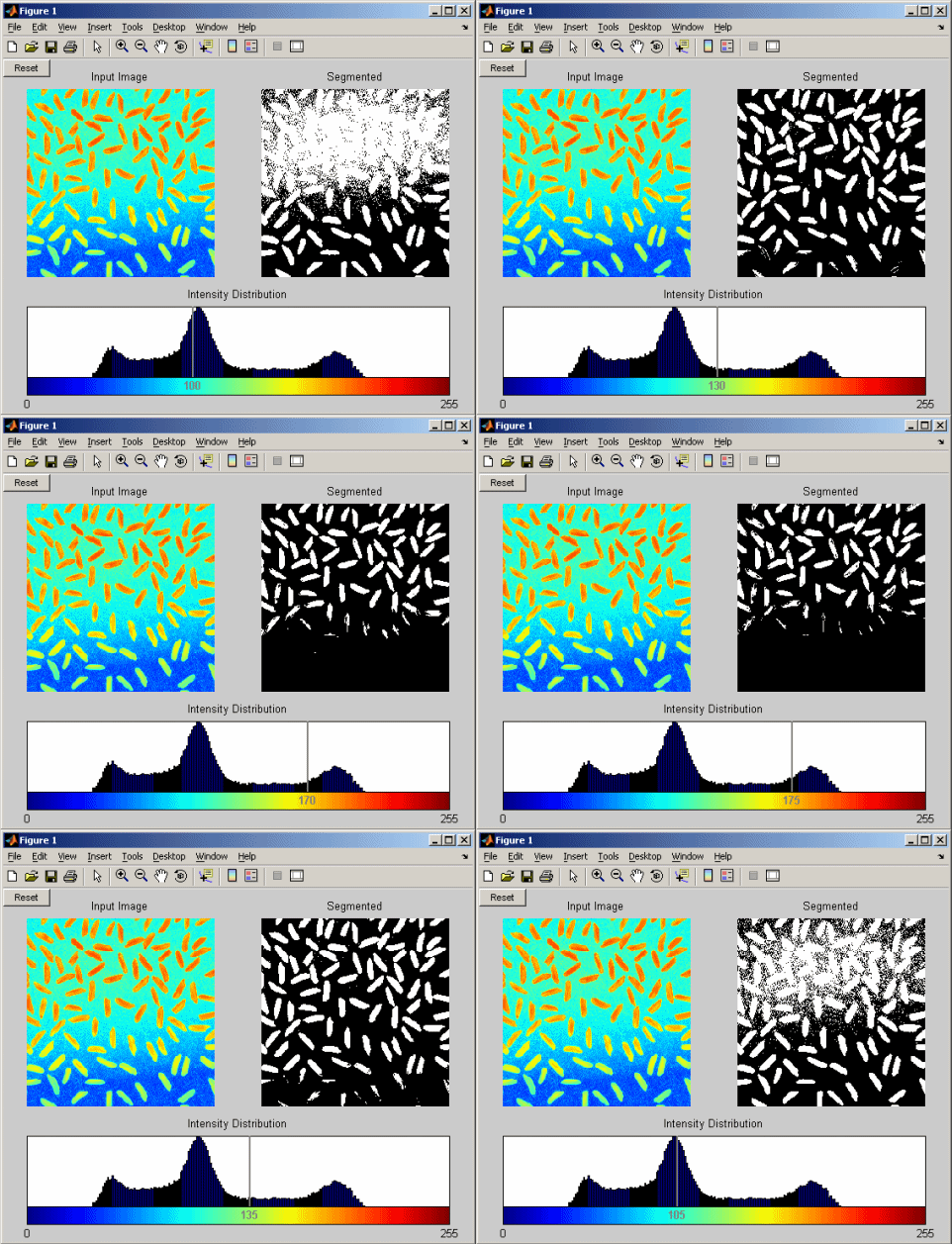
THRESH_TOOL launches a GUI (graphical user interface) for thresholding an intensity input image, IM. IM is displayed in the top left corner. A colorbar and IM's histogram are displayed on the bottom. A line on the histogram indicates the current threshold level. A binary image is displayed in the top right based on the selected level. To change the level, click and drag the line. The output image updates automatically.
There are two ways to use this tool.
Mode 1 - nonblocking behavior:
THRESH_TOOL(IM) launches GUI tool. You can continue using the MATLAB Desktop.Since no results are needed, the function does not block execution of other commands.
THRESH_TOOL(IM,CMAP) allows the user to specify the colormap, CMAP. If not specified, the default colormap is used.
THRESH_TOOL(IM,CMAP,DEFAULTLEVEL) allows the user to specify the default threshold level. If not specified, DEFAULTLEVEL is determined by GRAYTHRESH. Valid values for DEFAULTLEVEL must be consistent with the data type of IM for integer intensity images: uint8 [0,255], uint16 [0,65535], int16 [-32768,32767].
Example
x = imread('rice.png');
thresh_tool(x)
%no return value, so MATLAB keeps running
Mode 2 - blocking behavior:
LEVEL = THRESH_TOOL(...) returns the user selected level, LEVEL, and MATLAB waits for the result before proceeding. This blocking behavior mode allows the tool to be inserted into an image processing algorithm to support an automated workflow.
[LEVEL,BW] = THRESH_TOOL(...) also returns the thresholded binary output image, BW.
Example
x = imread('rice.png');
lev = thresh_tool(x) %MATLAB waits for GUI tool to finish
See also colormap, graythresh, im2bw.
Citar como
Robert Bemis (2026). Thresholding Tool (https://es.mathworks.com/matlabcentral/fileexchange/6770-thresholding-tool), MATLAB Central File Exchange. Recuperado .
Agradecimientos
Inspirado por: hline and vline
Inspiración para: Demos from Image Processing Webinar 2006, Cell_area, Manual Thresholding Tool
Información general
- Versión 1.6.0.1 (6,21 KB)
Compatibilidad con la versión de MATLAB
- Compatible con cualquier versión
Compatibilidad con las plataformas
- Windows
- macOS
- Linux
