Generate C++ Executable at the Command Line
R2026bThis example shows how to generate a C++ executable from a MATLAB® function by using the codegen command. In this example, you prepare an entry-point function for code generation, determine input types, and then generate a MEX function, an example C++ main function, and a simple C++ executable. To learn the basics of code generation, see Generate Deployable Standalone Code by Using the MATLAB Coder App.
Examine MATLAB Function and Generate Sample Data
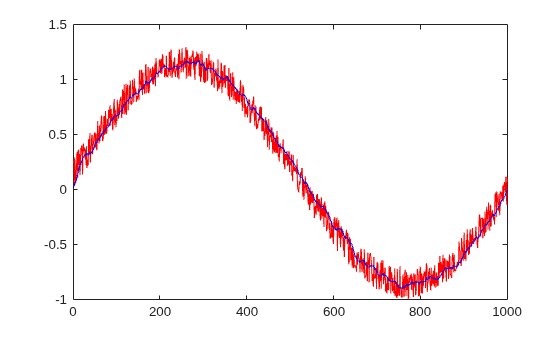
Examine the MATLAB function averagingFilterML. This function denoises an input signal by using an averaging filter. It takes an input vector of signal values and returns an output vector of filtered values that is the same size as the input vector. The averagingFilterML function uses the variable slider to represent a sliding window of 16 signal values and calculates the average signal value for each window position.
type averagingFilterMLfunction y = averagingFilterML(x)
slider = zeros(16,1);
for i = 1:numel(x)
slider(2:end) = slider(1:end-1); % move one position in the buffer
slider(1) = x(i); % Add a new sample value to the buffer
y(i) = sum(slider)/numel(slider); % write the average of the current window to y
end
end
Generate a noisy sine wave and use averagingFilterML to filter and plot the noisy data.
v = 0:0.00614:2*pi;
x = sin(v) + 0.3*rand(1,numel(v));
filtered_ML = averagingFilterML(x);
plot(x,"red");
hold on
plot(filtered_ML,"blue");
xlim([0 1000])
hold off;
Prepare Entry-Point Function for Code Generation
Prepare the entry-point function for code generation. An entry-point function is a top-level function that calls all of the other MATLAB functions for which you want to generate code. In this example, you use averagingFilterML as the entry-point function.
To prepare averagingFilterML for code generation, edit the function.
edit averagingFilterMLAdd the %#codegen directive after the averagingFilterML function declaration. This directive prompts the MATLAB Code Analyzer to identify warnings and errors specific to code generation. In this example, the Code Analyzer indicates that you must fully define the output argument y before you use it. For more information about the checks performed by the Code Analyzer, see MATLAB for Code Generation Messages.

The code generator must be able to determine the size and type of an array before you access an element of the array. In this example, before you update element y(i), you must define the size and type of array y. You can use the zeros function to indicate that y is a 1-by-x array of doubles. Add this line of code after the function declaration:
y = zeros(size(x));
After you make this change, the Code Analyzer does not identify additional potential code generation errors in the code. The file averagingFilterCG.m contains the updated code.
Use the coder.screener function to run the code generation readiness tool. Use this tool to check whether the MATLAB code includes functions or features that are not supported for code generation. For more information about the checks performed by this tool, see Code Generation Readiness Tool.
In this example, the code generation readiness tool does not find unsupported functions or feature in the averagingFilterCG function.
coder.screener("averagingFilterCG")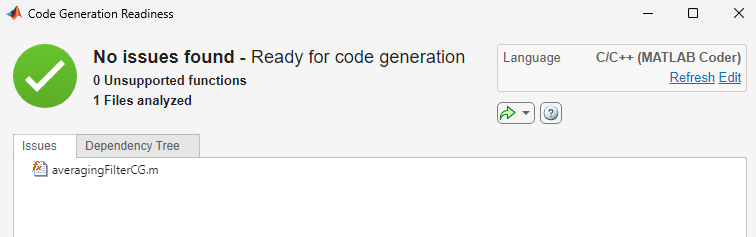
Specify Input Types
Specify the types of the inputs to your entry-point function. Because C and C++ are statically typed languages, the code generator must determine the class and size of all variables in the generated code during code generation. One of the ways that you can specify input types is by using an arguments block. To learn about other methods of input-type specification, see Specify Types of Entry-Point Function Inputs.
Add this code after the function declaration to define the input argument x as an unbounded row vector of doubles:
arguments
x (1,:) double
end
The file averagingFilter.m contains the updated code:
type averagingFilterfunction y = averagingFilter(x) %#codegen
arguments
x (1,:) double
end
y = zeros(size(x));
slider = zeros(16,1);
for i = 1:numel(x)
slider(2:end) = slider(1:end-1); % move one position in the buffer
slider(1) = x(i); % Add a new sample value to the buffer
y(i) = sum(slider)/numel(slider); % write the average of the current window to y
end
end
Generate and Run MEX Function
Generate a MEX function from your entry-point function. A MEX function is a C or C++ executable that you can run from inside MATLAB. Run the generated MEX function to check that the generated code has the same behavior as the original MATLAB code.
It is a best practice to perform this step because you can run the generated MEX function to detect run-time errors that are harder to diagnose in standalone code. For example, the MEX function includes memory integrity checks by default. These checks perform array bounds and dimension checking to detect violations of memory integrity in code generated for MATLAB functions.
By default, the codegen command generates a MEX function in C in the working folder. Use the -lang:C++ option to instruct the code generator to produce a C++ MEX function.
codegen averagingFilter -lang:c++
Code generation successful.
Test the MEX function with the same input that you passed to the original MATLAB function. In this example, the outputs of the two functions are equivalent within machine epsilon.
filtered_MEX = averagingFilter_mex(x);
all(abs(filtered_ML-filtered_MEX)) < eps
ans = logical
   1
Generate Example C++ main Function
Generate an example C++ main function. The code generator produces an example C or C++ main function when you generate standalone code. Because the example main function demonstrates how to call the generated C or C++ function, you can use it as a template for your application. Use the codegen command with the -config:lib and -lang:c++ options to generate a standalone C++ static library.
codegen -config:lib -lang:c++ averagingFilter
Code generation successful.
Examine the example C++ main function. The code generate creates the example CPP and H files in the folder codegen/lib/averagingFilter/examples.
type(fullfile("codegen","lib","averagingFilter","examples","main.cpp"))
//
// File: main.cpp
//
// MATLAB Coder version            : 26.2
// C/C++ source code generated on  : 06-Aug-2026 22:59:57
//

/*************************************************************************/
/* This automatically generated example C++ main file shows how to call  */
/* entry-point functions that MATLAB Coder generated. You must customize */
/* this file for your application. Do not modify this file directly.     */
/* Instead, make a copy of this file, modify it, and integrate it into   */
/* your development environment.                                         */
/*                                                                       */
/* This file initializes entry-point function arguments to a default     */
/* size and value before calling the entry-point functions. It does      */
/* not store or use any values returned from the entry-point functions.  */
/* If necessary, it does pre-allocate memory for returned values.        */
/* You can use this file as a starting point for a main function that    */
/* you can deploy in your application.                                   */
/*                                                                       */
/* After you copy the file, and before you deploy it, you must make the  */
/* following changes:                                                    */
/* * For variable-size function arguments, change the example sizes to   */
/* the sizes that your application requires.                             */
/* * Change the example values of function arguments to the values that  */
/* your application requires.                                            */
/* * If the entry-point functions return values, store these values or   */
/* otherwise use them as required by your application.                   */
/*                                                                       */
/*************************************************************************/

// Include Files
#include "main.h"
#include "averagingFilter.h"
#include "averagingFilter_initialize.h"
#include "averagingFilter_terminate.h"
#include "coder_array.h"

// Function Declarations
static coder::array<double, 2U> argInit_1xUnbounded_real_T();

static double argInit_real_T();

// Function Definitions
//
// Arguments    : void
// Return Type  : coder::array<double, 2U>
//
static coder::array<double, 2U> argInit_1xUnbounded_real_T()
{
  coder::array<double, 2U> result;
  // Set the size of the array.
  // Change this size to the value that the application requires.
  result.set_size(1, 2);
  // Loop over the array to initialize each element.
  for (int idx1{0}; idx1 < result.size(1); idx1++) {
    // Set the value of the array element.
    // Change this value to the value that the application requires.
    result[idx1] = argInit_real_T();
  }
  return result;
}

//
// Arguments    : void
// Return Type  : double
//
static double argInit_real_T()
{
  return 0.0;
}

//
// Arguments    : int argc
//                char **argv
// Return Type  : int
//
int main(int, char **)
{
  // Initialize the application.
  // You do not need to do this more than one time.
  averagingFilter_initialize();
  // Invoke the entry-point functions.
  // You can call entry-point functions multiple times.
  main_averagingFilter();
  // Terminate the application.
  // You do not need to do this more than one time.
  averagingFilter_terminate();
  return 0;
}

//
// Arguments    : void
// Return Type  : void
//
void main_averagingFilter()
{
  coder::array<double, 2U> x;
  coder::array<double, 2U> y;
  // Initialize function 'averagingFilter' input arguments.
  // Initialize function input argument 'x'.
  x = argInit_1xUnbounded_real_T();
  // Call the entry-point 'averagingFilter'.
  averagingFilter(x, y);
}

//
// File trailer for main.cpp
//
// [EOF]
//
Modify Example C++ main Function
Copy the example main.cpp file to the working directory and modify it for your application. Use the generated example main as a starting point for creating a main function. The example main shows how to pass input to and output from the generated code.
Do not modify the files main.c and main.h in the examples subfolder. Before using the example main function, copy the example main source and header files to a location outside of the build folder. Modify the files in the new location to meet the requirements of your application.
For this example, the file main.cpp in the working directory contains a simplified C++ main function.
type main.cpp#include "averagingFilter.h"
#include "averagingFilter_initialize.h"
#include "averagingFilter_terminate.h"
#include "coder_array.h"
#include <iostream>
int main()
{
coder::array<double, 2U> x = {1.0, 2.0};
coder::array<double, 2U> y;
averagingFilter_initialize();
averagingFilter(x, y);
averagingFilter_terminate();
std::cout << "Execution completed";
return 0;
}
Generate and Test C++ Executable
Instruct the code generator to generate a C++ executable by using the codegen command with the -config:exe and -lang:c++ options. Instruct the codegen command to include the custom main.cpp source code file by specifying the file name on the command line. The code generator creates the averagingFilter executable in the working folder.
codegen -config:exe -lang:c++ averagingFilter main.cpp
Code generation successful.
To run the executable in MATLAB, use the system command. Use the ispc function to select the appropriate system command.
if ispc
    system("averagingFilter.exe")
else
    system("./averagingFilter")
end
Execution completed
ans =
0

