Generate Standalone C++ Classes to Represent a Physical System
R2026bIn this example, you generate standalone C++ classes from MATLAB® classes that represent a physical system.
Note
Using a MATLAB class as an entry point for code generation is a tech preview. This
feature is in active development and might change between the tech preview and the
general release. To enable the feature, enter
enableCodegenForEntryPointClasses at the command line before
launching the MATLAB
Coder™ app, calling the codegen function, or creating a coder.Type object. To provide feedback, email the
development team or participate
in a survey.
Generate C++ Classes That Model Simple and Damped Oscillators
When you use a MATLAB class to represent a physical system, you can:
Specify the system parameters by using private class properties.
Create an instance of the system by using the class constructor.
Capture the time evolution of the system by using a public method that returns the trajectory of the system for a given initial state.
Modularize the mathematical analysis by creating private or protected helper methods.
When you model a physical system, you often begin with a baseline model and then introduce additional effects, such as mechanical damping, to increase the accuracy of your analysis. In MATLAB, you can implement the baseline system as a base class and represent the damped system as a subclass that inherits from the base class. The subclass can define private properties for additional system parameters. Additionally, the subclass can inherit certain methods from the base class and can overload the other methods.
Enable Tech Preview
Before you begin, enable the entry-point classes tech preview.
enableCodegenForEntryPointClasses
=== Code generation for entry-point classes is ENABLED ===

To use the Classes As Entry-Points feature, restart MATLAB and rerun 'enableCodegenForEntryPointClasses' before calling codegen or coder.Type.

For feature overview and example usage, see Code Generation for Entry-Point Classes.

To send feedback or questions directly to the development team, email entrypointclassfeedback@groups.mathworks.com or click here to take survey.
Examine the Oscillator Base Class
A simple harmonic oscillator has two parameters, the mass and the spring constant . The angular frequency of the oscillator is . This equation defines the position of the oscillator as a function of time :
The initial position and initial velocity determine the amplitude and the phase constant .
Examine the MATLAB class simpleOscillator. This class models a one-dimensional simple harmonic oscillator in the MATLAB namespace mySystem. This class has two properties, mass and springConstant. The dynamics method returns the final position of the oscillator after a specified time interval. To evolve the system over a specified number of time steps, the evolution method calls the dynamics method iteratively.
type +mySystem/simpleOscillator.mclassdef simpleOscillator
properties (SetAccess = private, GetAccess = protected)
mass
springConstant
end
methods
function obj = simpleOscillator(m,k)
obj.mass = m;
obj.springConstant = k;
end
function [time,position] = evolution(obj,initialPosition,initialVelocity,timeInterval,timeStep)
numSteps = floor(timeInterval/timeStep);
position = zeros(numSteps + 1,1);
time = zeros(numSteps + 1,1);
position(1) = initialPosition;
for i = 1:numSteps
currentTime = i*timeStep;
position(i+1) = obj.dynamics(initialPosition,initialVelocity,currentTime);
time(i+1) = currentTime;
end
end
end
methods (Access = protected)
function omega = angularFrequency(obj)
omega = sqrt(obj.springConstant/obj.mass);
end
function amplitudeValue = amplitude(obj,initialPosition,initialVelocity)
omega = obj.angularFrequency;
positionSquared = initialPosition^2;
velocityTerm = (initialVelocity / omega)^2;
amplitudeValue = sqrt(positionSquared + velocityTerm);
end
function phi = phase(obj,initialPosition,initialVelocity)
omega = obj.angularFrequency;
phi = atan2(omega*initialPosition,initialVelocity);
end
function finalPosition = dynamics(obj,initialPosition,initialVelocity,timeInterval)
omega = obj.angularFrequency;
amplitudeValue = obj.amplitude(initialPosition, initialVelocity);
phi = obj.phase(initialPosition,initialVelocity);
finalPosition = amplitudeValue*sin(omega*timeInterval+phi);
end
end
end
Examine the Damped Oscillator Subclass
To model the effects of mechanical damping on a harmonic oscillator, a class also needs to define the damping constant . The equation represents the damping parameter. Because the damping parameter is small compared to the angular frequency , only the first-order damping effects are significant. The position of the damped oscillator as a function of time is:
.
Like the simple oscillator, the initial position and initial velocity determine the amplitude and the phase constant . The damping constant causes the amplitude to decay exponentially.
Examine the MATLAB class dampedOscillator. This class is a subclass of the simpleOscillator base class and is in the MATLAB namespace mySystem. The dampedOscillator subclass has one additional property, dampingConstant. The subclass overloads the phase and dynamics methods to include the effects of damping and defines an additional method, dampingParameter, that calculates the normalized damping parameter in the dynamic equation.
type +mySystem/dampedOscillator.mclassdef dampedOscillator < mySystem.simpleOscillator
properties (SetAccess = private, GetAccess = protected)
dampingConstant
end
methods
function obj = dampedOscillator(m,b,k)
obj@mySystem.simpleOscillator(m,k);
obj.dampingConstant = b;
end
end
methods (Access = protected)
function gamma = dampingParameter(obj)
gamma = obj.dampingConstant/(2*obj.mass);
end
function phi = phase(obj,initialPosition,initialVelocity)
omega = obj.angularFrequency();
gamma = obj.dampingParameter();
phi = atan2(omega*initialPosition,initialVelocity+gamma*initialPosition);
end
function finalPosition = dynamics(obj,initialPosition,initialVelocity,timeInterval)
gamma = obj.dampingParameter();
omega = obj.angularFrequency();
amplitudeValue = obj.amplitude(initialPosition, initialVelocity);
phi = obj.phase(initialPosition, initialVelocity);
expDecay = exp(-gamma * timeInterval);
finalPosition = amplitudeValue*expDecay*sin(omega*timeInterval+phi);
end
end
end
Use Oscillator Classes in MATLAB
Specify the parameters for the simple and damped oscillators in normalized units.
springConstant = 1;
dampingConstant = 0.1;
mass = 1;
Create an instance of the simpleOscillator class that has the specified spring constant and mass. Evolve this oscillator from an initial position of 1 and an initial velocity of 0. Specify the time period as 100 and the time step as 0.01.
myOscillator = mySystem.simpleOscillator(springConstant,mass);
[time_simple,position_simple] = myOscillator.evolution(1,0,100,0.01);
Create an instance of the dampedOscillator class that uses these parameters. Evolve this oscillator from the same initial state as the simple oscillator. Use the same time period and time step.
myDampedOscillator = mySystem.dampedOscillator(springConstant,dampingConstant,mass);
[time_damped,position_damped] = myDampedOscillator.evolution(1,0,100,0.01);
Plot the position of each oscillator over time. The amplitude of the damped oscillator decays exponentially with time.
plot(time_simple,position_simple)
hold on
plot(time_damped,position_damped)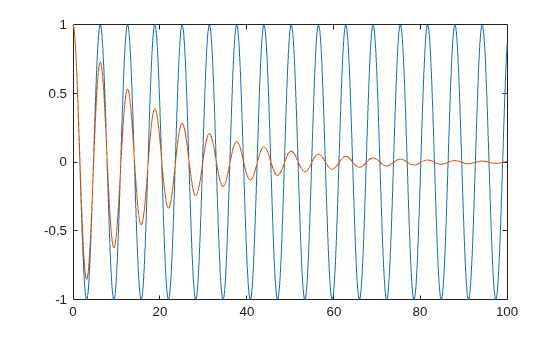
Display the final position of the simple oscillator.
disp(position_simple(end))
0.8623
Display the final position of the damped oscillator. Damping causes the final position of this oscillator to be closer to the mean position, 0.
disp(position_damped(end))
0.0056
Specify Entry-Point Classes
To generate standalone C++ classes from MATLAB classes, you must first specify simpleOscillator and dampedOscillator as entry points.
Create a coder.ClassSignature object for the mySystem.simpleOscillator class. Use the addMethod object function to specify the public methods that you want to access from your external C++ application.
classSig1 = coder.ClassSignature("mySystem.simpleOscillator");
addMethod(classSig1,"simpleOscillator",{0,0});
addMethod(classSig1,"evolution",{classSig1,0,0,0,0})
ans =
coder.ClassSignature
  1×1 mySystem.simpleOscillator
    TypeName: "simpleOscillator"
    Properties: struct with no fields.
    Methods:
      simpleOscillator:
        Args: {1×1 double, 1×1 double}
      evolution:
        Args: {1×1 this, 1×1 double, 1×1 double, 1×1 double, 1×1 double}
Create a class signature object for the mySystem.dampedOscillator class. Use the addMethod object function to specify the public methods that you want to access from your external C++ application.
classSig2 = coder.ClassSignature("mySystem.dampedOscillator");
addMethod(classSig2,"dampedOscillator",{0,0,0});
addMethod(classSig2,"evolution",{classSig2,0,0,0,0})
ans =
coder.ClassSignature
  1×1 mySystem.dampedOscillator
    TypeName: "dampedOscillator"
    Properties: struct with no fields.
    Methods:
      dampedOscillator:
        Args: {1×1 double, 1×1 double, 1×1 double}
      evolution:
        Args: {1×1 this, 1×1 double, 1×1 double, 1×1 double, 1×1 double}
Generate MEX Function and Test Generated Classes
Generate a MEX function from the entry-point classes. When you generate MEX code for multiple entry-point classes, the code generator produces a single MEX function that contains the class and method definitions.
By default, calling the codegen command for multiple entry-point classes generates a C MEX function with the same name as the first MATLAB class passed to the command. For this example, specify a different name for the generated MEX function by using the -o option. Use the -class option to specify each class object, and use the -lang:c++ option to generate C++ code.
codegen -lang:c++ -o oscillatorsMex -class classSig1 -class classSig2
Code generation successful.
Create classes that represent the simple and damped oscillators by using the MEX function. To invoke the class constructor for each class, pass the name of the class constructor to the MEX function, followed by the required inputs. Because the classes are inside a namespace, call the constructor methods by using dot notation.
myMexOscillator = oscillatorsMex("mySystem.simpleOscillator",springConstant,mass);
myMexDampedOscillator = oscillatorsMex("mySystem.dampedOscillator",springConstant,dampingConstant,mass);
Then, evolve both oscillators using the same inputs that you passed to the methods of the MATLAB classes.
[~,position_simple_mex] = myMexOscillator.evolution(1,0,100,0.01);
[~,position_damped_mex] = myMexDampedOscillator.evolution(1,0,100,0.01);
Display the final positions of the two oscillators as calculated by the MEX code. The MEX class methods produce the same outputs as the MATLAB class methods.
disp(position_simple_mex(end))
0.8623
disp(position_damped_mex(end))
0.0056
Generate Standalone C++ Classes
To generate standalone C++ classes, create a code configuration object for a static library and set the target language to C++. Because optimizations during code generation can result in the inlining of protected methods in generated C++ classes, set the InlineBetweenUserFunctions property to "Never".
cfg = coder.config("lib");
cfg.TargetLang = "C++";
cfg.InlineBetweenUserFunctions = "Never";
Generate code for the two entry-point classes by using the codegen command with the -class option. Specify the code configuration option by using the -config option.
codegen -config cfg -class [classSig1 classSig2]
Code generation successful.
Examine Generated C++ Classes
Inspect the declarations of the C++ classes mySystem::simpleOscillator and mySystem::dampedOscillator in the generated header files. Because the generated code does not preserve the inheritance structure of the MATLAB class and subclass, dampedOscillator is not a subclass of simpleOscillator. Instead, the dampedOscillator class reimplements the methods that the corresponding MATLAB class inherits.
file = fullfile("codegen","lib","mySystem_simpleOscillator","mySystem_simpleOscillator.h");
coder.example.extractLines(file,"namespace mySystem {","#endif",1,0)
namespace mySystem {
class simpleOscillator {
public:
  void init(double m, double k);
  void evolution(double initialPosition, double initialVelocity,
                 double timeInterval, double timeStep,
                 coder::array<double, 1U> &b_time,
                 coder::array<double, 1U> &position) const;
  simpleOscillator(double m, double k);
  simpleOscillator();
  ~simpleOscillator();

protected:
  double dynamics(double initialPosition, double initialVelocity,
                  double timeInterval) const;
  double angularFrequency() const;
  double amplitude(double initialPosition, double initialVelocity) const;
  double phase(double initialPosition, double initialVelocity) const;

private:
  double mass;
  double springConstant;
};

} // namespace mySystem
file = fullfile("codegen","lib","mySystem_simpleOscillator","mySystem_dampedOscillator.h");
coder.example.extractLines(file,"namespace mySystem {","#endif",1,0)
namespace mySystem {
class dampedOscillator {
public:
  void init(double m, double b, double k);
  void evolution(double initialPosition, double initialVelocity,
                 double timeInterval, double timeStep,
                 coder::array<double, 1U> &b_time,
                 coder::array<double, 1U> &position) const;
  dampedOscillator(double m, double b, double k);
  dampedOscillator();
  ~dampedOscillator();

protected:
  double dynamics(double initialPosition, double initialVelocity,
                  double timeInterval) const;
  double dampingParameter() const;
  double angularFrequency() const;
  double amplitude(double initialPosition, double initialVelocity) const;
  double phase(double initialPosition, double initialVelocity) const;

private:
  void simpleOscillator(double m, double k);
  double mass;
  double springConstant;
  double dampingConstant;
};

} // namespace mySystem
Examine C++ main Function That Uses Generated C++ Classes
When you generate code for an entry-point class, the code generator does not produce an example main function. To generate an executable, you must write an appropriate main function for your application.
For this example, the main_oscillators.cpp file defines a main function that uses the generated classes mySystem::simpleOscillator and mySystem::dampedOscillator. This function uses the same initial parameters and conditions that you used to test the MATLAB classes. The main function uses the coder::array API to interact with the dynamic arrays that the generated evolution methods return and prints the final positions of the two oscillators.
type main_oscillators.cpp#include "mySystem_simpleOscillator.h"
#include "mySystem_dampedOscillator.h"
#include "coder_array.h"
#include <cstddef>
#include <cstdlib>
#include <iostream>
int main(int, const char * const [])
{
coder::array<double, 1U> position1;
coder::array<double, 1U> position2;
coder::array<double, 1U> time1;
coder::array<double, 1U> time2;
double springConstant = 1;
double dampingConstant = 0.1;
double mass = 1;
mySystem::simpleOscillator obj1(mass,springConstant);
mySystem::dampedOscillator obj2(mass,dampingConstant,springConstant);
obj1.evolution(1, 0, 100, 0.01, time1, position1);
obj2.evolution(1, 0, 100, 0.01, time2, position2);
std::cout << position1[position1.size(0) - 1] << std::endl;
std::cout << position2[position2.size(0) - 1] << std::endl;
return 0;
}
Generate and Run C++ Executable
To generate a C++ executable, set the OutputType property of the cfg code configuration object to "EXE" and specify the main_oscillators.cpp file as an additional source file by using the CustomSource property.
cfg.OutputType = "EXE";
cfg.CustomSource = "main_oscillators.cpp";
Generate code for the two entry-point classes by using the codegen command with the -class option. Use the -config option to specify the code configuration object and name the generated executable myExe by using the -o option.
codegen -config cfg -o myExe -class [classSig1 classSig2]
Code generation successful.
Run the generated executable. The methods of the standalone C++ class produce the same outputs as the methods of the MATLAB class.
if isunix
    system('./myExe');
elseif ispc
    system('myExe.exe');
else
    disp('Platform is not supported');
end
0.862319
0.00563263
See Also
coder.ClassSignature | addMethod | codegen | coder.config

