Optimize Implicit Expansion in Generated Code
Implicit expansion in the generated code is enabled by default. The code generator introduces modifications in the generated code to perform implicit expansion. The changes in the generated code might result in additional code to expand the operands. The expansion of the operands might affect the performance of the generated code. See Generate Code with Implicit Expansion Enabled.
Implicit expansion might change the size of the outputs from the supported operators and functions causing size and type mismatch errors in your workflow.
For fine-grained control of where implicit expansion is enabled in the generated code, use the following functions in your MATLAB® code:
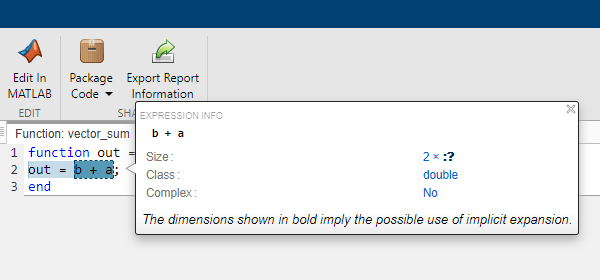
For example, consider this code snippet. The function vector_sum finds
the sum of two arrays of compatible sizes.
function out = vector_sum(a,b)
out = b + a;
end
The types of operands a and b are defined as:
a_type = coder.typeof(1,[2 1])       %size: 2x1
b_type = coder.typeof(1,[2 Inf])     %size: 2x:inf
Without implicit expansion, the size of the out variable is calculated as
2x1.

With implicit expansion, the size of the variable out is calculated as
2x:?.
These code snippets outline the changes in the generated code for the function
vector_sum, while implicit expansion is disabled and enabled. To generate
the code, the types of operands a and b are defined
as:
a_type = coder.typeof(1,[1 Inf])       %size: 1x:inf
b_type = coder.typeof(1,[1 Inf])       %size: 1x:inf
| Generated Code With Implicit Expansion Disabled | Generated Code With Implicit Expansion Enabled |
|---|---|
void vector_sum(const emxArray_real_T *a, const emxArray_real_T *b,
                emxArray_real_T *out)
{
  int i;
  int loop_ub;
  i = out->size[0] * out->size[1];
  out->size[0] = 1;
  out->size[1] = b->size[1];
  emxEnsureCapacity_real_T(out, i);
  loop_ub = b->size[1];
  for (i = 0; i < loop_ub; i++) {
    out->data[i] = b->data[i] + a->data[i];
  }
}
|
static void plus(emxArray_real_T *out, const emxArray_real_T *b,
                 const emxArray_real_T *a)
{
  int i;
  ....
  if (a->size[1] == 1) {
    out->size[1] = b->size[1];
  } else {
    out->size[1] = a->size[1];
  }
  ....
  if (a->size[1] == 1) {
    loop_ub = b->size[1];
  } else {
    loop_ub = a->size[1];
  }
  for (i = 0; i < loop_ub; i++) {
    out->data[i] = b->data[i * stride_0_1] + a->data[i * stride_1_1];
  }
}
void vector_sum(const emxArray_real_T *a, const emxArray_real_T *b,
                emxArray_real_T *out)
{
  int i;
  int loop_ub;
  if (b->size[1] == a->size[1]) {
    i = out->size[0] * out->size[1];
    out->size[0] = 1;
    out->size[1] = b->size[1];
    emxEnsureCapacity_real_T(out, i);
    loop_ub = b->size[1];
    for (i = 0; i < loop_ub; i++) {
      out->data[i] = b->data[i] + a->data[i];
    }
  } else {
    plus(out, b, a);
  }
} |
Disable Implicit Expansion in Specified Function by Using coder.noImplicitExpansionInFunction
If you require implicit expansion in your project but not in specific functions, disable
implicit expansion for the generated code of that function by calling coder.noImplicitExpansionInFunction within the function.
For example, the code generated for vector_sum does not apply implicit
expansion.
| MATLAB Code | Generated Code with coder.sameSizeBinaryOp |
|---|---|
function out = vector_sum(a,b)
coder.noImplicitExpansionInFunction();
out = a + b;
end
a = coder.typeof(1,[1 Inf]) %size: 1x:inf b = coder.typeof(1,[1 Inf]) %size: 1x:inf codegen vector_sum -launchreport ... -args {a,b} -config:lib |
void vector_sum(const emxArray_real_T *a,
const emxArray_real_T *b, emxArray_real_T *out)
{
  int i;
  int loop_ub;
  i = out->size[0] * out->size[1];
  out->size[0] = 1;
  out->size[1] = a->size[1];
  emxEnsureCapacity_real_T(out, i);
  loop_ub = a->size[1];
  for (i = 0; i < loop_ub; i++) {
    out->data[i] = a->data[i] + b->data[i];
  }
} |
Note
coder.noImplicitExpansionInFunction does not disable implicit
expansion in your MATLAB code. It disables implicit expansion only in the generated code.
Disable Implicit Expansion for Specific Binary Operation by Using coder.sameSizeBinaryOp
Use the function coder.sameSizeBinaryOp to perform an error check to
ensure that the operands are the same size and prevent the
code generator from generating implicitly expanded code for that function.
For example, this code snippet applies the plus operation by using
coder.sameSizeBinaryOp without implicit expansion.
| MATLAB Code | Generated Code |
|---|---|
function out = vector_sum(a,b)
out = coder.sameSizeBinaryOp(@plus, a, b);
end
a = coder.typeof(1,[1 Inf]) %size: 1x:inf b = coder.typeof(1,[1 Inf]) %size: 1x:inf codegen vector_sum -launchreport ... -args {a,b} -config:lib |
void vector_sum(const emxArray_real_T *a,
const emxArray_real_T *b, emxArray_real_T *out)
{
  int i;
  int loop_ub;
  i = out->size[0] * out->size[1];
  out->size[0] = 1;
  out->size[1] = a->size[1];
  emxEnsureCapacity_real_T(out, i);
  loop_ub = a->size[1];
  for (i = 0; i < loop_ub; i++) {
    out->data[i] = a->data[i] + b->data[i];
  }
} |
coder.sameSizeBinaryOp does not support scalar expansion. Operands
given to coder.sameSizeBinaryOp must be of the same size.
Disable Implicit Expansion in your Project
Implicit expansion is enabled by default. If you do not require implicit expansion in the
generated code, you can disable the Enable implicit
expansion configuration parameter. Alternatively, you can set the
EnableImplicitExpansion property in your code configuration object to
false.
Disable implicit expansion in your Simulink® model by setting the model-wide parameter Enable Implicit Expansion in
MATLAB functions to false. Alternatively, use this
command:
set_param(gcs,'EnableImplicitExpansion',false);Note
Before turning off implicit expansion, ensure that the external code does not use implicit expansion. Disabling implicit expansion for an entire project might cause errors when generating code if your project includes MATLAB code from external sources.
See Also
coder.noImplicitExpansionInFunction | coder.sameSizeBinaryOp

