Contenido principal

connection

DuckDB native interface database connection

Since R2026a

    Description

    Create a connection to a DuckDB™ database by using the DuckDB native interface.

    Creation

    Create a DuckDB database connection object by using the duckdb function. After creating the connection object, you can use the connection object functions to perform common database operations such as importing and exporting data.

    Properties

    expand all

    This property is read-only.

    Database name, specified as a string scalar. For a transient, in-memory database, the property value is "memory". If you are using a file-based database, the property value is the name of the database file.

    Flag to autocommit database transactions, specified as one of the following:

    • "on" — Automatically commit database transactions to the database.

    • "off" — Manually commit database transactions to the database.

    This property is read-only.

    Default catalog, specified as a string scalar. This property matches the value of the Database property.

    This property is read-only.

    Catalogs in database, specified as a string vector. This property depends on the database you connect to. Since each file is a catalog, this property value matches the values of the Database and DefaultCatalog properties.

    This property is read-only.

    Schemas in database, specified as a string vector. This property depends on the database you connect to.

    This property is read-only.

    Database product name, specified as "DuckDB".

    This property is read-only.

    Database product version, specified as a string scalar representing the full version number of the DuckDB engine, including major and minor and numbers.

    Example: "v.1.3.2"

    This property is read-only.

    Permission flag, specified as a logical scalar. The default value (false) means that the database has read and write access. If the value is true, the database has read-only access. Set this property by specifying the ReadOnly argument when creating the database connection object with the duckdb function.

    Object Functions

    expand all

    duckdbCreate DuckDB native interface database connection
    closeClose database connection
    isopenDetermine if database connection is open
    fetchImport data from execution of SQL statement
    sqlfindRetrieve metadata about database objects
    sqlreadImport table data from database
    sqlinnerjoinPerform inner join on two database tables
    sqlouterjoinPerform outer join on two database tables
    sqlwriteInsert MATLAB data into database table
    executeExecute SQL statement on database
    commitMake changes to database permanent
    rollbackRevert changes made to database
    sqlupdateUpdate rows in database table

    Examples

    collapse all

    Use the duckdb function to create a transient, in-memory DuckDB™ database connection.

    conn = duckdb()
    conn = 
      connection with properties:
    
                        Database: "memory"
    
      Database Properties:
    
                        ReadOnly: false
                      AutoCommit: "on"
    
      Catalog and Schema Information:
    
                  DefaultCatalog: "memory"
                        Catalogs: "memory"
                         Schemas: "main"
    
      Database and Driver Information:
    
             DatabaseProductName: "DuckDB"
          DatabaseProductVersion: "v1.3.2"


    Confirm the connection is in‑memory by checking that conn.Database is "memory".

    Close the database connection.

    close(conn);

    Create a connection to a DuckDB™ database file, import data, and perform some data analysis.

    Use the duckdb function to connect to the DuckDB database file, nyctaxi.db with read-only access.

    filePath = fullfile(matlabroot,"toolbox","database","dbdata","nyctaxi.db");
    conn = duckdb(filePath,ReadOnly=true);

    Inspect the structure of the nyctaxi database by using the sqlfind function to return a table of metadata. The database contains a table named "demo".

    pattern = "";
    data = sqlfind(conn,pattern)
    data=1×5 table
         Catalog     Schema    Table                                                                                                                                                                                            Columns                                                                                                                                                                                               Type    
        _________    ______    ______    _____________________________________________________________________________________________________________________________________________________________________________________________________________________________________________________________________________________________________________________________________________________________________________________    ____________
    
        "nyctaxi"    "main"    "demo"    {["vendorid"    "tpep_pickup_datetime"    "tpep_dropoff_datetime"    "passenger_count"    "trip_distance"    "pickup_longitude"    "pickup_latitude"    "ratecodeid"    "store_and_fwd_flag"    "dropoff_longitude"    "dropoff_latitude"    "payment_type"    "fare_amount"    "extra"    "mta_tax"    "tip_amount"    "tolls_amount"    "improvement_surcharge"    "total_amount"]}    "BASE TABLE"


    Display the variable names.

    data.Columns{1}
    ans = 1×19 string
        "vendorid"    "tpep_pickup_datetime"    "tpep_dropoff_datetime"    "passenger_count"    "trip_distance"    "pickup_longitude"    "pickup_latitude"    "ratecodeid"    "store_and_fwd_flag"    "dropoff_longitude"    "dropoff_latitude"    "payment_type"    "fare_amount"    "extra"    "mta_tax"    "tip_amount"    "tolls_amount"    "improvement_surcharge"    "total_amount"


    Import the "demo" data table into MATLAB®.

    sqlQuery = 'SELECT * FROM main.demo';
    data = fetch(conn,sqlQuery)
    data=10000×19 table
        vendorid    tpep_pickup_datetime    tpep_dropoff_datetime    passenger_count    trip_distance    pickup_longitude    pickup_latitude    ratecodeid    store_and_fwd_flag    dropoff_longitude    dropoff_latitude    payment_type    fare_amount    extra    mta_tax    tip_amount    tolls_amount    improvement_surcharge    total_amount
        ________    ____________________    _____________________    _______________    _____________    ________________    _______________    __________    __________________    _________________    ________________    ____________    ___________    _____    _______    __________    ____________    _____________________    ____________
    
           2        09-Jun-2015 14:58:55    09-Jun-2015 15:26:41            1                2.63            -73.983              40.73             1                "N"                 -73.977              40.759              2               18          0        0.5            0              0                 0.3                 18.8    
           2        09-Jun-2015 14:58:55    09-Jun-2015 15:02:13            1                0.32            -73.997             40.732             1                "N"                 -73.994              40.731              2                4          0        0.5            0              0                 0.3                  4.8    
           1        09-Jun-2015 14:58:56    09-Jun-2015 16:08:52            2                20.6            -73.983             40.767             2                "N"                 -73.798              40.645              1               52          0        0.5           10           5.54                 0.3                68.34    
           1        09-Jun-2015 14:58:57    09-Jun-2015 15:12:00            1                 1.2             -73.97             40.762             1                "N"                 -73.969               40.75              1                9          0        0.5         1.96              0                 0.3                11.76    
           2        09-Jun-2015 14:58:58    09-Jun-2015 15:00:49            5                0.49            -73.978             40.786             1                "N"                 -73.972              40.785              2              3.5          0        0.5            0              0                 0.3                  4.3    
           2        09-Jun-2015 14:58:59    09-Jun-2015 15:42:02            1               16.64             -73.97             40.757             2                "N"                  -73.79              40.647              1               52          0        0.5        11.67           5.54                 0.3                70.01    
           1        09-Jun-2015 14:58:59    09-Jun-2015 15:03:07            1                 0.8            -73.976             40.745             1                "N"                 -73.983              40.735              1                5          0        0.5            1              0                 0.3                  6.8    
           2        09-Jun-2015 14:59:00    09-Jun-2015 15:21:31            1                3.23            -73.982             40.767             1                "N"                 -73.994              40.736              2             16.5          0        0.5            0              0                 0.3                 17.3    
           1        09-Jun-2015 14:59:01    09-Jun-2015 15:08:17            1                 1.1            -73.949             40.788             1                "N"                 -73.954              40.775              1              7.5          0        0.5            0              0                 0.3                  8.3    
           2        09-Jun-2015 14:59:02    09-Jun-2015 15:19:34            6                1.79            -73.993             40.747             1                "N"                 -73.972               40.76              1             13.5          0        0.5         2.86              0                 0.3                17.16    
           1        09-Jun-2015 14:59:02    09-Jun-2015 15:28:12            2                 4.8            -73.984             40.756             1                "N"                 -73.916              40.764              1               22          0        0.5            5              0                 0.3                 27.8    
           2        09-Jun-2015 14:59:03    09-Jun-2015 15:09:21            1                0.96            -73.962             40.776             1                "N"                 -73.969              40.766              1                8          0        0.5          2.2              0                 0.3                   11    
           2        09-Jun-2015 14:59:03    09-Jun-2015 15:11:48            5                1.12            -73.978             40.753             1                "N"                  -73.99              40.747              2                9          0        0.5            0              0                 0.3                  9.8    
           1        09-Jun-2015 14:59:04    09-Jun-2015 15:04:12            1                 0.7            -73.978             40.767             1                "N"                 -73.981              40.774              1              5.5          0        0.5         1.55              0                 0.3                 7.85    
           2        09-Jun-2015 14:59:01    09-Jun-2015 15:21:56            1                2.06            -73.969             40.786             1                "N"                 -73.961              40.765              1               15          0        0.5         3.95              0                 0.3                19.75    
           1        09-Jun-2015 14:59:04    09-Jun-2015 15:17:55            1                 1.6            -73.977             40.784             1                "N"                 -73.954              40.772              2             12.5          0        0.5            0              0                 0.3                 13.3    
          ⋮


    Find the minimum and maximum passenger counts per taxi ride and visualize the distribution by plotting a histogram of the passenger_count variable. Close the connection after you create the plot.

    histogram(data.passenger_count)
    xlabel('Number of Passengers')
    ylabel('Number of Taxi Rides')
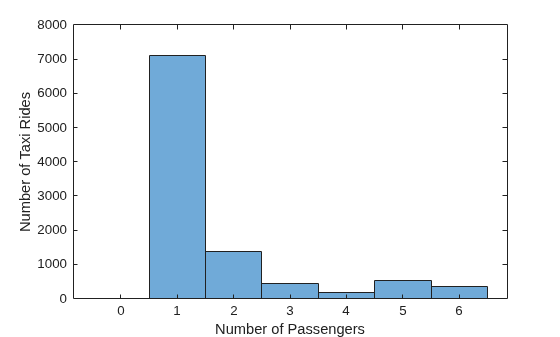
    Figure contains an axes object. The axes object with xlabel Number of Passengers, ylabel Number of Taxi Rides contains an object of type histogram.

    close(conn);

    Version History

    Introduced in R2026a

    See Also

    |