Configure a Model for ARM Cortex-Mx Processor
R2026bConfigure a Simulink® model, build an executable, and run the executable on ARM® Cortex®-M3/M4/M55/M7 processor.
Open an existing Simulink model, such as
arm_cortex_m_gettingstarted, or create a new model.Create a working copy of your Simulink model using File > Save As. Keep the original model as a backup copy.
Open the Modeling tab and press CTRL+E to open the Configuration Parameters dialog box.
Go to Hardware Implementation > Hardware Board and select
ARM Cortex-M3 (QEMU)orARM Cortex-M4 (MPS2)orARM Cortex-M55 (MPS3)orARM Cortex-M7 (MPS2)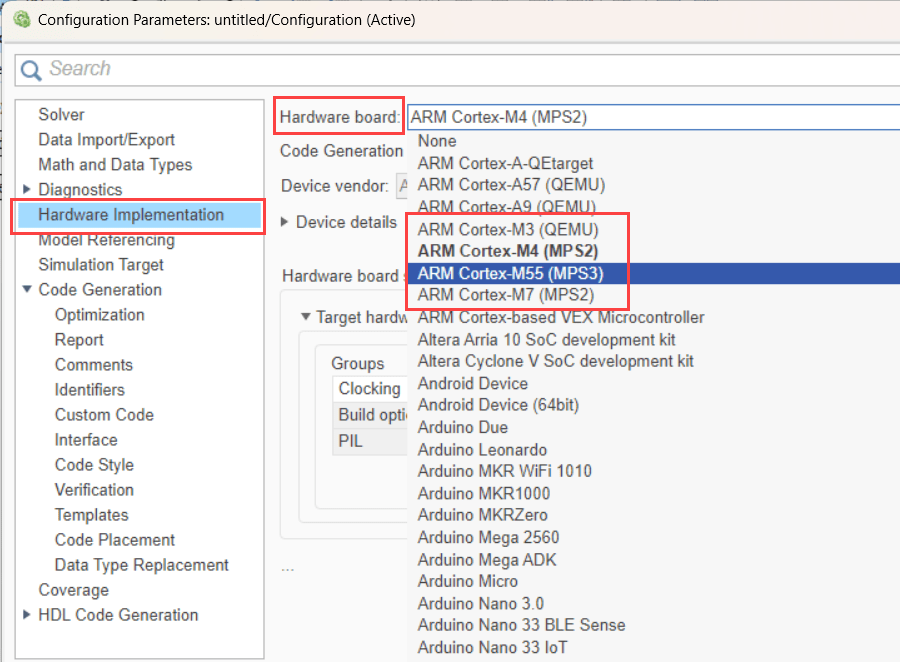
To execute the generated code using the QEMU emulator, requires you to install Embedded Coder® Interface to QEMU emulator add-on. If you have not installed, only code generation is supported.
Ensure that you select the Generate Code Only option in Configuration Parameters > Code generation > Build process category.
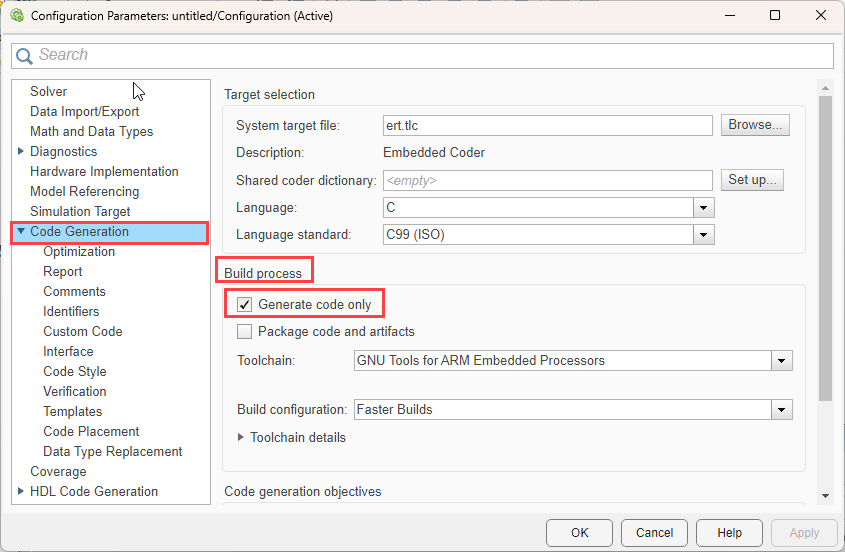
Click Apply to save the changes to your model.
Note
Rapid Accelerator simulation is not supported by Embedded Coder Support Package for ARM Cortex-M Processors.

