characterizeBattery
R2026bClass: mbcrunner
Syntax
Description
[
characterizes a battery using the Simulink® or Simscape™ battery block specified by results,rmse] = characterizeBattery(obj,block,dataFolder)block and data from the folder
specified by dataFolder in the CAGE project specified by
obj.
[
characterizes a battery using additional options specified by name-value arguments.results,rmse] = characterizeBattery(obj,block,dataFolder,Name=Value)
Input Arguments
Handle to the CAGE project, specified as an mbcrunner
object.
Simulink or Simscape battery block, specified as a string scalar.
These battery blocks are supported:
Equivalent Circuit Battery (Powertrain Blockset)
Battery Equivalent Circuit (Simscape Battery)
Battery (Table-Based) (Simscape Battery)
Data Types: string
Path to data files, specified as a string scalar. For information on supported file types, see Import the Block and Data Set.
Data Types: string
Name-Value Arguments
Specify optional pairs of arguments as
Name1=Value1,...,NameN=ValueN, where Name is
the argument name and Value is the corresponding value.
Name-value arguments must appear after other arguments, but the order of the
pairs does not matter.
Example: [results,rmse] = characterizeBattery(mbcrunner,"Equivalent Circuit
Battery",dataFolder,SampleTime=0.001,UseMeasuredSoC=false)
Sample time, specified as a nonnegative scalar.
Example: SampleTime=0.001
Data Types: double
Reference voltage variable, specified as a string.
Example: ReferenceVariable="voltage"
Data Types: string
Smoothing factor, specified as a scalar. The smoothing factor applies a smoothing penalty to the optimization. The smoothness penalty uses the second derivative to avoid steep jumps between adjacent table values.
Example: SmoothingFactor=1e-4
Data Types: double
Option to use measured state of charge (SOC) data, specified as
false or true.
Example: UseMeasuredSOC=true
Data Types: logical
Option to use positive current as charging, specified as true
or false.
Example: PositiveCharge=false
Data Types: logical
Option to use parallel computing, specified as true or
false. The default value is true if a
Parallel Computing Toolbox™ license is available.
Example: UseParallel=false
Data Types: logical
Mapping for current, temperature, time, or SOC, specified as a structure.
Example: alias=struct; alias.current="myCurrentSignal";
alias.Temperature="myTemperatureSignal"; alias.soc="mySOCSignal";
alias.time="myTimeSignal";
Data Types: struct
Option to show the fill progress, specified as true or
false. The same fill dialog box used in CAGE is shown when
ShowProgress=true.
Example: ShowProgress=true
Data Types: logical
Number of iterations for battery characterization process, specified as a positive scalar.
Example: NumIterations=400
Data Types: double
Bounds for lookup tables specified as a structure. Define the structure's fields using the names of the lookup tables.
Example: Bnds.Tau1 = [1,30] , Bnds.Tau2 =
[30,100]
Data Types: structure
Option to set open circuit voltage table to monotonically increase with state of
charge specified as true or false.
Data Types: logical
Since R2026b
Option to specify which tables to skip estimating, specified as a vector of strings.
Data Types: string
Output Arguments
Battery characterization results, returned as a structure with the estimated lookup tables.
Root mean squared error (RMSE) of residuals, returned as a vector. Each file in the data folder is an element in the vector.
Data Types: double
Examples
This example shows how to use the characterizeBattery method to estimate equivalent circuit model lookup table parameters from battery cell test data for the Battery Equivalent Circuit (Simscape Battery) block. Use this workflow when you have transient data, including HPPC test data, and need to parameterize the block for system-level simulation. For example, you can use this approach for battery management system (BMS) algorithm development.
Create mbcrunner Object
Create a handle to a CAGE project.
r = mbcrunner;
Open Simulink Model
Open the Simulink model containing the Battery Equivalent Circuit block.
open("Simscape_BEC.slx");Set the batteryBlock variable to the battery block path.
batteryBlock = "Simscape_BEC/Battery Equivalent Circuit";Characterize Battery Cell
Characterize the battery using the data files located in the folder HPPC_data/origPreprocessedData. Set the number of iterations for the battery characterization process to 25.
[tbls,sfit] = characterizeBattery( ... r,batteryBlock,fullfile(pwd,'HPPC_data','origPreprocessedData'), ... NumIterations=25,ShowProgress=false);
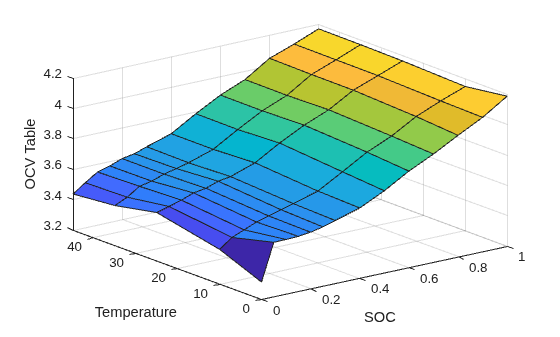
Preview the open circuit voltage table.
surf(SOC_vec,Temperature_vec,tbls.OCV'); xlabel('SOC');ylabel('Temperature');zlabel('OCV Table');
Evaluate Feature
Evaluate the Voltage3 feature using the hppcDataBAKcell0degC.mat data file.
[results,s] = evaluateFeature(r,"Voltage3", ... fullfile( ... pwd,'HPPC_data', 'origPreprocessedData','hppcDataBAKcell0degC.mat'));
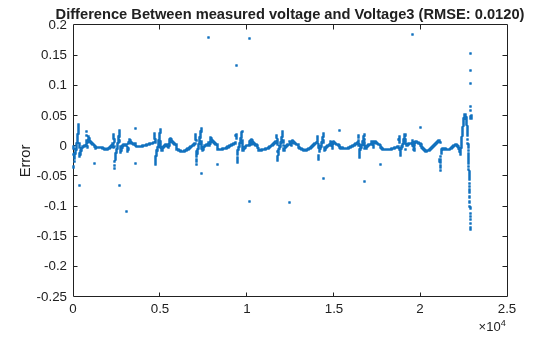
Plot the voltage error to inspect the fit.
plot(results.voltage - results.Voltage3, '.'); ylabel('Error'); title(sprintf('Difference Between measured voltage and Voltage3 (RMSE: %.4f)', s));
Version History
Introduced in R2024bStarting in R2026b, specify which lookup tables to exclude from estimation using the
SkipTables name-value argument.
MATLAB Command
You clicked a link that corresponds to this MATLAB command:
Run the command by entering it in the MATLAB Command Window. Web browsers do not support MATLAB commands.
Seleccione un país/idioma
Seleccione un país/idioma para obtener contenido traducido, si está disponible, y ver eventos y ofertas de productos y servicios locales. Según su ubicación geográfica, recomendamos que seleccione: .
También puede seleccionar uno de estos países/idiomas:
Cómo obtener el mejor rendimiento
Seleccione China (en idioma chino o inglés) para obtener el mejor rendimiento. Los sitios web de otros países no están optimizados para ser accedidos desde su ubicación geográfica.
América
- América Latina (Español)
- Canada (English)
- United States (English)
Europa
- Belgium (English)
- Denmark (English)
- Deutschland (Deutsch)
- España (Español)
- Finland (English)
- France (Français)
- Ireland (English)
- Italia (Italiano)
- Luxembourg (English)
- Netherlands (English)
- Norway (English)
- Österreich (Deutsch)
- Portugal (English)
- Sweden (English)
- Switzerland
- United Kingdom (English)