pcfitcuboidalign
R2026bSyntax
Description
model = pcfitcuboidalign(___,Name=Value)AngleRange=[25 75]
sets the range of angles over which to identify the cuboid orientation to between 25 and 75
degrees.
Examples
Load a point cloud of a driving scene from a MAT file.
ptCloud = load("drivingLidarPoints.mat").ptCloud;Transform the point cloud to simulate a tilted sensor.
tform = rigidtform3d([0 10 0],[0 0 0]);
ptCloud = pctransform(ptCloud,tform);
Select a cylindrical region of interest from the point cloud with a 15-meter radius.
radius = 15;
indices = findPointsInCylinder(ptCloud,radius);
ptCloud = select(ptCloud,indices);
Segment the ground using SMR, and fit a plane to the ground points.
[~,ptCloudNoGround,groundPtCloud] = segmentGroundSMRF(ptCloud,ElevationThreshold=0.9);
groundPlane = pcfitplane(groundPtCloud,0.5);
Cluster the non-ground points into objects.
minDistance = 1;
[labels,numClusters] = pcsegdist(ptCloudNoGround,minDistance,NumClusterPoints=50);
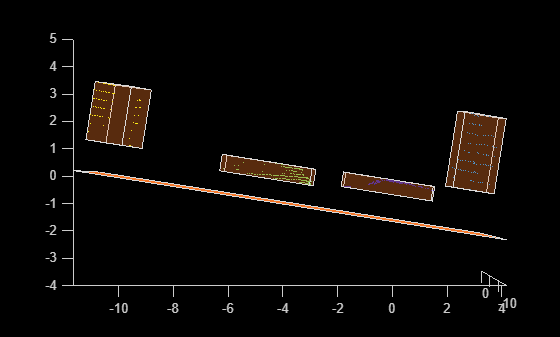
Fit a ground-aligned cuboid to each cluster using pcfitcuboidalign, and display the results.
hold on
for i = 1:numClusters
    indices = labels == i;
    ptCloudSegment = select(ptCloudNoGround,indices);
    cuboid = pcfitcuboidalign(ptCloudSegment,NormalVector=groundPlane.Normal);

    pcshow(ptCloudSegment.Location,labels(indices))
    plot(cuboid)
end
Plot the ground plane, and set the view to visualize the cuboids aligned to the ground.
zlim([-4 5])
plot(groundPlane)
view(0,0)
Input Arguments
Name-Value Arguments
Output Arguments
Algorithms
Use this function when the cuboid orientation must align with a specified coordinate frame. Use the
pcfitcuboidfunction to fit a cuboid without orientation constraints, which can result in a closer fit to the input point cloud.This function uses an L-shape based detection algorithm to fit a cuboid to point cloud data. For every point in the point cloud, the function iterates through all possible directions for a rectangle and finds the corresponding square errors. The possible directions for the rectangle lie within [0, 90] degrees,each adjacent pair of rectangle sides are orthogonal. You can specify a different range of rectangle directions by using the
AngleRangeargument. The function then selects the direction that has the least error and fits the rectangle along that direction.
References
[1] Zhang, Xiao, Wenda Xu, Chiyu Dong, and John M. Dolan. “Efficient L-Shape Fitting for Vehicle Detection Using Laser Scanners.” 2017 IEEE Intelligent Vehicles Symposium (IV), June 2017, 54–59. https://doi.org/10.1109/IVS.2017.7995698.
Extended Capabilities
Version History
Introduced in R2026b

