Contenido principal

brcsSignature

Bistatic radar cross section (BRCS) signature

Since R2026a

    Description

    brcsSignature creates a bistatic radar cross section (BRCS) signature object. You can use this object to model an angle-dependent and frequency-dependent radar cross section (RCS) pattern. Bistatic radars are systems in which the transmitter and receiver are not co-located. The bistatic radar cross section of a target is a measure of the energy scattered from the target in the direction of the receiver.

    Creation

    Description

    brcsSig = brcsSignature creates a brcsSignature object, brcsSig, that models a platform with a 10 dBsm cross section at all transmit and receive angles.

    example

    brcsSig = brcsSignature(PropertyName=Value) creates a brcsSignature object, brcsSig, with each specified PropertyName set to the corresponding Value. You can specify additional pairs of arguments in any order as (PropertyName1=Value1,...,PropertyNameN=ValueN).

    Note

    You can only set property values of brcsSignature when constructing the object. You cannot change values after construction.

    Properties

    expand all

    Mean radar bistatic cross section (BRCS) pattern, specified as a scalar or an M-by-N-by-P-by-Q real-valued array in units of dBsm. The pattern is an array of BRCS values defined on a grid of transmit and receive angles and frequencies, where:

    • M is the number of receive azimuth angles in the ReceiveAzimuth property.

    • N is the number of transmit azimuth angles in the TransmitAzimuth property.

    • P is the number of transmit and receive elevation angle pairs in the Elevation property.

    • Q is the number of frequencies in the Frequency property.

    Data Types: double

    Receive azimuth angles used to define the angular coordinates of the first dimension of the Pattern property, specified as a scalar or length-M strictly increasing vector with values between -180 and 180, inclusive. Receive azimuth angles are specified with respect to the target's local coordinate system, referred to as the target body frame. For more information, see Coordinates of Radar Cross-Section Signature. Units are in degrees (deg).

    Example: [-45:0.5:45]

    Data Types: double

    Transmit azimuth angles used to define the angular coordinates of the second dimension of the Pattern property, specified as a scalar or length-N strictly increasing vector with values between -180 and 180, inclusive. The transmit azimuth angles specify the azimuth of the incident signal with respect to the target's local coordinate system, referred to as the target body frame. For more information, see Coordinates of Radar Cross-Section Signature. Units are in degrees (deg).

    Example: [-45:0.5:45]

    Data Types: double

    Transmit and receive elevation angle pairs used to define the angular coordinates of the third dimension of the Pattern property, specified as a scalar or 2-by-P matrix of the form [TransmitElevation;ReceiveElevation], where the first row corresponds to the transmit elevation angle and the second row is the receive elevation angle. Angular values are between -90 and 90, inclusive. Elevation angles are specified with respect to the target's local coordinate system, referred to as the target body frame. For more information, see Coordinates of Radar Cross-Section Signature. Units are in degrees (deg).

    Data Types: double

    Frequencies used to define the fourth dimension of the Pattern property, specified as a scalar or nonnegative length-Q strictly increasing vector. Units are in hertz (Hz).

    Data Types: double

    Object Functions

    valueBistatic radar cross section (BRCS) values at specified angles and frequencies

    Examples

    collapse all

    This example shows how to import mean bistatic radar cross section (BRCS) data from the NASA almond-shaped test body, assign it to a brcsSignature object, plot a pattern, and obtain the BRCS value at specified transmit and receive angles and frequency.

    Import and Plot Data

    The NASA bistatic RCS (BRCS) was simulated for transmit and receive azimuth angles between -180 and 180 degrees in 10 degree increments. Obtain the value of the pattern for a transmit azimuth of 0 degrees and receive azimuth of 30 degrees for transmit and receive elevations of 0 degrees.

    Import and load NASA almond data.

    nasaAlmond = stlread('nasaAlmond.stl');
    
    trimesh(nasaAlmond)
    axis equal
    title('NASA Almond')
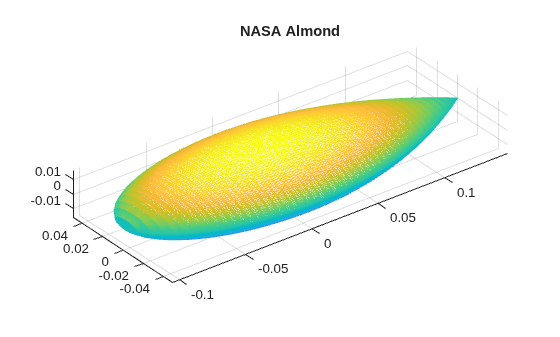
    Figure contains an axes object. The axes object with title NASA Almond contains an object of type patch.

    load('nasaAlmondBRCS.mat','brcsAlmond');

    Create a BRCS signature from the pattern.

    brcs = brcsSignature(Pattern=brcsAlmond.Pattern01, ...
         TransmitAzimuth=brcsAlmond.TransmitAzimuth, ...
         ReceiveAzimuth=brcsAlmond.ReceiveAzimuth, ...
         Elevation=brcsAlmond.Elevation01)
    brcs = 
      brcsSignature with properties:
    
                Pattern: [37×37 double]
         ReceiveAzimuth: [-180 -170 -160 -150 -140 -130 -120 -110 -100 -90 -80 -70 -60 -50 -40 -30 -20 -10 0 10 20 30 40 50 60 70 80 90 100 110 120 130 140 150 160 170 180]
        TransmitAzimuth: [-180 -170 -160 -150 -140 -130 -120 -110 -100 -90 -80 -70 -60 -50 -40 -30 -20 -10 0 10 20 30 40 50 60 70 80 90 100 110 120 130 140 150 160 170 180]
              Elevation: [2×1 double]
              Frequency: 300000000


    Plot the BRCS pattern.

    figure
    imagesc(brcs.TransmitAzimuth,brcs.ReceiveAzimuth,brcs.Pattern)
    title('BRCS (dBsm)')
    xlabel('Transmit Azimuth (deg)')
    ylabel('Receive Azimuth (deg)')
    colorbar
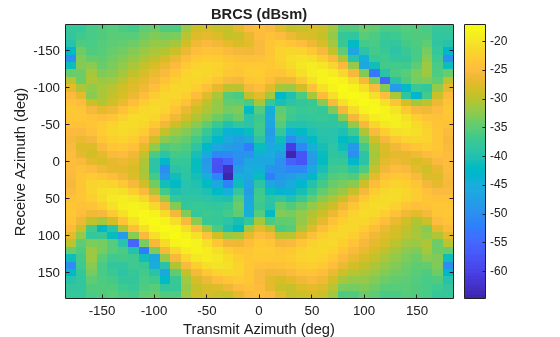
    Figure contains an axes object. The axes object with title BRCS (dBsm), xlabel Transmit Azimuth (deg), ylabel Receive Azimuth (deg) contains an object of type image.

    Obtain the value of the patern for a transmit azimuth of 0 degrees and receive azimuth of 30 degrees for transmit and receive elevations of 0 degrees. Units are in dBsm.

    value(brcs,[0; 0],[30; 0],2e9)
    ans = 
    -38.6897
    

    References

    [1] https://github.com/UTAustinCEMGroup/AustinCEMBenchmarks/tree/master/Austin-RCS-Benchmarks/Problem%20III-Almonds/Problem%20Set%20IIIB-Solid%20Resin%20Almonds

    [2] https://github.com/UTAustinCEMGroup/AustinCEMBenchmarks/blob/ba9f243c3210eb3cda78f1bd18971c9c576c53ae/Austin-BioEM-Benchmarks/LICENSE.txt

    Extended Capabilities

    expand all

    C/C++ Code Generation
    Generate C and C++ code using MATLAB® Coder™.

    Version History

    Introduced in R2026a