clutterVolumeRCS
Radar cross-section of volume clutter
Description
Examples
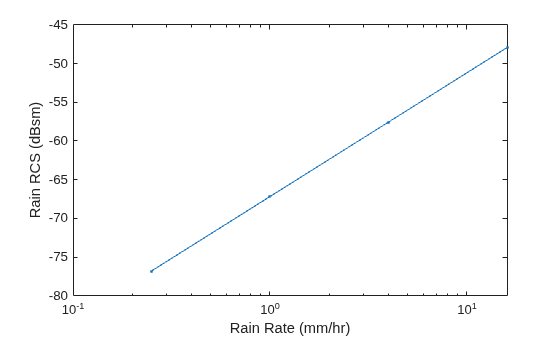
Estimate the radar cross-section of rain for a side-looking airborne SAR operating in the L band at 1.5 GHz. The rain is specified by a range resolution of 15 m, an azimuth resolution of 18 m, and a rain elevation cell resolution of 20 m. The rain rates are 0.25 mm/hr, 1 mm/hr, 4 mm/hr, and 16 mm/hr.
f = 1.5e9; rngres = 15; azres = 18; elres = 20; res = [rngres azres elres]; rr = [0.25 1 4 16];
Compute the rain radar cross-section. Use rainreflectivity to compute the volume reflectivity of the scattering particles.
volref = rainreflectivity(f,rr); rcs = clutterVolumeRCS(volref,res);
Plot the rain radar cross-section as a function of the rain rate. Express the cross-section in dB.
semilogx(rr,pow2db(rcs),'.-') xlabel('Rain Rate (mm/hr)') ylabel('Rain RCS (dBsm)')
Input Arguments
Volume reflectivity of scattering particles in square meters per cubic meter, specified as a scalar or a vector.
Data Types: double
Clutter extent, specified as a positive real scalar or a 1-by-3 row vector.
If specified as a positive real scalar,
volrepresents the volume of the clutter in cubic meters.If specified as a 1-by-3 row vector:
The first element of
volis a positive real scalar that represents the clutter within the range resolution in meters of the radar.The second element of
volis a positive real scalar that represents the clutter within the azimuth (or cross-range) resolution in meters of the radar.The third element of
volis a positive real scalar that represents the clutter within the elevation resolution in meters of the radar.
Data Types: double
Output Arguments
Radar cross-section of volume clutter in square meters, returned as a scalar or a
vector. rcs has the same dimensions as
volrefl.
Extended Capabilities
C/C++ Code Generation
Generate C and C++ code using MATLAB® Coder™.
Version History
Introduced in R2021a
See Also
MATLAB Command
You clicked a link that corresponds to this MATLAB command:
Run the command by entering it in the MATLAB Command Window. Web browsers do not support MATLAB commands.
Seleccione un país/idioma
Seleccione un país/idioma para obtener contenido traducido, si está disponible, y ver eventos y ofertas de productos y servicios locales. Según su ubicación geográfica, recomendamos que seleccione: .
También puede seleccionar uno de estos países/idiomas:
Cómo obtener el mejor rendimiento
Seleccione China (en idioma chino o inglés) para obtener el mejor rendimiento. Los sitios web de otros países no están optimizados para ser accedidos desde su ubicación geográfica.
América
- América Latina (Español)
- Canada (English)
- United States (English)
Europa
- Belgium (English)
- Denmark (English)
- Deutschland (Deutsch)
- España (Español)
- Finland (English)
- France (Français)
- Ireland (English)
- Italia (Italiano)
- Luxembourg (English)
- Netherlands (English)
- Norway (English)
- Österreich (Deutsch)
- Portugal (English)
- Sweden (English)
- Switzerland
- United Kingdom (English)