radarTransceiver
R2026bMonostatic radar transceiver
Description
The radarTransceiver
System object™ creates a monostatic radar object that generates I/Q samples of the received
target echo. You can specify stationary or constant velocity point targets as
tgt
structs or you can define two-way propagation paths using the
proppaths
struct input argument. Alternatively, you can attach a
radarTransceiver object as a sensor to a platform in a radarScenario to
leverage built-in scenario, target, and trajectory management features. You can also create a
radarTransceiver object that corresponds to your radarDataGenerator
object.
To generate samples of the received target echo:
Create the
radarTransceiverobject and set its properties.Call the object with arguments, as if it were a function.
To learn more about how System objects work, see What Are System Objects?
Creation
Syntax
Description
radarTrans = radarTransceiver
radarTrans = radarTransceiver(PropertyName=Value)PropertyName set to the corresponding Value.
For example, you can specify the waveform using the Waveform
property. You can specify additional pairs of arguments in any order as
(PropertyName1=Value1, …
,PropertyNameN=ValueN).
iqSensor = radarTransceiver(radarGenerator)iqSensor, based on the
radarDataGenerator object, radarGenerator. This
syntax configures properties in iqSensor so that you can process the
I/Q signals it generates to obtain comparable detections to those returned from
radarDataGenerator.
Properties
Usage
Syntax
Description
sig = radarTrans(tgt,t)sig,
at time t seconds due to targets specified by
tgt in a freespace propagation environment. This syntax is
intended for use only when radarTransceiver is advanced by consecutive time
steps (t is set equal to the start time of the next available
repetition interval, see info).
[___,
also returns the range grid rgrid] = radarTrans(___)rgrid of the received signal.
To enable this syntax, set the RangeOutputPort property to
true.
[___,
also returns the time grid tgrid] = radarTrans(___)tgrid of the received signal.
To enable this syntax, set the TimeOutputPort property to
true.
You can combine optional output arguments when you set the properties to enable them.
You must list optional outputs in the same order as the enabled properties. The
info argument must be listed last.
[___] = radarTrans(___,
specifies the scenario axes sceneaxes)sceneaxes.
To enable this syntax, set the Polarization property in the
TransmitAntenna and ReceiveAntenna objects
to "Combined".
[___] = radarTrans(___,
specifies the number of pulses/sweeps N)N in the signal as a positive
integer.
To enable this syntax, set the NumRepetitionSource to
"Input port".
[___] = radarTrans(___,
specifies the PRF index of the radar waveform as a positive integer.PRFIDX)
To enable this syntax, set the PRFSelectionInputPort property
to true within the waveform object specified by the
Waveform property.
[___] = radarTrans(___,
specifies the transmit weights of the radar system as a column vector.wt)
To enable this syntax, set the ElectronicScanMode property to
"Custom" and also set the WeightsInputPort
property to true in the transmit antenna object specified by the
TransmitAntenna property.
[___] = radarTrans(___,
specifies the transmit steering angle azimuth and elevation as a column vector.steert)
To enable this syntax, set the ElectronicScanMode property to
"Custom", specify the transmit antenna object as a senor with
subarrays in the TransmitAntenna property, and set the subarray's
SubarraySteering property to "Phase" or
"Time".
[___] = radarTrans(___,
specifies the transmit weights applied to each element as either a matrix or a cell
array.wst)
To enable this syntax, set the ElectronicScanMode property to
"Custom", specify the transmit antenna object as a senor with
subarrays in the TransmitAntenna property, and set the subarray's
SubarraySteering property to "Custom".
[___] = radarTrans(___,
specifies the receive weights of the radar system as a column vector.wr)
To enable this syntax, set the ElectronicScanMode property to
"Custom" and also set the WeightsInputPort
property to true in the receive antenna object specified by the
ReceiveAntenna property.
[___] = radarTrans(___,
specifies the receive steering angle azimuth and elevation as a column vector.steerr)
To enable this syntax, set the ElectronicScanMode property to
"Custom", use a subarray in the receive antenna, and set its
SubarraySteering property to "Phase" or
"Time".
[___] = radarTrans(___,
specifies the receive weights applied to each element as either a matrix or a cell
array.wsr)
To enable this syntax, set the ElectronicScanMode property to
"Custom", specify the receive antenna object as a senor with
subarrays in the ReceiveAntenna property, and set the subarray's
SubarraySteering property to "Phase" or
"Time".
[___] = radarTrans(___,
specifies the range limits of interest.rl)
To enable this syntax, set the RangeLimits property to
"Input port".
You can combine optional input arguments when you set the properties to enable them. You must list optional inputs in the same order as the enabled properties and in the order the syntaxes are listed for properties that enable multiple input arguments.
Input Arguments
Output Arguments
Object Functions
To use an object function, specify the
System object as the first input argument. For
example, to release system resources of a System object named obj, use
this syntax:
release(obj)
Examples
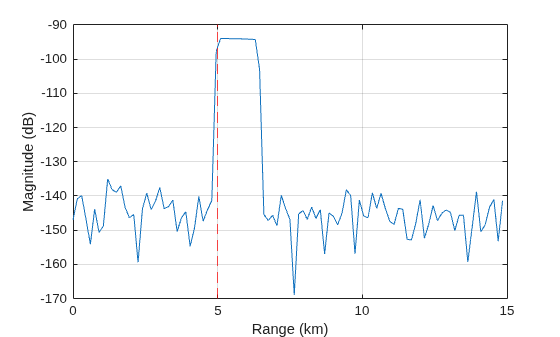
This example shows how to calculate the free space propagation path for a radar transceiver configuration.
Create a radar transceiver with an isotropic antenna, transmitting a linear frequency modulated (LFM) pulse waveform with a 10 microsecond pulse width. Calculate the free space propagation paths assuming the radar is at the origin and the target is 5 km away. Return I/Q signals from the radar transceiver at the initial time and plot the results. Start by initializing the radar transceiver.
wav  = phased.LinearFMWaveform(PulseWidth=1e-5);
ant  = phased.IsotropicAntennaElement;
rdr  = radarTransceiver(Waveform=wav, ...
     TransmitAntenna=phased.Radiator(Sensor=ant), ...
     ReceiveAntenna=phased.Collector(Sensor=ant), ...
     RangeOutputPort=true);
freq = rdr.TransmitAntenna.OperatingFrequency;
Define the radar position, target position, and target velocity. Calculate the free space propagation paths. The target is located 5 km away and is moving at 20 m/s in the y-direction.
rdrPose.Position = [0 0 0];   % Radar position (m)
tgtPose.Position = [0 5e3 0]; % Target position (m)
tgtPose.Velocity = [0 20 0];  % Target velocity (m/s)
proppaths        = freeSpacePath(freq,rdrPose,tgtPose)
proppaths = struct with fields:
               PathLength: 10000
                 PathLoss: 191.9392
    ReflectionCoefficient: 11.2177
         AngleOfDeparture: [2×1 double]
           AngleOfArrival: [2×1 double]
             DopplerShift: -40.0277
Return I/Q signals from the radarTransceiver at a time of 0 seconds and plot the results. The target is located at 5 km.
t = 0; % Time (sec)
[iq,rgrid] = rdr(proppaths,t);

% Plot
figure
plot(rgrid*1e-3,mag2db(abs(sum(iq,2))))
grid on
hold on
xline(5,'r--')
xlabel('Range (km)')
ylabel('Magnitude (dB)')
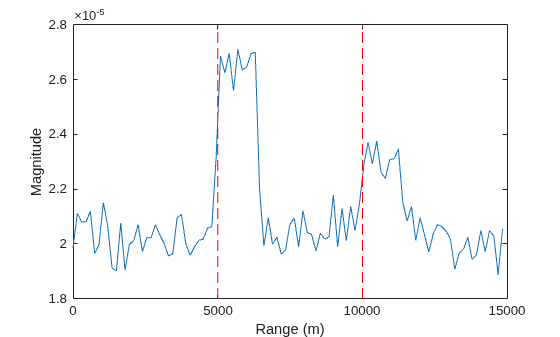
Model the target echo received by a monostatic radar using the radarTransceiver object.
Create the radar targets as an array of two structures with a specified position and velocity.
tgt1 = struct( ...
    'Position', [0 5e3 0], ...
    'Velocity', [0 0 0]);
tgt2 = struct( ...
    'Position', [10e3 0 0], ...
    'Velocity', [0 0 0]);
Create a surveillance radar 15 meters above the ground. Specify rpm to determine the scan rate (in deg/s). For the specified scanrate and beamwidth, determine the update rate.
rpm = 12.5;
scanrate = rpm*360/60;       % deg/s
beamw = 1;                   % beamwidth
updaterate = scanrate/beamw; % update at each beam
radarht = 15.0;              % radar height
Create a phased.CustomAntennaElement object that acts as a transmit antenna element and a receive antenna element in the radarTransceiver object.
az = -180:0.5:180;
el = -90:0.5:90;
pat = zeros(numel(el),numel(az));
pat(-0.5 <= el & el <= 0.5,-0.5 <= az & az <= 0.5) = 1;
ant = phased.CustomAntennaElement('AzimuthAngles',az,...
    'ElevationAngles',el,'MagnitudePattern',mag2db(abs(pat)),...
    'PhasePattern',zeros(size(pat)));
Create a radarTransceiver object. Specify a rectangular waveform for the radar using the phased.RectangularWaveform object. Specify the transmit antenna and the receive antenna. The mechanical scan mode is set to 'Circular' with a defined scan rate.
wav = phased.RectangularWaveform('PulseWidth',1e-5);
sensor = radarTransceiver( ...
    'Waveform',wav, ...
    'TransmitAntenna',phased.Radiator('Sensor',ant), ...
    'ReceiveAntenna',phased.Collector('Sensor',ant), ...
    'MechanicalScanMode','Circular', ...
    'MechanicalScanRate',scanrate, ...
    'MountingLocation',[0,0,radarht]);
Generate detections from a full scan of the radar.
simTime = 0;
sigi = 0;
while true
    [sig, info] = sensor([tgt1 tgt2], simTime);
    sigi = sigi + abs(sig);

    % Is full scan complete?
    if info.IsScanDone
        break % yes
    end
    simTime = simTime + 1/updaterate;
end
r = (0:size(sigi,1)-1)/sensor.Waveform.SampleRate* ...
    sensor.TransmitAntenna.PropagationSpeed/2;
plot(r,sigi)
hold on
plot([5e3 5e3],ylim,'r--',[10e3 10e3],ylim,'r--')
xlabel('Range (m)')
ylabel('Magnitude')
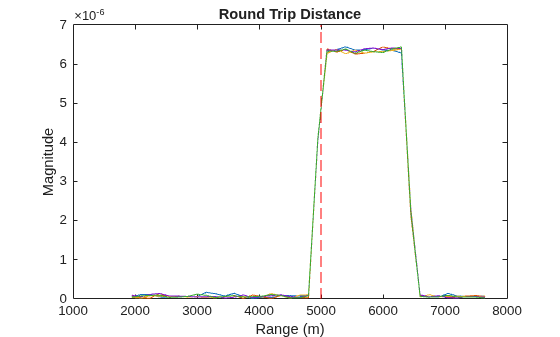
Find the received signals at a monostatic radar between 4 and 6 km from target.
First, create a target at a range of 5 km moving at 10 m/sec.
rng1 = 5e3;
tgt = struct( ...
    'Position',[0 rng1 0], ...
    'Velocity',[0 10 0]);
Create a rectangular pulse transmitted waveform.
wav = phased.RectangularWaveform('PulseWidth',1e-5);Configure the radarTransceiver. The transmit and receive arrays are co-located 5-element ULAs. Configure the radarTransceiver to output the range and time.
ant = phased.IsotropicAntennaElement;
array = phased.ULA(5,Element=ant);
sensor = radarTransceiver(...
    Waveform=wav, ...
    TransmitAntenna=phased.Radiator('Sensor',array), ...
    ReceiveAntenna=phased.Collector('Sensor',array), ...
    MechanicalScanMode='None', ...
    RangeLimits=[2e3 6e3], ...
    RangeOutputPort=true, ...
    TimeOutputPort=true);
Generate the received signal.
simTime = 0;
[sig,rgrid,tgrid,info] = sensor(tgt,simTime);
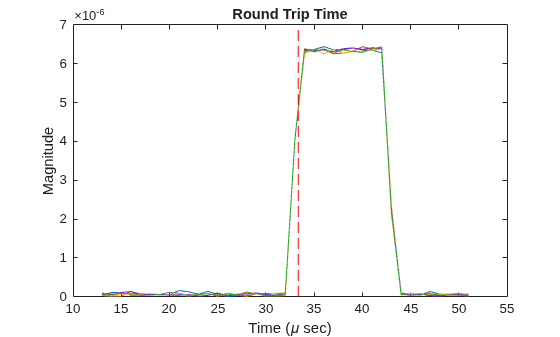
Plot the signal versus range and time.
plot(rgrid,abs(sig))
hold on
plot([rng1 rng1],ylim,'r--')
title('Round Trip Distance')
xlabel('Range (m)')
ylabel('Magnitude')
hold off
plot(tgrid*10^6,abs(sig))
hold on;
title('Round Trip Time')
xlabel('Time (\mu sec)')
ylabel('Magnitude')
c = physconst('LightSpeed');
tarrive = 2*rng1/c*1e6;
plot([tarrive tarrive],ylim,'r--')
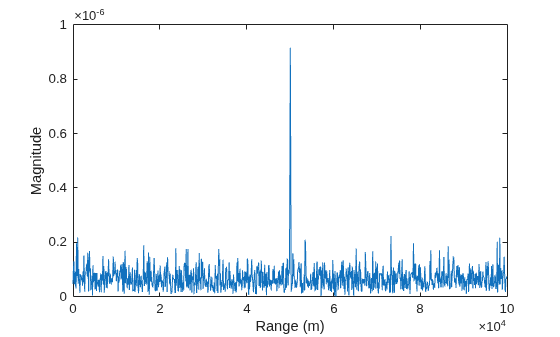
Create a radarDataGenerator and generate a radar transceiver from it.
rdr = radarDataGenerator;
iqsensor = radarTransceiver(rdr);
Produce radar signal from a target using the transceiver.
tgt = struct('Position',[50e3 0 0]);
x = iqsensor(tgt,0);
t = (0:numel(x)-1)/iqsensor.Waveform.SampleRate;
plot(t*physconst('lightspeed')/2,abs(x))
xlabel('Range (m)')
ylabel('Magnitude')
References
[1] M. Richards. "Fundamentals of Radar Signal Processing, 2nd ed." McGraw-Hill Professional Engineering, (2014).
Extended Capabilities
Version History
Introduced in R2021aSee Also
radarDataGenerator | radarScenario | freeSpacePath | rcsSignature | radarChannel
Topics
- Radar Coordinate Systems and Frames
- Frame Rotation (Sensor Fusion and Tracking Toolbox)

