Water Tank Custom Simulink Environment for Reinforcement Learning
R2026bThis example illustrates the water tank Simulink® environment. This environment is based on the rlwatertank Simulink model, which contains an RL Agent block (instead of a controller) to control the water level in a tank.
To simulate this model, you must create an agent and specify that agent in the RL Agent block. For an example that trains an agent using this environment, see Control Water Level in a Tank Using a DDPG Agent.
mdl = "rlwatertank";
open_system(mdl)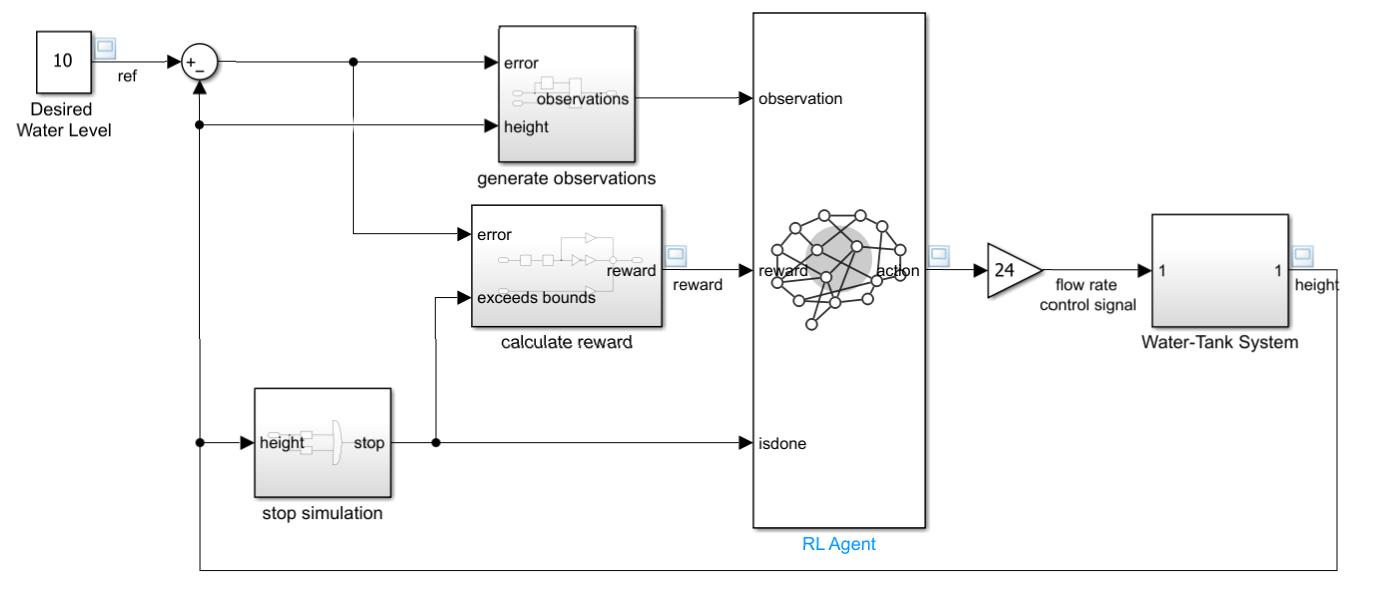
This model already contains an RL Agent block, which connects to the following signals:
Scalar action output signal
Vector of observation input signals
Scalar reward input signal
Logical input signal for stopping the simulation
Action Specification
A reinforcement learning environment receives action signals from the agent and generates observation signals in response to these actions. To create a custom Simulink environment, first create action and observation specification objects. For more information about custom Simulink environments, see Create Custom Simulink Environments.
The action signal for this environment is the flow rate control signal that is sent to the plant, which is a continuous variable. To create a specification object for an action channel carrying a continuous signal, use rlNumericSpec. The flow-rate control signal is normalized and nonnegative, with a lower limit of 0 and an upper limit of 1. This signal is scaled before being sent to the Water Tank System subsystem.
actInfo = rlNumericSpec([1 1], LowerLimit=0, UpperLimit=1);
actInfo.Name = "flow rate control signal";
If the action signal instead takes one of a discrete set of possible values, create the specification using the rlFiniteSetSpec.
Observation Specification
For this environment, there are three observation signals sent to the agent, specified as a vector signal. The observation vector is , where:
is the height of the water in the tank.
, where is the reference value for the water height.
Compute the observation signals in the generate observations subsystem.
open_system(mdl + "/generate observations")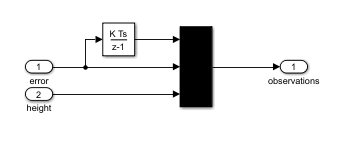
Create a three-element vector of observation specifications. Specify a lower bound of 0 for the water height, leaving the other observation signals unbounded.
obsInfo = rlNumericSpec([3 1], ...
    LowerLimit=[-inf -inf 0  ]', ...
    UpperLimit=[ inf  inf inf]');
obsInfo.Name = "observations";
obsInfo.Description = "integrated error, error, and measured height";
If the actions or observations are represented by bus signals, create specifications using the bus2RLSpec function.
Reward Signal
Construct a scalar reward signal. For this example, specify the following reward.
The reward is positive when the error is below 0.1 and negative otherwise. Also, there is a large reward penalty when the water height is outside the 0 to 20 range.
Construct this reward in the calculate reward subsystem.
open_system(mdl + "/calculate reward")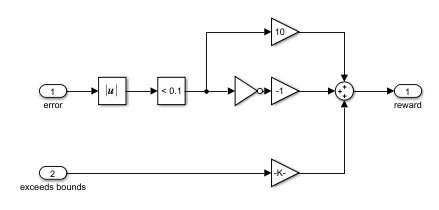
Stop Signal
To terminate training episodes and simulations, specify a logical signal to the isdone input port of the block. For this example, terminate the episode if or .
Compute this signal in the stop simulation subsystem.
open_system(mdl + "/stop simulation")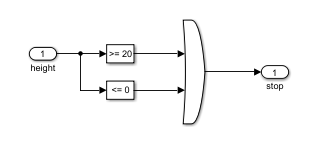
Create Environment Object
Create an environment object from the Simulink model.
env = rlSimulinkEnv(mdl,mdl + "/RL Agent",obsInfo,actInfo);Add Reset Function
You can also create a custom reset function that randomizes parameters, variables, or states of the model. In this example, the reset function localResetFcn defined at the end of the example randomizes the reference signal and the initial water height and sets the corresponding block parameters.
env.ResetFcn = @(in)localResetFcn(in);
To check that the reset function always returns the same random initial value when it is called the first time in your script, fix the random stream generator before calling train or sim. For example, fix the random number stream with seed 0 and random number algorithm Mersenne Twister:
previousRngState = rng(0,"twister");For more information on controlling the seed used for random number generation, see rng. For more information on result reproducibility, see Results Reproducibility.
Load Trained Agent and Simulate Environment
Load the DDPG agent trained in the example Control Water Level in a Tank Using a DDPG Agent.
load("WaterTankDDPG.mat","agent")
By default, the agent uses a greedy (hence deterministic) policy in simulation. To use the exploratory policy instead, set the UseExplorationPolicy agent property to true.
Simulate the agent within the environment for 100 steps, and return the experience as output. For more information, see rlSimulationOptions and sim.
simOpts = rlSimulationOptions(MaxSteps=100,StopOnError="on");
experience = sim(env,agent,simOpts);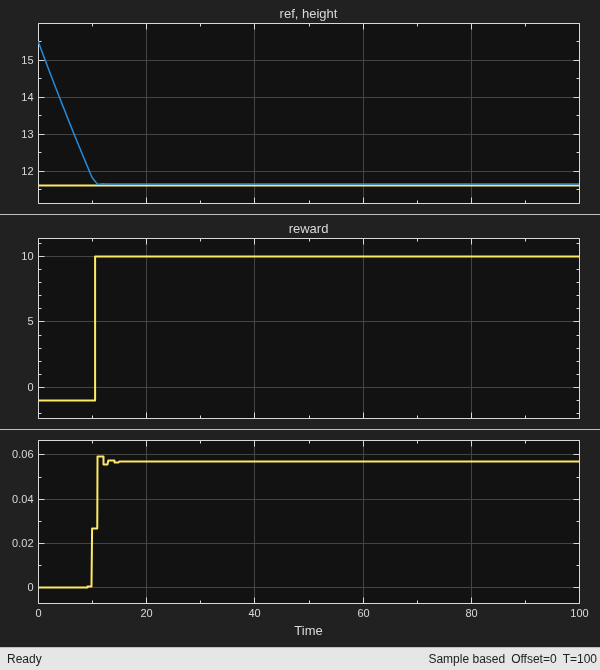
Display the total reward that the agent collects in the simulation.
sum(experience.Reward)
ans =
890
Restore the random number stream using the information stored in previousRngState.
rng(previousRngState);
Local Reset Function
The sim function calls the reset function at the start of each simulation episode, and the train function calls it at the start of each training episode. The reset function takes as input, and returns as output, a Simulink.SimulationInput (Simulink) object. The output object specifies temporary changes applied to model, which are then discarded when the simulation or training completes. For this example, the reset function uses setBlockParameter (Simulink) to specify random values of the reference signal and the initial water height. For more information, see Reset Function for Simulink Environments.
function in = localResetFcn(in)

% Randomize reference signal
blk = sprintf("rlwatertank/Desired \nWater Level");
h = 3*randn + 10;
while h <= 0 || h >= 20
    h = 3*randn + 10;
end
in = setBlockParameter(in,blk,Value=num2str(h));

% Randomize initial water height
h = 3*randn + 10;
while h <= 0 || h >= 20
    h = 3*randn + 10;
end
blk = "rlwatertank/Water-Tank System/H";
in = setBlockParameter(in,blk,InitialCondition=num2str(h));

end

