Contenido principal

Dynamic Load (Three-Phase)

R2026b

Balanced three-phase dynamic load

  • Dynamic Load (Three-Phase) block

Libraries:
Simscape / Electrical / Passive

Description

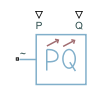
The Dynamic Load (Three-Phase) block models a balanced dynamic load for a balanced three-phase supply.

This table shows how the block calculates the consumed active and reactive power based on the voltage from the supply, V.

Range of V ValuesConsumed Active and Reactive Power
V>VminPactual=PinQactual=Qin
V<Vmin

The block models a load with an impedance equal to:

R=Vmin2PinPin2+Qin2X=Vmin2QinPin2+Qin2Z=R2+X2

In these equations:

  • Vmin is the value of the Minimum supply voltage (phase-to-phase RMS) parameter.

  • Pactual is the consumed active power of the Dynamic Load (Three-Phase) block.

  • Pin is the input active power of the Dynamic Load (Three-Phase) block, determined by external input port P.

  • Qactual is the consumed reactive power of the Dynamic Load (Three-Phase) block.

  • Qin is the input reactive power of the Dynamic Load (Three-Phase) block, determined by external input port Q.

The Dynamic Load (Three-Phase) block consumes or generates active power depending on the polarity of input active power Pin. If Pin > 0, the block consumes active power. If Pin < 0, the block generates active power.

Faults

To model a fault in the Dynamic Load (Three-Phase) block, in the Faults section, click Add fault next to the fault that you want to model. For more information about fault modeling, see Fault Behavior Modeling and Fault Triggering.

The Dynamic Load (Three-Phase) block allows you to model an electrical fault as an open circuit.

Fault Triggers

You specify how and when faults occur by using the Trigger type parameter.

If you set the Trigger Type parameter to Timed, the block triggers fault events when the simulation time reaches the value you specify for the Trigger fault at time parameter.

If you set the Trigger Type parameter to Conditional, the fault injects as a result of a condition that reflects a behavior associated with a signal. Conditionals evaluate the Boolean expression in the Condition parameter at each time step.

If you set the Trigger Type parameter to Manual, the fault injects or clears when you toggle the status in the Fault Dashboard pane.

For more information about adding faults to blocks and specifying fault triggers, see Introduction to Simscape Faults.

Load-Flow Analysis

If the block is in a network that is compatible with the frequency-time simulation mode, you can perform a load-flow analysis on the network. A load-flow analysis provides steady-state values that you can use to initialize a machine.

For more information, see Perform a Load-Flow Analysis Using Simscape Electrical and Frequency and Time Simulation Mode.

Ports

Input

expand all

Physical signal port associated with real power, specified as a scalar.

Physical signal port associated with reactive power, specified as a scalar.

Conserving

expand all

Composite three-phase port associated with the three-phase voltage.

Dependencies

To enable this port, set Electrical connection to Composite three-phase ports.

Expanded three-phase port associated with the phase A voltage.

Dependencies

To enable this port, set Electrical connection to Expanded three-phase ports.

Expanded three-phase port associated with the phase B voltage.

Dependencies

To enable this port, set Electrical connection to Expanded three-phase ports.

Expanded three-phase port associated with the phase C voltage.

Dependencies

To enable this port, set Electrical connection to Expanded three-phase ports.

Parameters

expand all

Main

Whether to model composite or expanded three-phase ports.

When you select Composite three-phase ports, the ~ conserving port represents a composite three-phase port.

When you select Expanded three-phase ports, the a, b, and c conserving ports represent the individual phases of a three-phase system.

Since R2023a

Rated electrical frequency.

Minimum voltage, in phase-to-phase RMS, that the supply needs for the block to act as a dynamic load.

Since R2023a

Time constant associated with the transients of the terminal voltage measurement.

Since R2023a

Terminal voltage, in phase-to-phase RMS, at time zero.

Since R2023a

Terminal voltage angle of phase A at time zero.

Since R2023a

Parasitic conductance to electrical reference.

Faults

Option to add an open-circuit fault in the Dynamic Load (Three-Phase) block.

To add a fault, click the Add fault hyperlink.

Conductance during the open-circuit state.

Dependencies

To enable this parameter, click the Add fault hyperlink for the Open circuit fault parameter.

Trigger type, specified as one of these options:

  • Always On — The fault injects at the start of the simulation.

  • Timed — The fault injects when the simulation time reaches the value you specify for the Trigger fault at time parameter.

  • Additional triggers — The fault injects as a result of additional triggers not available in the block dialog box. Select this option and click the Open fault properties hyperlink to set the Trigger type to one of these values in the Property Inspector:

    • Conditional — The fault injects as a result of a condition that reflects a behavior associated with a signal. Conditionals evaluate the Boolean expression in the Condition parameter at each time step. To learn more, see Create and Manage Conditionals.

    • Manual — The fault injects or clears when you toggle the status in the Fault Dashboard pane. To learn more, see Manually Trigger Faults in Models.

Dependencies

To enable this parameter, click the Add fault hyperlink for the Open circuit fault parameter.

Simulation time at which the block enters the faulted state.

Dependencies

To enable this parameter, click the Add fault hyperlink for the Open circuit fault parameter and set Trigger type to Timed.

Option to enable additional trigger types not available in the block dialog box. To set the Trigger type parameter to Conditional or Manual, click the Open fault properties hyperlink and set the Trigger type in the Property Inspector.

Dependencies

To enable this parameter, click the Add fault hyperlink for the Open circuit fault parameter and set Trigger type to Additional triggers.

Extended Capabilities

expand all

C/C++ Code Generation
Generate C and C++ code using Simulink® Coder™.

Version History

Introduced in R2019a

expand all