EnergyInfo
R2026bDescription
An EnergyInfo object contains information about the types of
energy used by the block and flowing through its ports, energy conversion and dissipation, and
the assumptions used in calculating energy info for the block.
Creation
To create an EnergyInfo object, use the getEnergyInfo
function.
Properties
Object Functions
plot | Plot data associated with EnergyInfo or
ExergyInfo object |
Examples
This example shows how you can get energy usage for an electrical block in a model.
Open the Permanent Magnet DC Motor example model, which already has data logging enabled for the whole model.
openExample("simscape/PermanentMagnetDCMotorExample")
Enable energy accounting and run the simulation to create the simulation log variable simlog_PermanentMagnetDCMotor (as specified by the Workspace variable name model configuration parameter) in your current workspace:
set_param(bdroot,"SimscapeUseEnergyAccounting","on")
sim("PermanentMagnetDCMotor");
Open the DC Motor subsystem and select the Resistor block.
Find the node corresponding to the selected block:
r = simscape.logging.findNode(simlog_PermanentMagnetDCMotor,gcbh)
r =

  Node with properties:

                  id: 'Rotor_Resistance'
             savable: 1
          exportable: 0
                   i: [1×1 simscape.logging.Node]
    power_dissipated: [1×1 simscape.logging.Node]
                   n: [1×1 simscape.logging.Node]
                   p: [1×1 simscape.logging.Node]
                   v: [1×1 simscape.logging.Node]
Use node r, which is the Node object corresponding to the rotor resistance, to get the energy and power usage for the block.
r_energyInfo = getEnergyInfo(r)
r_energyInfo =

  EnergyInfo with properties:

           Path: "PermanentMagnetDCMotor/DC Motor/Rotor↵Resistance"
    Assumptions: [2×5 table]
        Summary: [2×5 table]
          Ports: [1×1 struct]
         Energy: [125×2 timetable]
          Power: [125×2 timetable]
View the energy usage summary.
r_energyInfo.Summary
ans =

  2×5 table

        Type           Ports          External         Converted      Accumulated
    ____________    ____________    _____________    _____________    ___________

    "Electrical"    0.052272 (J)            0 (J)    -0.052272 (J)       0 (J)
    "Thermal"              0 (J)    -0.052272 (J)     0.052272 (J)       0 (J)
The summary shows that the block acquired 0.052272 J of electrical energy through its ports and converted all this energy into thermal. The thermal energy is classified as external, which means that it got dissipated.
You can also check the assumptions used in calculating energy info for the block.
r_energyInfo.Assumptions
ans =

  2×5 table

        Type            Ports            External                 Converted               Accumulated
    ____________    ______________    ______________    _____________________________    ______________

    "Electrical"    "Measured"        "Assumed zero"    "Derived from energy balance"    "Assumed zero"
    "Thermal"       "Assumed zero"    "Measured"        "Derived from energy balance"    "Assumed zero"
The assumptions table shows that the energy usage tool measures electrical energy through the ports and external thermal energy. Converted energy of both types is derived from energy balance. All other types of energy are assumed zero.
This example shows how you can plot energy usage for a block in a model.
Open the Permanent Magnet DC Motor example model, which already has data logging enabled for the whole model.
openExample("simscape/PermanentMagnetDCMotorExample")
Enable energy accounting and run the simulation to create the simulation log variable
simlog_PermanentMagnetDCMotor (as specified by the Workspace
variable name model configuration parameter) in your current workspace:
set_param(bdroot,"SimscapeUseEnergyAccounting","on")
sim("PermanentMagnetDCMotor");
Get the energy usage for the Friction block in the DC
Motor subsystem. You can use tab completion to navigate through the simulation log
data tree. You can also use the simscape.logging.findNode function to find the node corresponding to the
block.
fr_energyInfo = getEnergyInfo(simlog_PermanentMagnetDCMotor.DC_Motor.Friction)
fr_energyInfo =

  EnergyInfo with properties:

           Path: "PermanentMagnetDCMotor/DC Motor/Friction"
    Assumptions: [2×5 table]
        Summary: [2×5 table]
          Ports: [1×1 struct]
         Energy: [125×2 timetable]
          Power: [125×2 timetable]
View the energy usage summary.
fr_energyInfo.Summary
ans =

  2×5 table

        Type            Ports           External         Converted       Accumulated
    ____________    _____________    ______________    ______________    ___________

    "Mechanical"    0.0041018 (J)             0 (J)    -0.0041018 (J)       0 (J)
    "Thermal"               0 (J)    -0.0041018 (J)     0.0041018 (J)       0 (J)
The summary shows that the block acquired 0.0041018 J of mechanical energy through its ports and converted all this energy into thermal. The thermal energy is classified as external, which means that it got dissipated.
Plot the cumulative energy usage for the block.
plot(fr_energyInfo)
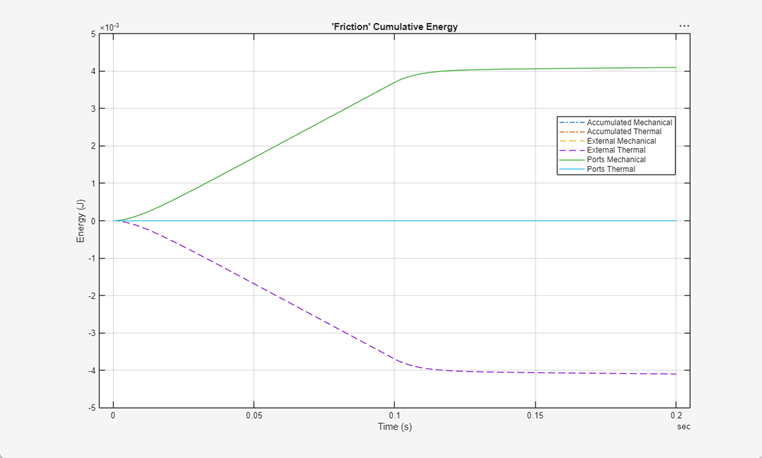
The plot shows how the cumulative energy of each combination of category and type used by the block changes over time.
Version History
Introduced in R2026b

