About Energy Accounting
R2026bEnergy accounting is a set of tools that lets you analyze energy and power usage by specific blocks in your model. Use it to understand energy flow and conversions within a block, calculate energy losses, and verify energy efficiency requirements.
Energy accounting is based on post-processing logged simulation data. Prior to using energy accounting tools, you must obtain the simulation log:
Open the model.
Enable logging additional variables and intermediates required for energy accounting by setting the Enable energy accounting model configuration parameter:
set_param(bdroot,'SimscapeUseEnergyAccounting','on')
Turn on Simscape™ data logging either for the whole model or for specific blocks of interest. For more information, see Enable Simscape Data Logging for the Whole Model and Log Data for Selected Blocks Only.
Simulate the model.
Once you generate the simulation log, you no longer need access to the model to analyze the data. You can save the simulation log, and then retrieve it later to analyze the energy and power usage in the model during simulation. For more information, see Saving and Retrieving Logged Simulation Data.
Getting Energy Information
To analyze the energy and power usage, use the getEnergyInfo
function. This function returns an EnergyInfo object, which contains
information about the energy and power usage for the block that corresponds to the specified
node in the logged simulation data tree. For example, if the simulation log variable name is
simlog, then to get energy information for a
Friction block in the DC Motor subsystem of the model,
type:
fr_energyInfo = getEnergyInfo(simlog.DC_Motor.Friction)
fr_energyInfo =

  EnergyInfo with properties:

           Path: "PermanentMagnetDCMotor/DC Motor/Friction"
    Assumptions: [2×5 table]
        Summary: [2×5 table]
          Ports: [1×1 struct]
         Energy: [125×2 timetable]
          Power: [125×2 timetable]
You can use tab completion to navigate through the simulation log data tree. You can
also use the simscape.logging.findNode function to find the node corresponding to the block
of interest.
The EnergyInfo object contains:
Path– Block name, including the path to the block in the modelAssumptions– Assumptions used in calculating energy info for the block, presented as a table. Table rows are energy types and table columns are energy categories. For each combination of energy type and category, the table lists whether this energy is measured, assumed zero, or derived from energy balance.Summary– Table of the net energy change during simulation, for the time range available in the simulation log, listed by energy type and category.Ports– A structure that contains block port names, domains, and the time table of the power at the ports at each step during simulation.Energy– A time table showing the evolution of cumulative energy change at each step during simulation, listed by energy type and category.Power– A time table showing the evolution of the instantaneous power, that is, the rate of change of cumulative energy, at each step during simulation, listed by energy type and category.
Energy Types
Energy accounting tools classify energy by type. Not all energy types are available in each block. In many cases, the energy types correspond to the domain types of the block ports, but certain energy types do not have a one-to-one correspondence with a domain. The table summarizes energy types available and maps their correspondence to domain types.
| Energy Types | Domain Types |
|---|---|
| Electrical, including multiphase electrical domains |
| Magnetic |
|
|
Gas | Gas |
IsothermalLiquid | Isothermal liquid |
ThermalLiquid | Thermal liquid |
|
|
Chemical | Not connected to a domain but present in specific blocks, such as batteries |
Optical | Not connected to a domain but present in specific blocks, such as Light-Emitting Diode |
Energy Categories
For each energy type within a block, there are four categories of energy use:
Ports – Energy flowing into and out of the block through a conserving port. Positive value means energy flowing into the block. Negative value means energy flowing out of the block.
External – Positive external energy of any type means energy flowing into the block through an external source that is not part of the model. Physically, this means the environment is injecting energy into this physical component. For example, ideal sources, such as AC Voltage Source block, obtain their energy this way and then pass it to the rest of the network through their ports. Negative external energy of type Thermal means thermal losses.
Converted – Energy converted from one type to a different type within the same block. A negative value for a certain type means that the block is converting energy of this type into other energy types.
Accumulated – Energy accumulated within the block. An increase in accumulated energy means the block is storing energy of this type. The initial value of accumulated energy is always zero because the reference energy storage level is the level at the first time that the value is available (usually, at the start of simulation, when t=0).
Visualizing the Block Energy Usage
An easy way to visualize the cumulative energy usage for a block is to plot the
EnergyInfo object. The plot object
function assigns specific line styles and colors to each combination of energy category and
energy type used by the block.
fr_energyInfo = getEnergyInfo(simlog.DC_Motor.Friction);
plot(fr_energyInfo)
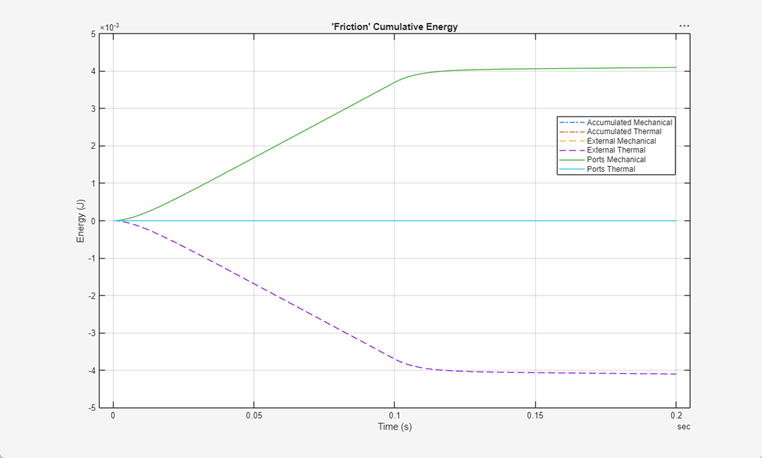
The plot shows that during simulation the Friction block acquires mechanical energy through its ports and converts all this energy into external thermal energy. All other types of energy listed in the plot legend are at 0 throughout the simulation.
Limitations
Energy accounting is available for most Simscape blocks in the Foundation libraries and in add-on product libraries.
Energy accounting is not available for:
Subsystems
Simscape Multibody™ blocks
Simscape blocks that use custom domains
Simscape blocks that use legacy domains, such as pneumatic
Simscape blocks that use moist air and two-phase fluids domains
Simscape Fluids™ blocks in the Simscape / Fluids / Isothermal Liquid / Valves & Orifices / Hydromechanical Valves library.
Certain other blocks in add-on product libraries. If you try to get energy information for such a block, the
getEnergyInfofunction generates an error message saying that this block is not supported.
Simscape blocks that have only PS input and PS output ports return an empty
EnergyInfo object.
Additionally, these types of blocks correctly report energy and power in the Ports category, but may incorrectly assume zero for other categories:
Custom blocks that use Foundation domains
Custom blocks in featured examples
Certain blocks in add-on product libraries
Check the Assumptions table in the EnergyInfo object to verify the
assumptions used in calculating energy info for the block.
Hard Stop Limitation
There is a known limitation related to hard stop models parameterized with the
Based on coefficient of restitution option. If your model
contains a mass or inertia connected to such a hard stop block, the
getEnergyInfo function reports an energy imbalance for both blocks
because this hard stop parameterization lacks a force model to compute port power. The
relevant blocks are:
For example, consider this model.
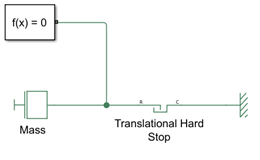
If you run the simulation with the default hard stop model, Stiffness and
damping applied smoothly through transition, damped rebound, and get the
energy info reports for the Mass and the
Translational Hard Stop blocks, you can see the kinetic
energy in the Mass block converted into mechanical energy
and transferred through the ports to the Translational Hard
Stop block, where it gets converted into thermal energy and dissipated.
In other words, the energy balance works, as expected.
energyInfoMassDefault = getEnergyInfo(result.simlog.Mass);
disp(energyInfoMassDefault.Summary)
        Type           Ports        External     Converted     Accumulated
    ____________    ____________    ________    ___________    ___________

    "Kinetic"              0 (J)     0 (J)         -0.5 (J)     -0.5 (J)
    "Mechanical"    -0.50079 (J)     0 (J)      0.50079 (J)        0 (J)
energyInfoHSDefault = getEnergyInfo(result.simlog.Translational_Hard_Stop);
disp(energyInfoHSDefault.Summary)
        Type           Ports         External       Converted      Accumulated
    ____________    ___________    ____________    ____________    ___________

    "Elastic"             0 (J)           0 (J)           0 (J)       0 (J)
    "Mechanical"    0.50079 (J)           0 (J)    -0.50079 (J)       0 (J)
    "Thermal"             0 (J)    -0.50079 (J)     0.50079 (J)       0 (J)
However, if you set the Hard stop model parameter to
Based on coefficient of restitution, the energy accounting
for the Mass block no longer shows that kinetic energy is
converted into mechanical energy. This is the limitation. This hard stop model is mode
chart based, and when an impact occurs in the mode chart, the force becomes an impulse,
and a variable-step solver treats this force as zero. Therefore, the energy accounting
tool calculates the mechanical energy transfer between the hard stop and the mass as zero.
energyInfoMassCRest = getEnergyInfo(result.simlog.Mass);
disp(energyInfoMassCRest.Summary)
        Type        Ports    External     Converted      Accumulated
    ____________    _____    ________    ____________    ____________

    "Kinetic"       0 (J)     0 (J)      -0.49834 (J)    -0.49834 (J)
    "Mechanical"    0 (J)     0 (J)             0 (J)           0 (J)
The hard stop energy accounting exhibits the same limitation. The negative thermal energy in the External column indicates thermal dissipation, but the table does not show where the energy comes from.
energyInfoHSCRest = getEnergyInfo(result.simlog.Translational_Hard_Stop);
disp(energyInfoHSCRest.Summary)
        Type        Ports      External       Converted     Accumulated
    ____________    _____    ____________    ___________    ___________

    "Elastic"       0 (J)           0 (J)          0 (J)       0 (J)
    "Mechanical"    0 (J)           0 (J)          0 (J)       0 (J)
    "Thermal"       0 (J)    -0.49834 (J)    0.49834 (J)       0 (J)
See Also
getEnergyInfo | EnergyInfo | simscape.logging.findNode | Enable energy
accounting

