spsConversionFindBlocks
Syntax
Description
Note
A newer version of the SPS conversion assistant is available. The Specialized Power
Systems (SPS) Conversion Add-On includes new functions similar to the built-in
spsConversionAssistant and
spsConversionFindBlocks functions in Simscape™
Electrical™ software but with new features and support for earlier releases of MATLAB®, starting from R2024b. For more information and to download the add-on with
the latest features, see SPS Conversion Add-On (MATLAB Central File Exchange).
For more information about upgrading Specialized Power Systems models, see Upgrade Specialized Power Systems Models to use Simscape Electrical Blocks.
blockTable = spsConversionFindBlocks(modelName)modelName model, its subsystems, and any models referenced by it,
including all variants. The function returns a blockTable table that
contains the Model Block, Library Block, and
Library variables.
blockTable = spsConversionFindBlocks(modelName,Name=Value)
Examples
This example shows you how to search for Specialized Power Systems
library blocks in a model by using the spsConversionFindBlocks
function.
Open the model you want to search for Specialized Power Systems blocks.
open_system("myModelName");
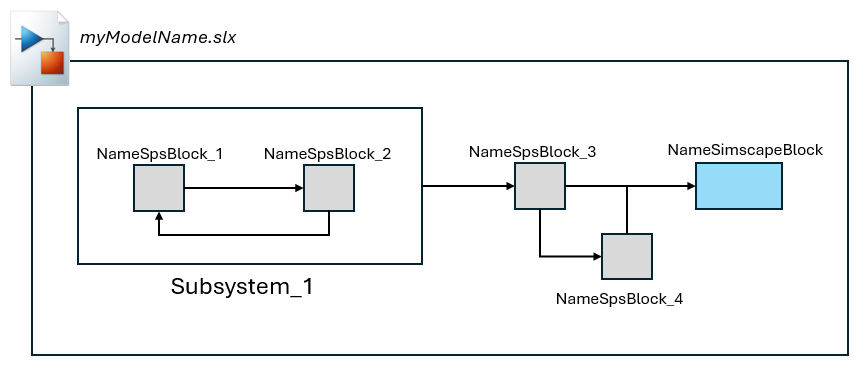
The model in this example comprises one subsystem named
Subsystem_1 that contains two Specialized Power Systems blocks
named NameSPSBlock_1, NameSPSBlock_2, two
additional Specialized Power Systems blocks named NameSPSBlock_3 and
NameSPSBlock_4, and one Simscape block named
NameSimscapeBlock.
Use the spsConvesionFindBlocks function to obtain a table that
lists all the Specialized Power Systems blocks in the model, including the blocks inside
subsystems.
spsBlocksTable = spsConversionFindBlocks("myModelName");Model contains Specialized Power Systems library blocks.
spsBlocksTable =
4×3 table
Model Block Library Block Library
________________________________________ _____________________________________________ _________________________
"myModelName/NameSpsBlock_4" "libraryName1/SpsBlock_4" "libraryName1"
"myModelName/Subsystem_1/NameSpsBlock_1" "libraryName2/SpsBlock_1" "libraryName2"
"myModelName/Subsystem_1/NameSpsBlock_2" "libraryName1/SpsBlock_2" "libraryName1"
"myModelName/NameSpsBlock_3" "libraryName3/SpsBlock_3" "libraryName3"The table comprises these variables:
Model Block— Name of the block in the modelLibrary Block— Name of the block in the libraryLibrary— Name of the library
Input Arguments
Name-Value Arguments
Output Arguments
Version History
Introduced in R2025b

