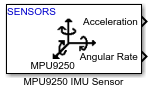
MPU9250 IMU Sensor
Measure acceleration, angular rate, magnetic field, and temperature along axes of MPU-9250 sensor
Since R2026a
Libraries:
STM32 Microcontroller Blockset /
Sensors /
IMU Sensors
STM32 Microcontroller Blockset /
(Legacy) STM32 MBED Based Boards /
MBED Based Sensors
Description
The MPU9250 IMU Sensor block reads data from the MPU-9250 sensor that is connected to the hardware.
The block outputs acceleration, angular rate, strength of the magnetic field, and temperature along the axes of the sensor. The block outputs all the values except for temperature as a 3-by-1 double-precision array. The temperature data is output as a scalar double.
Note
The output from the MPU-9250 sensor may have a finite non-negligible offset value
except for the Temperature output. You may consider correcting this offset value for
such cases.
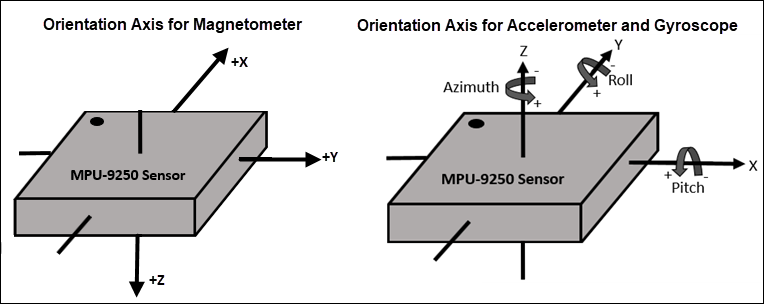
This diagram shows the default orientation of the x-, y-, and z-axes of the MPU-9250 sensor.
If you simulate a model that contains the MPU9250 block without connecting it to the hardware, the block outputs zeros. For more information, see Block Produces Zeros or Does Nothing in Simulation.
Examples
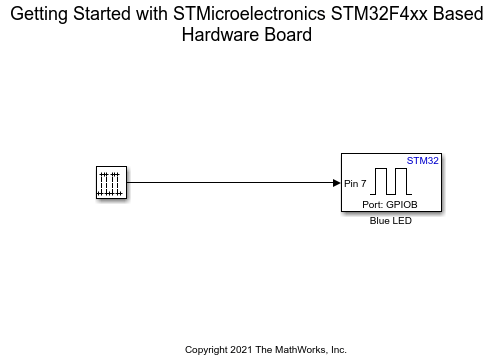
Get Started with STMicroelectronics STM32 Processor Based Boards
Run a Simulink model on STM32 processor.
Ports
Output
The Acceleration port outputs acceleration along the x-, y-, and z- axes of the sensor as a 3-by-1 vector. The acceleration is measured in m/s2 and also includes acceleration due to gravity.
Dependencies
The Acceleration port is available only when you select the Acceleration (m/s^2) parameter.
Data Types: double
The Angular rate port outputs the angle of rotation per second along the x-, y-, and z-axes of the sensor as a 3-by-1 vector. The angular rate is measured in dps.
Dependencies
The Angular rate port is available only when you select the Angular rate (dps) parameter.
Data Types: double
The Magnetic field port outputs the strength of the magnetic field along the x-, y-, and z- axes of the sensor as a 3-by-1 vector. The magnetic strength is measured in μT.
Dependencies
The Magnetic field port is available only when you select the Magnetic field (μT) parameter.
Data Types: double
The Temperature port outputs the temperature along the x-, y-, and z-axes of the sensor. The temperature is measured in degree Celsius.
Dependencies
The Temperature port is available only when you select the Temperature (deg C) parameter.
Data Types: double
The Status port outputs the status of the read
operation. The port outputs the status as a uint8 value.
Each value corresponds to the data transfer status.
| Status Value | Status Description |
|---|---|
0
|
SUCCESS
|
1
|
BUSY
|
2
|
ARBITRATION_LOST
|
4
|
NO_ACKNOWLEDGE
|
8
|
BUS_ERROR
|
16
|
BUS_NOT_IN_USE
|
32
|
SENSOR_INIT_ERROR
|
Dependencies
The Status port is available only when you select the Status parameter.
Data Types: uint8
Parameters
Specify the I2C module on the STM32 processor to communicate with sensor peripherals.
Programmatic Use
Block Parameter:
I2CModule |
Select the I2C address of the sensor from which the block reads the values.
Programmatic Use
Block Parameter:
I2CAddress |
Specify how often the block read values from the sensor, in seconds. When you
specify this parameter as -1, Simulink® determines the best sample time for the block based on the block
context within the model. The output sample time is the product of
Sample time that you specify.
Programmatic Use
Block Parameter:
SampleTime |
Select outputs
When you select the Acceleration (m/s^2) parameter, the Acceleration port becomes available. For more information on the Acceleration port, see Acceleration.
Programmatic Use
Block Parameter:
Acceleration |
When you select the Angular rate (dps) parameter, the Angular rate port becomes available. For more information on the Angular rate port, see Angular rate.
Programmatic Use
Block Parameter:
AngularRate |
When you select the Magnetic field (μT) parameter, the Magnetic field port becomes available. For more information on the Magnetic field port, see Magnetic field .
Programmatic Use
Block Parameter:
MagneticField |
Data Types: double
When you select the Temperature (deg C) parameter, the Euler port becomes available. For more information on the Temperature (deg C) port, see Temperature.
Programmatic Use
Block Parameter:
Temperature |
Select this parameter to display the status of read operation.
When you select the Status parameter, the Status port becomes available. For more information on the Status port, see Status.
Programmatic Use
Block Parameter:
Status |
Advanced sensor settings (optional)
Select a deviation in the acceleration that the accelerometer can measure. The smaller the accelerometer range, the more sensitive the readings from the accelerometer. A small range provides more detailed data, resulting in a more precise reading from the accelerometer.
Dependencies
The Accelerometer range parameter is available only when you select the Acceleration (m/s^2) parameter.
Programmatic Use
Block Parameter:
AccelerometerRange |
Specify the highest frequency at which the accelerometer samples the signal without aliasing.
Dependencies
The Accelerometer bandwidth parameter is available only when you select the Acceleration (m/s^2) parameter.
Programmatic Use
Block Parameter:
AccelerometerBandwidth |
Specify the maximum angular velocity that the gyroscope can measure per second.
Dependencies
The Gyroscope range parameter is available only when you select the Angular rate (dps) parameter.
Programmatic Use
Block Parameter:
GyroscopeRange |
Specify the highest frequency at which the gyroscope samples the signal without aliasing.
Dependencies
The Gyroscope bandwidth parameter is available only when you select the Angular rate (dps) parameter.
Programmatic Use
Block Parameter:
GyroscopeBandwidth |
Extended Capabilities
C/C++ Code Generation
Generate C and C++ code using Simulink® Coder™.
Version History
Introduced in R2026a
See Also
MATLAB Command
You clicked a link that corresponds to this MATLAB command:
Run the command by entering it in the MATLAB Command Window. Web browsers do not support MATLAB commands.
Seleccione un país/idioma
Seleccione un país/idioma para obtener contenido traducido, si está disponible, y ver eventos y ofertas de productos y servicios locales. Según su ubicación geográfica, recomendamos que seleccione: .
También puede seleccionar uno de estos países/idiomas:
Cómo obtener el mejor rendimiento
Seleccione China (en idioma chino o inglés) para obtener el mejor rendimiento. Los sitios web de otros países no están optimizados para ser accedidos desde su ubicación geográfica.
América
- América Latina (Español)
- Canada (English)
- United States (English)
Europa
- Belgium (English)
- Denmark (English)
- Deutschland (Deutsch)
- España (Español)
- Finland (English)
- France (Français)
- Ireland (English)
- Italia (Italiano)
- Luxembourg (English)
- Netherlands (English)
- Norway (English)
- Österreich (Deutsch)
- Portugal (English)
- Sweden (English)
- Switzerland
- United Kingdom (English)