Train Custom Named Entity Recognition Model
R2026bThis example shows how to train a custom named entity recognition (NER) model.
Named entity recognition (NER) [1] is the process of detecting named entities in text such as "person" or "organization". This diagram shows text flowing through a NER model.
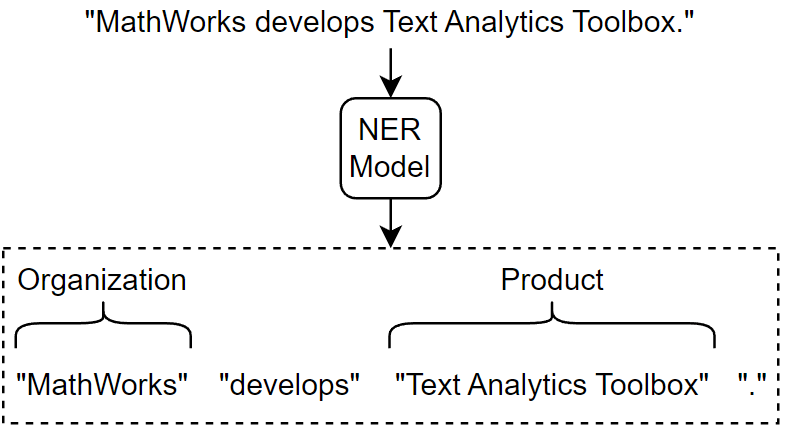
The addEntityDetails function automatically detects person names, locations, organizations, and other named entities in text. If you want to train a custom model that predicts different tags, or train a model using your own data, then you can use the trainHMMEntityModel function.
Load Training Data
Download the Wikipedia gold standard dataset. [2]
dataFolder = fullfile(tempdir,"wikigold");
if ~datasetExists(dataFolder)
    zipFile = matlab.internal.examples.downloadSupportFile("textanalytics","data/wikigoldData.zip");
    unzip(zipFile,dataFolder);
end
Download and extract the Wikipedia gold standard dataset.
filenameTrain = fullfile(dataFolder,"wikigold.conll.txt");The training data contains approximately 39,000 tokens, each tagged with one of these entities:
"LOC"— Location"MISC"— Miscellaneous"ORG"— Organization"PER"— Person"O"— Outside (non-entity)
The entity tags use the "inside, outside" (IO) labeling scheme. The tag "O" (outside) denotes non-entities. For each token in an entity, the tag is prefixed with "I-" (inside), which denotes that the token is part of an entity.
A limitation of the IO labeling scheme is that it does not specify entity boundaries between adjacent entities of the same type. The "inside, outside, beginning" (IOB) labeling scheme, also known as the "beginning, inside, outside" (BIO) labeling scheme, addresses this limitation by introducing a "beginning" prefix.
There are two variants of the IOB labeling scheme: IOB1 and IOB2.
IOB2 Labeling Scheme
For each token in an entity, the tag is prefixed with one of these values:
"B-"(beginning) — The token is a single token entity or the first token of a multi-token entity."I-"(inside) — The token is a subsequent token of a multi-token entity.
For a list of entity tags Entity, the IOB2 labeling scheme helps identify boundaries between adjacent entities of the same type by using this logic:
If
Entity(i)has prefix"B-"andEntity(i+1)is"O"or has prefix"B-", thenToken(i)is a single entity.If
Entity(i)has prefix"B-",Entity(i+1), ...,Entity(N)has prefix"I-", andEntity(N+1)is"O"or has prefix"B-", then the phraseToken(i:N)is a multi-token entity.
IOB1 Labeling Scheme
The IOB1 labeling scheme does not use the prefix "B-" when an entity token follows an "O-" prefix. In this case, an entity token that is the first token in a list or follows a non-entity token implies that the entity token is the first token of an entity. That is, if Entity(i) has prefix "I-" and i is equal to 1 or Entity(i-1) has prefix "O-", then Token(i) is a single token entity or the first token of a multi-token entity.
Read the data from the training data using the readWikigoldData function, attached to this example as a supporting file. To access this function, open the example as a live script. The trainHMMEntityModel function requires data in the IOB2 labeling scheme. The function converts the tags from IO labeling scheme to the IOB2 labeling scheme.
[data,numDocuments] = readWikigoldData(filenameTrain);
View the number of documents.
numDocuments
numDocuments =
145
Partition the data into training and test sets. Set aside 10% of the documents for testing.
cvp = cvpartition(numDocuments,HoldOut=0.1);
Find the indices of the training and test documents.
idxDocumentsTrain = find(training(cvp));
idxDocumentsTest = find(test(cvp));
Find the tokens in the training data corresponding to the training and test documents.
idxTokensTrain = ismember(data.DocumentNumber,idxDocumentsTrain);
idxTokensTest = ismember(data.DocumentNumber,idxDocumentsTest);
Partition the data using the token indices.
dataTrain = data(idxTokensTrain,:);
dataTest = data(idxTokensTest,:);
View the first few rows of the training data. The table contains three columns that represent token indices, tokens, and the entities.
head(dataTrain)
      Token        Entity     DocumentNumber
    __________    ________    ______________

    "010"         "B-MISC"          1
    "is"          "O"               1
    "the"         "O"               1
    "tenth"       "O"               1
    "album"       "O"               1
    "from"        "O"               1
    "Japanese"    "B-MISC"          1
    "Punk"        "O"               1
View the entity tags.
unique(dataTrain.Entity)
ans = 9×1 string array
    "B-LOC"
    "B-MISC"
    "B-ORG"
    "B-PER"
    "I-LOC"
    "I-MISC"
    "I-ORG"
    "I-PER"
    "O"
Train NER Model
Train the NER model and indicate that the tag "O" denotes non-entities. Depending on the size of the training data, this step can take a long time to run.
mdl = trainHMMEntityModel(dataTrain,NonEntity="O")mdl =
hmmEntityModel with properties:
Entities: [5×1 categorical]
Test NER Model
View the first few rows of the validation data.
head(dataTest)
       Token        Entity     DocumentNumber
    ____________    _______    ______________

    "Albert"        "B-PER"          18
    "Wren"          "I-PER"          18
    "was"           "O"              18
    "an"            "O"              18
    "Ontario"       "B-LOC"          18
    "politician"    "O"              18
    "."             "O"              18
    "He"            "O"              18
Make predictions on the validation data using the trained model.
documentsTest = tokenizedDocument(dataTest.Token',TokenizeMethod="none");
tbl = predict(mdl,documentsTest);
View the first few predictions.
head(tbl)
       Token        Entity
    ____________    ______

    "Albert"        B-PER
    "Wren"          I-PER
    "was"           O
    "an"            O
    "Ontario"       B-LOC
    "politician"    O
    "."             O
    "He"            O
Visualize the results in a confusion chart.
YTest = string(tbl.Entity);
TTest = dataTest.Entity;

figure
confusionchart(TTest,YTest,RowSummary="row-normalized",ColumnSummary="column-normalized")
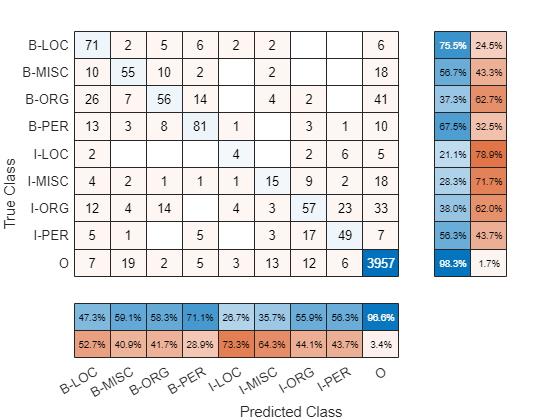
Calculate the average F1-score using the f1Score function, listed in the F1-Score Function section of the example.
score = f1Score(TTest,YTest)
score =
0.5634
Make Predictions with New Data
Create a tokenized document.
str = [
    "William Shakespeare was born in Stratford-upon-Avon, England."
    "He wrote plays such as Julius Caesar and King Lear."];
documentsNew = tokenizedDocument(str)
documentsNew =
2×1 tokenizedDocument:
9 tokens: William Shakespeare was born in Stratford-upon-Avon , England .
11 tokens: He wrote plays such as Julius Caesar and King Lear .
Add entity details to the documents using the addEntityDetails function and specify the trained model.
documentsNew = addEntityDetails(documentsNew,Model=mdl);
View the token details of the first few tokens. The addEntityDetails function automatically merges multi-token entities into a single token and removes the "B-" and "I-" prefixes from the tags.
details = tokenDetails(documentsNew)
details = 17×8 table
    "William Shakespeare"    1    1    1    other    en    proper-noun    PER
    "was"    1    1    1    letters    en    auxiliary-verb    O
    "born"    1    1    1    letters    en    verb    O
    "in"    1    1    1    letters    en    adposition    O
    "Stratford-upon-Avon"    1    1    1    other    en    proper-noun    LOC
    ","    1    1    1    punctuation    en    punctuation    O
    "England"    1    1    1    letters    en    proper-noun    LOC
    "."    1    1    1    punctuation    en    punctuation    O
    "He"    2    1    1    letters    en    pronoun    O
    "wrote"    2    1    1    letters    en    verb    O
    "plays"    2    1    1    letters    en    noun    O
    "such"    2    1    1    letters    en    adjective    O
    "as"    2    1    1    letters    en    adposition    O
    "Julius Caesar"    2    1    1    other    en    proper-noun    PER
      ⋮
Extract the Token and Entity variables of the table.
details(:,["Token" "Entity"])
ans = 17×2 table
    "William Shakespeare"    PER
    "was"    O
    "born"    O
    "in"    O
    "Stratford-upon-Avon"    LOC
    ","    O
    "England"    LOC
    "."    O
    "He"    O
    "wrote"    O
    "plays"    O
    "such"    O
    "as"    O
    "Julius Caesar"    PER
      ⋮
F1-Score Function
The f1Score function takes as input a data set of targets and predictions and returns the F1-score averaged over the classes. This metric is suited for data sets with imbalanced classes. The metric is given by
where and denote the precision and recall averaged over the classes given by:
where is the number of classes, and , , and , denote the numbers of true positives, false positives, and false negatives for class , respectively.
function score = f1Score(targets,predictions)

classNames = unique(targets);
numClasses = numel(classNames);

TP = zeros(1,numClasses);
FP = zeros(1,numClasses);
FN = zeros(1,numClasses);

for i = 1:numel(classNames)
    name = classNames(i);
    TP(i) = sum(targets == name & predictions == name);
    FP(i) = sum(targets ~= name & predictions == name);
    FN(i) = sum(targets == name & predictions ~= name);
end

precision = mean(TP ./ (TP + FP));
recall = mean(TP ./ (TP + FP));

score = 2*precision*recall/(precision + recall);

end
Bibliography
Krishnan, Vijay, and Vignesh Ganapathy. "Named entity recognition." Stanford Lecture CS229 (2005).
Dominic Balasuriya, Nicky Ringland, Joel Nothman, Tara Murphy, and James R. Curran. "Named entity recognition in wikipedia." In Proceedings of the 2009 workshop on the people’s web meets NLP: Collaboratively constructed semantic resources (People’s Web), pp. 10-18. 2009.
See Also
tokenizedDocument | addDependencyDetails | tokenDetails | trainHMMEntityModel | hmmEntityModel

