Simulate UAV Using Radar Sensor to Avoid Dynamic Obstacle
R2026bCreate UAV Scenario
To ensure a repeatable simulation result, initialize the random number generator. Then, create a UAV scenario configured to run for 30 seconds and store a maximum number of 200 steps.
rng(0)
s = uavScenario(StopTime=30,HistoryBufferSize=200);
Add the ego UAV platform to the scenario.
egoUAV = uavPlatform("EgoUAV",s);Specify an ego UAV velocity of 1 m/s in the x- and y-directions.
egoUAVVelocity = [1 1 0];
Specify the trajectory of the obstacle UAV to fly from a coordinate of [30 0 0] to [0 30 0] in 30 seconds.
obstacleTrajectory = waypointTrajectory([30 0 0; 0 30 0],[0 30]);
This example uses a second UAV as a dynamic obstacle for the ego UAV to avoid. Create the UAV platform for the UAV that simulates a dynamic obstacle for the ego UAV platform.
obstacleUAV = uavPlatform("ObstacleUAV",s,Trajectory=obstacleTrajectory);Add a blue quadcopter mesh to the ego UAV and a red fixed-wing mesh to the obstacle UAV.
updateMesh(egoUAV,"quadrotor",{2},[0 1 0],eul2tform([0 0 pi]));
updateMesh(obstacleUAV,"fixedwing",{2},[1 0 0],eul2tform([0 0 pi]));
Run Scenario Without Obstacle Avoidance
Create a 3D visualization of the UAV scenario.
[ax,~] = show3D(s);
% Specify X and Y limits.
xlim([-5,35])
ylim([-5,35])
% Specify a top-down view of the scenario.
view(0,90)
hold on
Draw the trajectory of the ego UAV with a green line.
egoUAVXPosition = nan(1,300);
egoUAVYPosition = nan(1,300);
egoUAVZPosition = nan(1,300);
egoTrajLine = plot3(nan,nan,nan,Color=[0 1 0],LineWidth=2);
egoTrajLine.XDataSource = "egoUAVYPosition(1:idx)";
egoTrajLine.YDataSource = "egoUAVXPosition(1:idx)";
egoTrajLine.ZDataSource = "-egoUAVZPosition(1:idx)";
Draw the trajectory of the obstacle UAV with a red line.
obstacleUAVXPosition = nan(1,300);
obstacleUAVYPosition = nan(1,300);
obstacleUAVZPosition = nan(1,300);
obstacleTrajLine = plot3(nan,nan,nan,Color=[1 0 0],LineWidth=2);
obstacleTrajLine.XDataSource = "obstacleUAVYPosition(1:idx)";
obstacleTrajLine.YDataSource = "obstacleUAVXPosition(1:idx)";
obstacleTrajLine.ZDataSource = "-obstacleUAVZPosition(1:idx)";
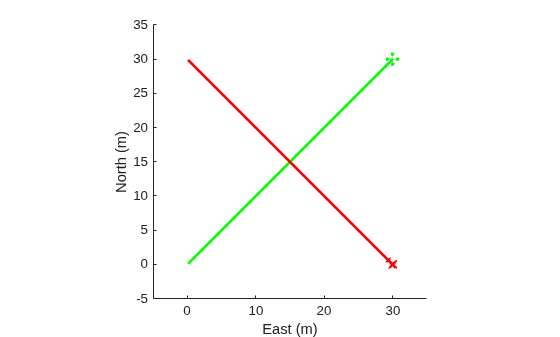
Set up and start the UAV scenario. The animation shows that the paths of the ego UAV and obstacle UAV intersect and the two UAVs collide.
setup(s)
idx = 0;
while advance(s)
    % Read the ego UAV motion vector.
    egoUAVMotion = read(egoUAV);
    % Read the obstacle UAV motion vector.
    obstacleUAVMotion = read(obstacleUAV);
    % Modify the ego UAV motion vector by adding the ego UAV velocity.
    egoUAVMotion(1:2) = egoUAVMotion(1:2) + egoUAVVelocity(1:2)/s.UpdateRate;
    % Move the ego UAV to a new location.
    move(egoUAV,egoUAVMotion)
    % Update the UAV mesh visualization.
    show3D(s,FastUpdate=true,Parent=ax);
    % Update the ego UAV and obstacle UAV trajectory visualization.
    idx = idx + 1;
    egoUAVXPosition(idx) = egoUAVMotion(1);
    egoUAVYPosition(idx) = egoUAVMotion(2);
    egoUAVZPosition(idx) = egoUAVMotion(3);
    obstacleUAVXPosition(idx) = obstacleUAVMotion(1);
    obstacleUAVYPosition(idx) = obstacleUAVMotion(2);
    obstacleUAVZPosition(idx) = obstacleUAVMotion(3);
    refreshdata
    drawnow limitrate
    % Pause for 0.02 seconds.
    pause(0.02)
end
hold off
Add Radar Sensor to Ego UAV
To perform obstacle avoidance, add a radar sensor to the ego UAV to detect the obstacle UAV. First, create a radar sensor by using the radarDataGenerator (Radar Toolbox) object. Configure the radar sensor object to measure target elevation angles and target range rate, accept inertial navigation system input, and detect false alarms. In addition, specify these properties:
Scanning mode: No scanning
Update rate: 10 Hz
Azimuth field of view: 120 degrees
Elevation field of view: 80 degrees
Elevation resolution: 3 meters
Azimuth resolution: 1 meter
Range resolution: 10 meters
Range rate resolution: 3 m/s
Range limits: 0 to 750 meters
Target report format: Tracks
Track coordinate system: Scenario
radarSensorObject = radarDataGenerator(1, HasElevation=true, ...
                                       HasRangeRate=true, ...
                                       HasINS=true, ...
                                       HasFalseAlarms=true, ...
                                       ScanMode="no scanning", ...
                                       UpdateRate=10, ...
                                       FieldOfView=[120 80], ...
                                       ElevationResolution=3, ...
                                       AzimuthResolution=1, ...
                                       RangeResolution=10, ...
                                       RangeRateResolution=3, ...
                                       RangeLimits=[0 750], ...
                                       FalseAlarmRate=1e-7, ...
                                       TargetReportFormat="Tracks", ...
                                       TrackCoordinates="Scenario");
Use the ExampleHelperUAVRadar helper function to adapt the radar sensor object for the UAV scenario. The helper function is an instance of the uav.SensorAdaptor class.
adaptedRadar = ExampleHelperUAVRadar(radarSensorObject);
Use the uavSensor function to mount the radar sensor to the ego UAV platform.
radar = uavSensor("Radar",egoUAV,adaptedRadar,MountingAngles=[0 0 0]);Configure Obstacle Avoidance Algorithm
In this example, the ego UAV avoids the obstacle UAV by using the velocity obstacles algorithm [1]. When the avoidance algorithm detects an oncoming collision, the algorithm calculates a collision-free target velocity vector for the ego UAV based on the velocity of the ego UAV, the velocity of the obstacle UAV, the effective radius, and the time horizon.
Specify the radii of the ego UAV and obstacle UAV as 1 meter.
radiusUAV = 1;
radiusObs = 1;
Specify a safety distance of 4 meters. This parameter sets the desired minimum separation of the ego UAV and the obstacle UAV during the obstacle avoidance maneuver.
safetyDist = 4;
Calculate the effective radius by adding the ego radius, obstacle radius, and safety distance together.
effectiveRadius = radiusUAV + radiusObs + safetyDist;
Specify a time horizon of 10 seconds. This parameter set the time before a potential collision at which the algorithm starts to perform the collision avoidance maneuver.
Th = 10;
Run Scenario with Obstacle Avoidance Algorithm
Create a 3D visualization of the UAV scenario.
[ax,plotFrames] = show3D(s);
% Specify X- and Y-limits.
xlim([-5,35])
ylim([-5,35])
% Specify top-down view of the scenario.
view(0,90)
hold on
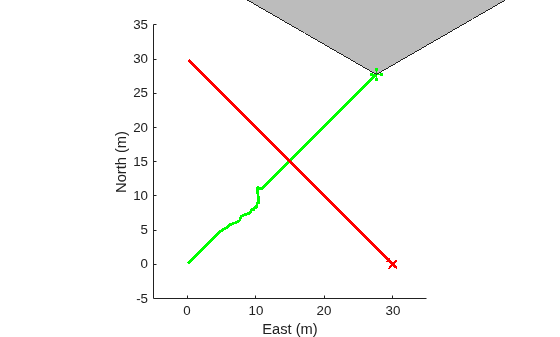
Visualize the radar field of view.
radarDirection = hgtransform(Parent=plotFrames.EgoUAV.BodyFrame,Matrix=eye(4));
coverageAngles = linspace(-radarSensorObject.FieldOfView(1)/360*pi,radarSensorObject.FieldOfView(1)/360*pi,128);
patch(XData=[0 radarSensorObject.RangeLimits(2)*cos(coverageAngles) 0], ...
      YData=[0 radarSensorObject.RangeLimits(2)*sin(coverageAngles) 0], ...
      FaceAlpha=0.3,Parent=radarDirection)
Draw the trajectory of the ego UAV with a green line.
egoUAVXPosition = nan(1,300);
egoUAVYPosition = nan(1,300);
egoUAVZPosition = nan(1,300);
egoTrajLine = plot3(nan,nan,nan,Color=[0 1 0],LineWidth=2);
egoTrajLine.XDataSource = "egoUAVYPosition(1:idx)";
egoTrajLine.YDataSource = "egoUAVXPosition(1:idx)";
egoTrajLine.ZDataSource = "-egoUAVZPosition(1:idx)";
Draw the trajectory of the obstacle UAV with a red line.
obstacleUAVXPosition = nan(1,300);
obstacleUAVYPosition = nan(1,300);
obstacleUAVZPosition = nan(1,300);
obstacleTrajLine = plot3(nan,nan,nan,Color=[1 0 0],LineWidth=2);
obstacleTrajLine.XDataSource = "obstacleUAVYPosition(1:idx)";
obstacleTrajLine.YDataSource = "obstacleUAVXPosition(1:idx)";
obstacleTrajLine.ZDataSource = "-obstacleUAVZPosition(1:idx)";
Reset and set up the UAV scenario.
restart(s)
setup(s)
Initialize the ego UAV target velocity.
targetEgoUAVVelocity = egoUAVVelocity(1:2);
Start the simulation. The animation shows the ego UAV successfully avoid a collision with the obstacle UAV.
while advance(s)
    % Read the ego UAV motion vector.
    egoUAVMotion = read(egoUAV);
    % Read the obstacle UAV motion vector.
    obstacleUAVMotion = read(obstacleUAV);
    % Modify the ego UAV motion vector by adding the velocity and getting the latest velocity vector.
    egoUAVMotion(1:2) = egoUAVMotion(1:2) + targetEgoUAVVelocity/s.UpdateRate;
    egoUAVMotion(4:5) = targetEgoUAVVelocity;
    % Move the ego UAV to a new location.
    move(egoUAV,egoUAVMotion)
    % Update sensor readings and read data.
    updateSensors(s)
    % Obtain detections from the radar.
    [isUpdated,time,confTracks,numTracks,config] = read(radar);
    % Set the target ego UAV velocity to match the desired velocity.
    targetEgoUAVVelocity = egoUAVVelocity(1:2);
    % If radar detection returns 1 or more obstacle tracks, start the
    % collision detection and avoidance process.
    if numTracks > 0
        % Obtain the state vector of the obstacle UAV.
        obstacleStates = [confTracks.State];
        % Use the exampleHelperDetectImminentCollision function to
        % determine if any obstacles are on an imminent collision path.
        [isOnCollisionPath,VOFrontAngle,VOBackAngle,VOMinAngle,VOMaxAngle] ...
            = exampleHelperDetectImminentCollision(egoUAVMotion(1:2)',egoUAVMotion(4:5)',obstacleStates([1,3],:), ...
            obstacleStates([2 4],:),effectiveRadius,Th);
        % Find obstacles that are on an imminent collision path.
        collisionObsIdx = find(isOnCollisionPath);
        % If there are obstacles on an imminent collision path, start the
        % collision avoidance process.
        if any(isOnCollisionPath)
            % Use the exampleHelperCVHeuristic2D function to calculate a
            % target velocity for the ego UAV that avoids the collision.
            targetEgoUAVVelocity = exampleHelperCVHeuristic2D(norm(egoUAVVelocity), ...
                egoUAVMotion(1:2)', ...
                egoUAVMotion(4:5)', ...
                obstacleStates([1 3],collisionObsIdx), ...
                obstacleStates([2 4],collisionObsIdx), ...
                effectiveRadius, ...
                VOFrontAngle(collisionObsIdx), ...
                VOBackAngle(collisionObsIdx), ...
                VOMinAngle(collisionObsIdx), ...
                VOMaxAngle(collisionObsIdx), Th);
            % Transpose the vector to match the dimensions of the motion
            % vector.
            targetEgoUAVVelocity = targetEgoUAVVelocity';
        end
    end
    % Update the 3D visualization.
    show3D(s,FastUpdate=true,Parent=ax);
    % Update the ego UAV and obstacle UAV trajectory visualization.
    idx = idx + 1;
    egoUAVXPosition(idx) = egoUAVMotion(1);
    egoUAVYPosition(idx) = egoUAVMotion(2);
    egoUAVZPosition(idx) = egoUAVMotion(3);
    obstacleUAVXPosition(idx) = obstacleUAVMotion(1);
    obstacleUAVYPosition(idx) = obstacleUAVMotion(2);
    obstacleUAVZPosition(idx) = obstacleUAVMotion(3);
    refreshdata
    drawnow limitrate
    % Pause the simulation.
    pause(0.02)
end
hold off
Reference
[1] Fiorini, Paolo, and Zvi Shiller. “Motion Planning in Dynamic Environments Using Velocity Obstacles.” The International Journal of Robotics Research 17, no. 7 (July 1998): 760–72. https://doi.org/10.1177/027836499801700706.

