Tracking Pedestrians from a Moving Car
R2026bThis example shows how to track pedestrians using a camera mounted in a moving car.
Overview
This example shows how to perform automatic detection and tracking of people in a video from a moving camera. It demonstrates the flexibility of a tracking system tuned to a moving camera, which is ideal for automotive safety applications. Unlike the stationary camera example, Motion-Based Multiple Object Tracking, this example contains several additional algorithmic steps. These steps include people detection and heuristics to identify and eliminate false alarm tracks. For more information please see Multiple Object Tracking.
Initialize Video Player, Detector, and Tracker
Load the video using VideoReader and initialize vision.VideoPlayer to display the video frames as tracking occurs. Resize the video frame to allow for the motion estimation to have a better bounding box scale to estimate from.
vid = VideoReader("vippedtracking.mp4");
videoScale = 2;
vidPlayer = vision.VideoPlayer(Position=[29 597 vid.Width*videoScale vid.Height*videoScale]);
Use peopleDetector to load a pretrained deep learning network that has been trained to robustly detect people in a scene.
detector = peopleDetector("medium-network");
Initialize a multi-object tracker that utilizes the Simple Online and Realtime (SORT) object tracking algorithm [1] using videoTracker. The tracker created with videoTracker is a multi-object track management object, which will automatically add, update, and delete object tracks as specified in its properties. The tracks are updated on a frame-by-frame basis with the detections produced by the people detector. To learn more about SORT, see the Implement Simple Online and Realtime Tracking (Sensor Fusion and Tracking Toolbox) example.
tracker = videoTracker("sort");
tracker.FrameSize = [vid.Width*videoScale, vid.Height*videoScale];
tracker.FrameRate = vid.FrameRate;
tracker.MinIntersectionOverUnion = 0.03;
Track Pedestrians
Process the video frame-by-frame and implement the following algorithm:
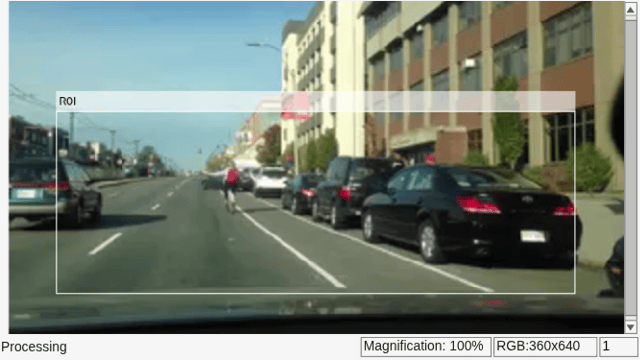
Detect all people in the frame within the specified ROI and filter out detections with confidence scores lower than 0.4.
Update the object tracks.
Annotate and visualize the detections.
Specify the region of the frame to detect pedestrians.
roi = [50 125 540 190];
Process the first 800 frames of the video.
endFrame = 800;
for fNum = 1:endFrame
    % Read the next frame from the video.
    frame   = readFrame(vid);

    % Resize the video frame.
    frame = imresize(frame,videoScale);

    % Detect all people in the current video frame, filtering out any
    % detections where the model has low confidence.
    bboxes = detect(detector,frame,roi,Threshold=0.4);

    % Update all object tracks based on the current detections.
    tracks = tracker(bboxes);

    % Add in the ROI annotation to visualize the detection area of the
    % frame.
    frame = insertObjectAnnotation(frame,'Rectangle',roi,"ROI",Color="white");

    % Visualize object tracks.
    if ~isempty(tracks)
        trackColors = getTrackColors(tracks);
        bboxes = vertcat(tracks.BoundingBox);
        trackIDs = "Track_" + [tracks.TrackID];
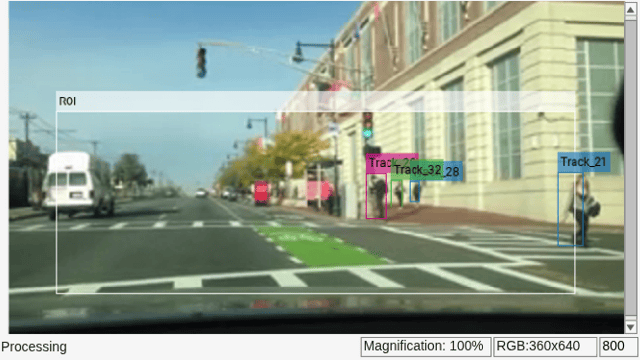
        frame = insertObjectAnnotation(frame,'Rectangle',bboxes,trackIDs,Color=trackColors);
    end

    % Display the annotated video frame.
    step(vidPlayer, frame);

    % Exit the loop if the video player figure is closed.
    if ~isOpen(vidPlayer)
        break;
    end
end
Next Steps
In general, the people detector, coupled with the multi-object tracker, effectively maintains object tracks even in this difficult scenario. However, the multi-object tracker fails in two areas: when the vehicle rapidly changes velocity and when pedestrians become occluded.
SORT's Kalman filters assume constant velocity at their core, so strong changes in the vehicle's speed, such as sudden acceleration or deceleration, can significantly disrupt tracking. Similarly, when a pedestrian becomes occluded, they may not reappear before the tracker deletes their respective object track. Due to pedestrians frequently leave the frame in this scenario, the track deletion time was intentionally kept low.
To address these issues, an additional metric can be introduced into the track assignment equation, specifically, the object's appearance. videoTracker provides a "deepsort" configuration that does exactly this. It combines traditional Kalman filters with appearance feature vectors, allowing the system to use an object's actual appearance to help maintain tracks in situations where constant velocity assumptions may not hold. For a detailed exploration of DeepSORT, see the Multi-Object Tracking with DeepSORT example.
Helper Functions
getTrackColors returns a fixed color associated with each track ID. This allows for easy color visualization of each object track.
function colors = getTrackColors(tracks)
    colors = zeros(numel(tracks), 3);
    coloroptions = 255*lines(7);
    for i=1:numel(tracks)
        colors(i,:) = coloroptions(mod(tracks(i).TrackID, 7)+1,:);
    end
end
References
[1] Bewley, Alex, Zongyuan Ge, Lionel Ott, Fabio Ramos, and Ben Upcroft. "Simple online and realtime tracking." In 2016 IEEE international conference on image processing (ICIP), pp. 3464-3468. IEEE, 2016.

