Contenido principal

countObjects

R2026b

Count objects using CounTR deep learning model

Since R2025a

Description

Add-On Required: This feature requires the Visual Inspection Toolbox Model for CounTR Object Counting add-on.

count = countObjects(counter,I) counts objects within an image I based on exemplar image patches containing objects.

Note

This functionality requires Deep Learning Toolbox™.

example

count = countObjects(counter,ds) counts the number of objects within images in a datastore ds based on exemplar patches containing objects.

count = countObjects(___,Name=Value) specifies options using additional name-value arguments in addition to any combination of arguments from previous syntaxes. For example, MiniBatchSize=4 specifies the mini-batch size as 4.

Examples

collapse all

Load an exemplar image that contains objects to count, cell nuclei, into the workspace. The exemplar image and the test image in this example are cropped from an image of lymph node cells (patient_000_node_1.tif) in the CAMELYON-17 data set.

exemplarI = imread("nuclei.png");

Define exemplar bounding boxes, which signify the locations of sample cells to count.

exemplarBoxes = ...
         [272   23   38   30
          302  193   30   24
          66   83   30   28
          108  243   38   32
          168   61   30   30];

Display the exemplar image together and the exemplar bounding boxes using the insertShape function.

annotatedImage = insertShape(exemplarI,"rectangle",exemplarBoxes,"LineWidth",4);
imshow(annotatedImage)
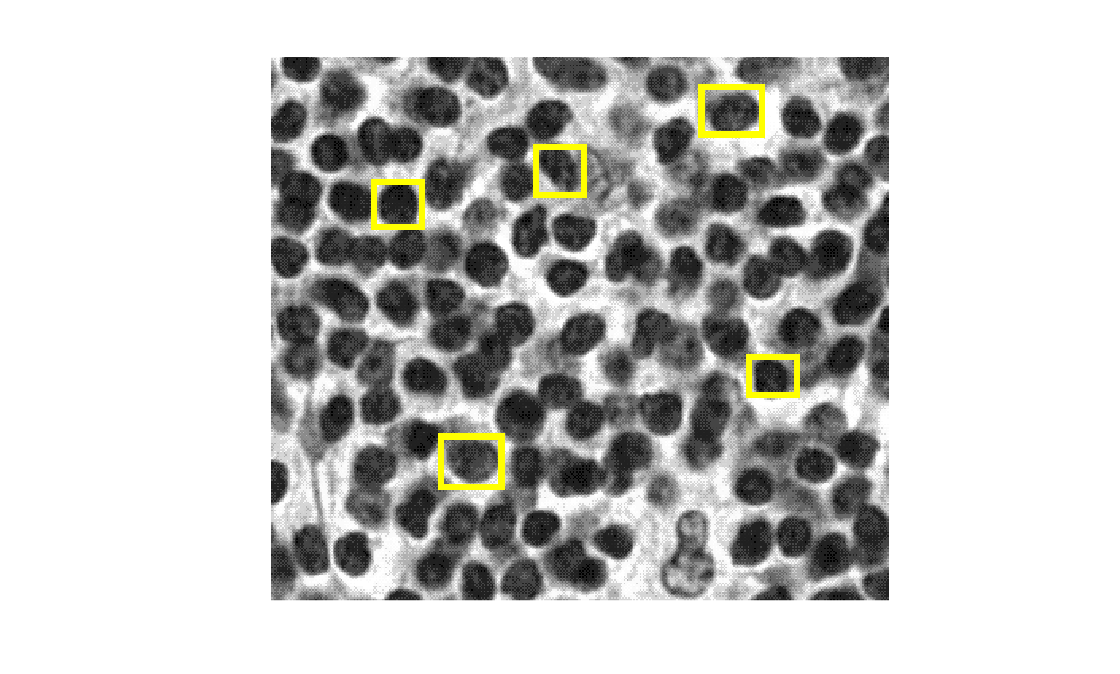
Figure contains an axes object. The hidden axes object contains an object of type image.

Create CounTR Model

Create a CounTR object counter model using the exemplar image and exemplar bounding boxes.

counter = counTRObjectCounter(exemplarI,exemplarBoxes);

Count Objects in Test Image

Load a test image containing more cell nuclei into the workspace.

I = imread("nucleiTest.png");

Display the test timage in which to count objects.

imshow(I)
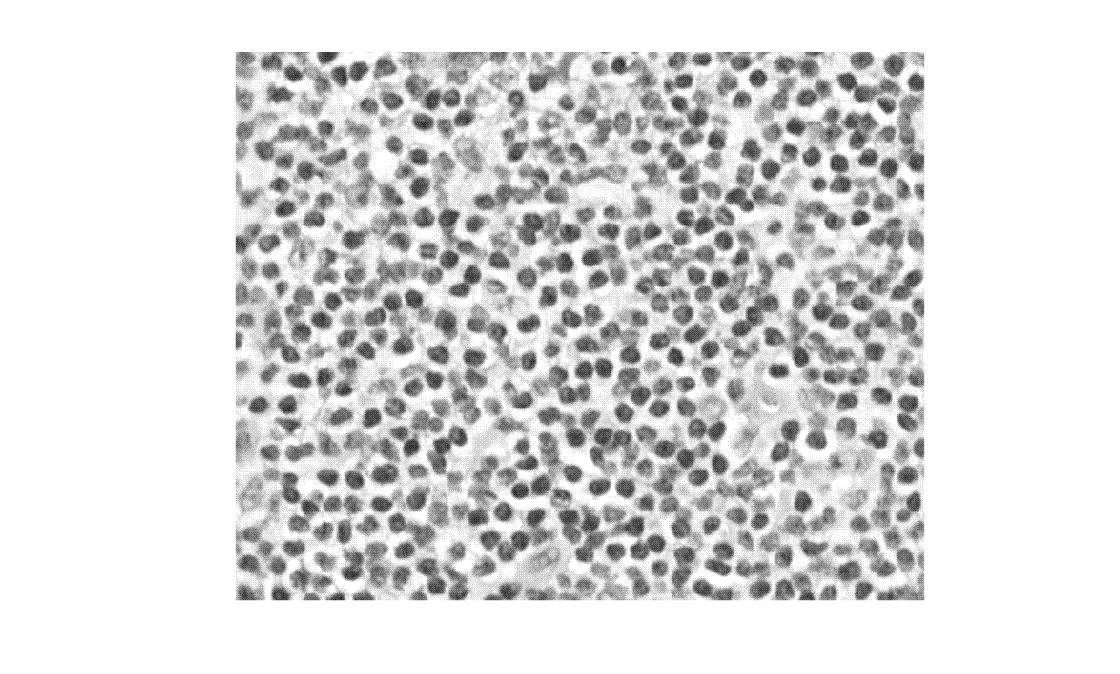
Figure contains an axes object. The hidden axes object contains an object of type image.

Compute the number of objects in the test image using the countObjects object function.

count = countObjects(counter,I);
count
count = single

496

Create Density Map of Object Count

Compute the density map of the object count in the test image using the densityMap object function.

densMap = densityMap(counter,I);

Display the object count density map overlaid over the test image using the anomalyMapOverlay function. Display the approximate object count on the overlaid image using the insertText function.

densityOverlayImage = anomalyMapOverlay(I,densMap,"Blend","equal");
fontSize = min(floor(size(densityOverlayImage,2)/30),200);
gutterWidth = fontSize*9;
densityOverlayImageWText = insertText(densityOverlayImage,[size(densityOverlayImage,2)-gutterWidth 5],...
sprintf("count=%0.2f",count),FontSize=fontSize);
imshow(densityOverlayImageWText)
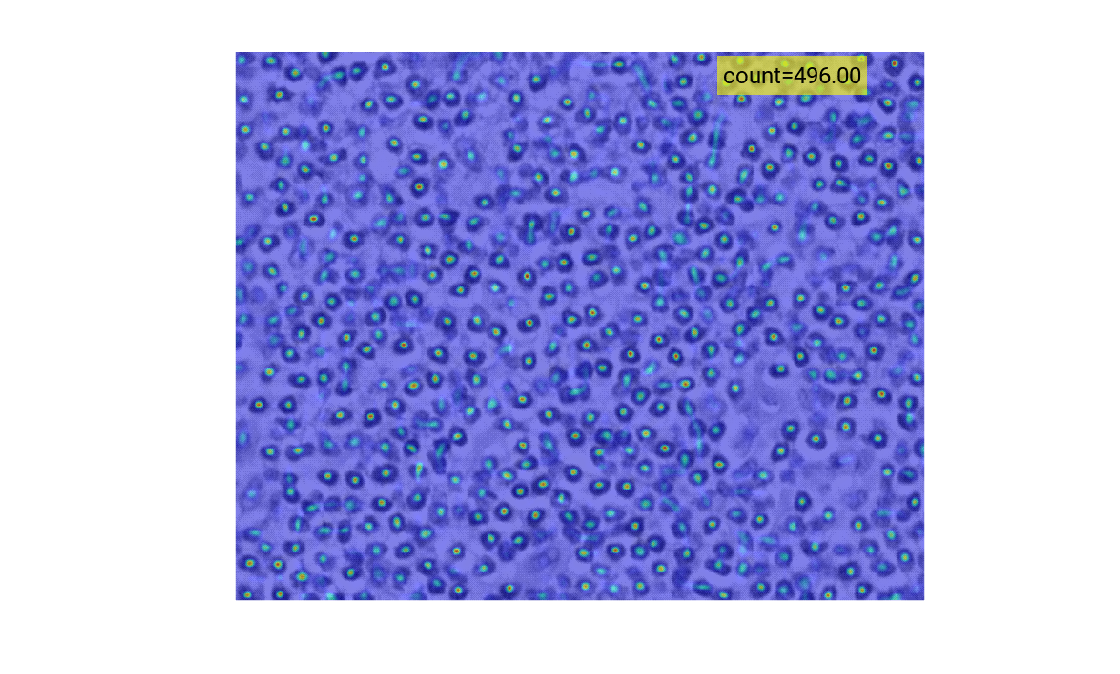
Figure contains an axes object. The hidden axes object contains an object of type image.

Input Arguments

collapse all

CounTR object counter model, specified as a counTRObjectCounter object.

Image in which to count objects, specified as one of these values:

Image TypeData Format
GrayscaleH-by-W numeric matrix
BinaryH-by-W logical matrix
RGBH-by-W-by-3 numeric array

Datastore of images, specified as a datastore such as an ImageDatastore or CombinedDatastore object, in which to count objects. If calling the datastore with the read function returns a cell array, then the image data must be in the first cell.

Name-Value Arguments

expand all

Specify optional pairs of arguments as Name1=Value1,...,NameN=ValueN, where Name is the argument name and Value is the corresponding value. Name-value arguments must appear after other arguments, but the order of the pairs does not matter.

Example: countObjects(counter,ds,MiniBatchSize=4) specifies the mini-batch size as 4.

Options for All Image Formats

expand all

Hardware resource on which to process images with the network, specified as one of the execution environment options in this table.

ExecutionEnvironmentDescription
"auto"Use a GPU if available. Otherwise, use the CPU. The use of a GPU requires Parallel Computing Toolbox™ and a CUDA® enabled NVIDIA® GPU. For information about the supported compute capabilities, see GPU Computing Requirements (Parallel Computing Toolbox).
"gpu"Use the GPU. If a suitable GPU is not available, the function returns an error message. Using a GPU requires Parallel Computing Toolbox and a CUDA enabled NVIDIA GPU. If Parallel Computing Toolbox or a suitable GPU is not available, then the function returns an error. For information about the supported compute capabilities, see GPU Computing Requirements (Parallel Computing Toolbox).
"cpu"Use the CPU.

Rounding method for the object count, specified as one of these values:

  • "round" — Round the object count to the nearest integer.

  • "none" — Return the object count without rounding.

Options for Datastore Inputs

expand all

Number of observations returned in each batch, specified as a positive integer. If you set a higher MiniBatchSize, computation requires more memory, which can cause errors if your system does not have sufficient memory.

You can specify this argument only when you specify an input datastore of images, ds.

Visible progress display, specified as a numeric or logical 1 (true) or 0 (false).

You can specify this argument only when you specify an input datastore of images, ds.

Output Arguments

collapse all

Object count, returned as a positive numeric scalar for a single image input, or an R-by-1 vector for a datastore input. R is the number of images in the input datastore, ds.

Version History

Introduced in R2025a

expand all