Use DBC Files in CAN Communication
R2026bThis example shows you how to create, receive and process messages using information stored in DBC files. This example describes the workflow for a CAN network, but the concept demonstrated also applies to a CAN FD network.
Open the DBC File
Open file demoVNT_CANdbFiles.dbc using canDatabase.
db = canDatabase("demoVNT_CANdbFiles.dbc")db =
Database with properties:
Name: 'demoVNT_CANdbFiles'
Path: 'C:\Users\user\OneDrive - MathWorks\Documents\MATLAB\Examples\vnt-ex80654288\demoVNT_CANdbFiles.dbc'
Nodes: {}
NodeInfo: [0×0 struct]
Messages: {5×1 cell}
MessageInfo: [5×1 struct]
Attributes: {}
AttributeInfo: [0×0 struct]
UserData: []
Examine the Messages property to see the names of all messages defined in this file.
db.Messages
ans = 5×1 cell array
    "'DoorControlMsg'"
    "'EngineMsg'"
    "'SunroofControlMsg'"
    "'TransmissionMsg'"
    "'WindowControlMsg'"
View Message Information
Use messageInfo to view information for message EngineMsg, including the identifier, data length, and a signal list.
messageInfo(db, "EngineMsg")ans = struct with fields:
Name: 'EngineMsg'
ProtocolMode: 'CAN'
Comment: ''
ID: 100
Extended: 0
J1939: []
Length: 8
DLC: 8
BRS: 0
Signals: {2×1 cell}
SignalInfo: [2×1 struct]
TxNodes: {0×1 cell}
Attributes: {}
AttributeInfo: [0×0 struct]
You can also query for information on all messages at once.
messageInfo(db)
ans = 5×1 struct array with fields:
       'DoorControlMsg'    'CAN'    ''    400    0    [ ]    8    8    0    2×1 cell    2×1 struct    0×1 cell    0×0 cell    0×0 struct
            'EngineMsg'    'CAN'    ''    100    0    [ ]    8    8    0    2×1 cell    2×1 struct    0×1 cell    0×0 cell    0×0 struct
    'SunroofControlMsg'    'CAN'    ''    800    0    [ ]    2    2    0    1×1 cell    1×1 struct    0×1 cell    0×0 cell    0×0 struct
      'TransmissionMsg'    'CAN'    ''    200    0    [ ]    8    8    0    1×1 cell    1×1 struct    0×1 cell    0×0 cell    0×0 struct
     'WindowControlMsg'    'CAN'    ''    600    0    [ ]    4    4    0    2×1 cell    2×1 struct    0×1 cell    0×0 cell    0×0 struct
View Signal Information
Use signalInfo to view information for signal EngineRPM in message EngineMsg, including type, byte ordering, size, and scaling values that translate raw signals to physical values.
signalInfo(db, "EngineMsg", "EngineRPM")
ans = struct with fields:
             Name: 'EngineRPM'
          Comment: ''
         StartBit: 0
       SignalSize: 32
        ByteOrder: 'LittleEndian'
           Signed: 0
        ValueType: 'Integer'
            Class: 'uint32'
           Factor: 0.1000
           Offset: 250
          Minimum: 250
          Maximum: 9500
            Units: 'rpm'
       ValueTable: [0×1 struct]
      Multiplexor: 0
      Multiplexed: 0
    MultiplexMode: 0
          RxNodes: {0×1 cell}
       Attributes: {}
    AttributeInfo: [0×0 struct]
You can also query for information on all signals in message EngineMsg at once.
signalInfo(db, "EngineMsg")ans = 2×1 struct array with fields:
'EngineRPM' '' 0 32 'LittleEndian' 0 'Integer' 'uint32' 0.1000 250 250 9500 'rpm' 0×1 struct 0 0 0 0×1 cell 0×0 cell 0×0 struct
'VehicleSpeed' '' 32 32 'LittleEndian' 0 'Integer' 'uint32' 1 0 0 4.2950e+09 'mph' 0×1 struct 0 0 0 0×1 cell 0×0 cell 0×0 struct
⋮
Create a Message Using Database Definitions
Create a new message by specifying the database and the message name EngineMsg to have the database definition applied. CAN signals in this message are represented in engineering units in addition to the raw data bytes.
msgEngineInfo = canMessage(db, "EngineMsg")msgEngineInfo =
Message with properties:
Message Identification
ProtocolMode: 'CAN'
ID: 100
Extended: 0
Name: 'EngineMsg'
Data Details
Timestamp: 0
Data: [0 0 0 0 0 0 0 0]
Signals: [1×1 struct]
Length: 8
Protocol Flags
Error: 0
Remote: 0
Other Information
Database: [1×1 can.Database]
UserData: []
View Signal Information
Use the Signals property to see signal values for this message. You can directly write to and read from these signals to pack and unpack data from the message.
msgEngineInfo.Signals
ans = struct with fields:
    VehicleSpeed: 0
       EngineRPM: 250
Change Signal Information
Write directly to the signal EngineRPM to change its value.
msgEngineInfo.Signals.EngineRPM = 5500.25
msgEngineInfo =
  Message with properties:

   Message Identification
    ProtocolMode: 'CAN'
              ID: 100
        Extended: 0
            Name: 'EngineMsg'

   Data Details
       Timestamp: 0
            Data: [23 205 0 0 0 0 0 0]
         Signals: [1×1 struct]
          Length: 8

   Protocol Flags
           Error: 0
          Remote: 0

   Other Information
        Database: [1×1 can.Database]
        UserData: []
Read the current signal values back and note that EngineRPM has been updated with the written value.
msgEngineInfo.Signals
ans = struct with fields:
    VehicleSpeed: 0
       EngineRPM: 5.5003e+03
When a value is written directly to the signal, it is translated, scaled, and packed into the message data using the database definition. Note the value change in the Data property after a new value is written to the VehicleSpeed signal.
msgEngineInfo.Signals.VehicleSpeed = 70.81
msgEngineInfo =
  Message with properties:

   Message Identification
    ProtocolMode: 'CAN'
              ID: 100
        Extended: 0
            Name: 'EngineMsg'

   Data Details
       Timestamp: 0
            Data: [23 205 0 0 71 0 0 0]
         Signals: [1×1 struct]
          Length: 8

   Protocol Flags
           Error: 0
          Remote: 0

   Other Information
        Database: [1×1 can.Database]
        UserData: []
msgEngineInfo.Signals
ans = struct with fields:
    VehicleSpeed: 71
       EngineRPM: 5.5003e+03
Receive Messages with Database Information
Attach a database to a CAN channel that receives messages to apply database definitions to incoming messages automatically. The database decodes only messages that are defined. All other messages are received in their raw form.
rxCh = canChannel("MathWorks", "Virtual 1", 2);
rxCh.Database = db
rxCh =
  Channel with properties:

   Device Information
            DeviceVendor: 'MathWorks'
                  Device: 'Virtual 1'
      DeviceChannelIndex: 2
      DeviceSerialNumber: 0
            ProtocolMode: 'CAN'

   Status Information
                 Running: 0
       MessagesAvailable: 0
        MessagesReceived: 0
     MessagesTransmitted: 0
    InitializationAccess: 1
        InitialTimestamp: [0×0 datetime]
           FilterHistory: 'Standard ID Filter: Allow All | Extended ID Filter: Allow All'

   Channel Information
               BusStatus: 'N/A'
              SilentMode: 0
         TransceiverName: 'N/A'
        TransceiverState: 'N/A'
       ReceiveErrorCount: 0
      TransmitErrorCount: 0
                BusSpeed: 500000
                     SJW: []
                   TSEG1: []
                   TSEG2: []
            NumOfSamples: []

   Other Information
                Database: [1×1 can.Database]
                UserData: []
Receive Messages
Start the channel, generate some message traffic, and receive messages with physical message decoding.
start(rxCh);
generateMsgsDb();
rxMsg = receive(rxCh, Inf, "OutputFormat", "timetable");
View the first few rows of received messages.
head(rxMsg)
ans = 8×8 timetable
    0.13103 sec    100    0    'EngineMsg'    [0,0,0,0,0,0,0,0]    8    1×1 struct    0    0
    0.13103 sec    200    0    'TransmissionMsg'    [0,0,0,0,0,0,0,0]    8    1×1 struct    0    0
    0.13104 sec    400    0    'DoorControlMsg'    [0,0,0,0,0,0,0,0]    8    1×1 struct    0    0
    0.13104 sec    600    0    'WindowControlMsg'    [0,0,0,0]    4    1×1 struct    0    0
    0.13105 sec    800    0    'SunroofControlMsg'    [0,0]    2    1×1 struct    0    0
    0.15598 sec    100    0    'EngineMsg'    [0,0,0,0,0,0,0,0]    8    1×1 struct    0    0
    0.18 sec    100    0    'EngineMsg'    [172,129,0,0,50,0,0,0]    8    1×1 struct    0    0
    0.18001 sec    200    0    'TransmissionMsg'    [4,0,0,0,0,0,0,0]    8    1×1 struct    0    0
Stop the receiving channel and clear it from the workspace.
stop(rxCh);
clear rxCh
Examine a Received Message
Inspect a received message to see the applied database decoding.
rxMsg(10, :)
ans = 1×8 timetable
    0.22994 sec    100    0    'EngineMsg'    [172,129,0,0,50,0,0,0]    8    1×1 struct    0    0
rxMsg.Signals{10}ans = struct with fields:
VehicleSpeed: 50
EngineRPM: 3.5696e+03
Extract All Instances of a Specified Message
Extract all instances of message EngineMsg.
allMsgEngine = rxMsg(strcmpi("EngineMsg", rxMsg.Name), :);View the first few instances of this specific message.
head(allMsgEngine)
ans = 8×8 timetable
    0.13103 sec    100    0    'EngineMsg'    [0,0,0,0,0,0,0,0]    8    1×1 struct    0    0
    0.15598 sec    100    0    'EngineMsg'    [0,0,0,0,0,0,0,0]    8    1×1 struct    0    0
    0.18 sec    100    0    'EngineMsg'    [172,129,0,0,50,0,0,0]    8    1×1 struct    0    0
    0.20597 sec    100    0    'EngineMsg'    [172,129,0,0,50,0,0,0]    8    1×1 struct    0    0
    0.22994 sec    100    0    'EngineMsg'    [172,129,0,0,50,0,0,0]    8    1×1 struct    0    0
    0.25695 sec    100    0    'EngineMsg'    [172,129,0,0,50,0,0,0]    8    1×1 struct    0    0
    0.27995 sec    100    0    'EngineMsg'    [172,129,0,0,50,0,0,0]    8    1×1 struct    0    0
    0.30597 sec    100    0    'EngineMsg'    [172,129,0,0,50,0,0,0]    8    1×1 struct    0    0
Plot Physical Signal Values
Use canSignalTimetable to repackage signal data from message EngineMsg into a signal timetable.
signalTimetable = canSignalTimetable(rxMsg, "EngineMsg");View the first few rows of the signal timetable.
head(signalTimetable)
ans = 8×2 timetable
    0.13103 sec    0    250
    0.15598 sec    0    250
    0.18 sec    50    3.5696e+03
    0.20597 sec    50    3.5696e+03
    0.22994 sec    50    3.5696e+03
    0.25695 sec    50    3.5696e+03
    0.27995 sec    50    3.5696e+03
    0.30597 sec    50    3.5696e+03
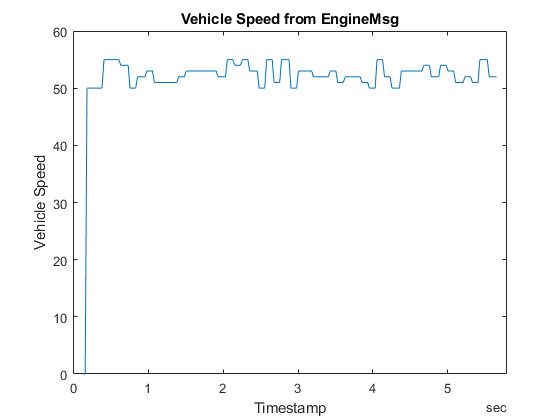
Plot the values of signal VehicleSpeed over time.
plot(signalTimetable.Time, signalTimetable.VehicleSpeed)
title("Vehicle Speed from EngineMsg", "FontWeight", "bold")
xlabel("Timestamp")
ylabel("Vehicle Speed")
Close the DBC File
Close access to the DBC file by clearing its variable from the workspace.
clear db
