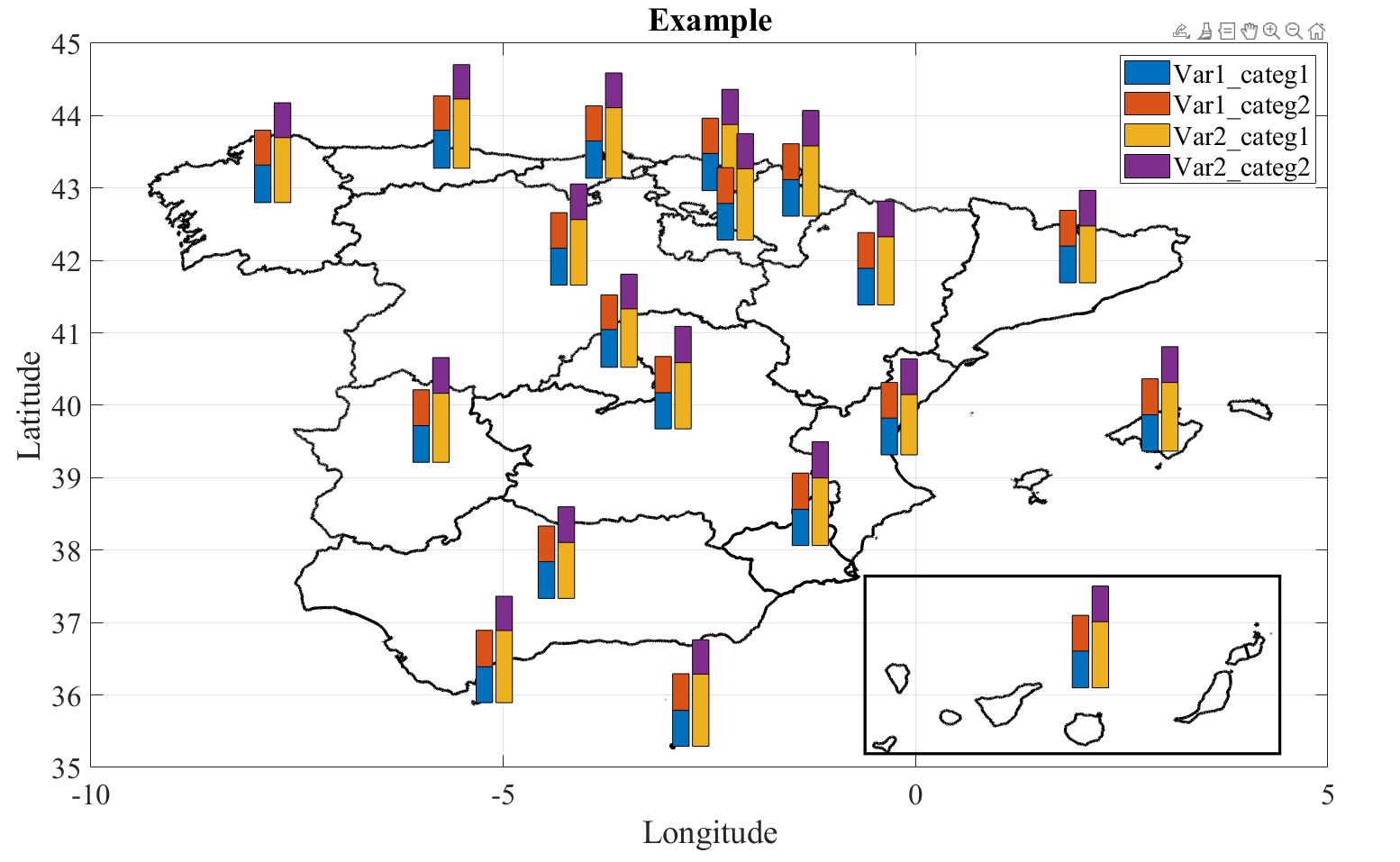
Merging a bar chart with a map

Versión 1.0.0 (8,56 MB) por O.Hubert
Seamlessly merge a bar chart with a map to display geographically-coded categorical variables
40 Descargas
Actualizado 16 may 2024

Ver licencia

Let us break down the example code that calls the bar_chart function:
  1. Data Loading:
  • The code begins by loading data from a file named dataexample.
  1. Data Description:
  • The following variables are described:
  • Idx: Index of data. This could be countries, provinces, etc.
  • BoundingBox: Maximum and minimum latitude and longitude values.
  • Lon and Lat: Vertices defining the boundaries of the map object. These can be obtained from loading a .SHP object and extracting the vertices.
  • centerLon and centerLat: By default, the center of BoundingBox, but this can be any coordinates that the user requires.
  • The column titles VarX_categY are the Yth category of variable X.
  1. Selecting Data to Plot:
  • The code defines sets of indices (idxtoplot{n}) to select the specific columns of the data table for plotting.
  • These indices correspond to the columns containing data to be plotted on the bar chart.
  1. Creating Useful Things:
  • The colormap for the bars is set using Colors=colormap('Lines'), but any type of color map can be used.
  1. Merging Geographical Map and Bar Chart:
  • The barchart_map function is called with the loaded data (dataexample), selected indices (idxtoplot), and options (optionsfig).
  • The resulting figure handle (h) and other relevant elements (hmap and hdata) are stored.
  1. Aesthetics and Annotations:
  • After the graph is generated, the user can tweak and add various objects by making explicit references to the graph objects.
Now let us dive into the plotting function barchart_map.
The function called barchart_map generates a graph combining geographical limits with a bar chart.
  1. Inputs:
  • data: A table containing the data.
  • idxtoplot: A cell array specifying the columns of data to be plotted.
  • options: A structure collecting various plot options.
  1. Options:
  • The function checks if options is provided. If not, default values are set:
  • options.factorLon: Shrinkage factor for the width of the bars.
  • options.factorLat: Shrinkage factor for the height of the bars.
  • options.offsetLon: Spacing between bars.
  • options.newfigure: Determines whether a new figure needs to be generated.
  • options.Colors: Colormap for the bars.
  1. Data Processing:
  • The function processes the data and organizes it into YData for plotting.
  1. Plotting:
  • It plots the geographical map using plot(data.Lon{i,1}, data.Lat{i,1}).
  • For each data point, it creates stacked bars based on the specified columns and their values.
  1. Outputs:
  • out: Figure handle.
  • outmap: Elements corresponding to the map.
  • outdata: Elements corresponding to the data bars.

Citar como

O.Hubert (2026). Merging a bar chart with a map (https://es.mathworks.com/matlabcentral/fileexchange/166031-merging-a-bar-chart-with-a-map), MATLAB Central File Exchange. Recuperado .

Compatibilidad con la versión de MATLAB
Se creó con R2021b
Compatible con cualquier versión
Compatibilidad con las plataformas
Windows macOS Linux
Versión Publicado Notas de la versión
1.0.0