optimizeDesign
R2026bSyntax
Description
Examples
Define the performance specifications of a second-order DSM.
outputTable=table();
outputTable.Test=["ACMeas";"ACMeas";"ACMeas";"ACMeas";"ACMeas"];
outputTable.Name={'SNR';'SFDR';'SINAD';'ENOB';'NoiseFloor'};
outputTable.Units={'dB';'dB';'dB';'bits';'dB'};
outputTable.Spec={'> 72';'> 74';'> 72';'maximize 11.5';'< -78'}
outputTable = 5×4 table
      Test           Name          Units            Spec
    ________    ______________    ________    _________________

    "ACMeas"    {'SNR'       }    {'dB'  }    {'> 72'         }
    "ACMeas"    {'SFDR'      }    {'dB'  }    {'> 74'         }
    "ACMeas"    {'SINAD'     }    {'dB'  }    {'> 72'         }
    "ACMeas"    {'ENOB'      }    {'bits'}    {'maximize 11.5'}
    "ACMeas"    {'NoiseFloor'}    {'dB'  }    {'< -78'        }
Define the variables to optimize.
variableTable=table();
variableTable.parameters={'a1';'a2';'b1';'b2'};
variableTable.values=["0.15:0.005:0.16";"0.55:0.005:0.7";"0.15:0.005:0.16";"0.55:0.005:0.7"]
variableTable = 4×2 table
parameters values
__________ _________________
{'a1'} "0.15:0.005:0.16"
{'a2'} "0.55:0.005:0.7"
{'b1'} "0.15:0.005:0.16"
{'b2'} "0.55:0.005:0.7"
Create the msbOptimizer object.
moptimizer = msbOptimizer(SimulationEnvironment='simulink',OutputsSetup=outputTable,VariableSetup=variableTable,DesignName='DSM2ndOrder')
moptimizer =
  msbOptimizer with properties:

               DesignName: 'DSM2ndOrder'
                   Solver: "surrogateopt"
    SimulationEnvironment: 'simulink'
             BestSolution: []
              BestMetrics: []
     FinalOptimizerStatus: []
             OutputsSetup: [5×4 table]
          ParametersSetup: [4×2 table]
           ParameterNames: ["a1"    "a2"    "b1"    "b2"]
          ParameterValues: ["0.15:0.005:0.16"    "0.55:0.005:0.7"    "0.15:0.005:0.16"    "0.55:0.005:0.7"]
                    Eflag: []
                   Trials: []
              Constraints: [5×9 table]
                  Corners: []
Optimize the parameters.
[sol,metric] = moptimizer.optimizeDesign
Maximum number of simulations: 100
Number of parallel simulations: 1
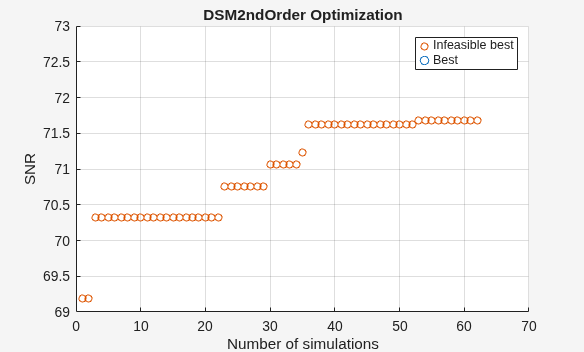
Optimizer was able to meet all the specifications.
sol = 4×2 table
    Name    Value
    ____    _____

    "a1"     0.15
    "a2"    0.575
    "b1"    0.155
    "b2"    0.635
metric = 5×4 table
        Name        FinalMetrics         Specs         Units
    ____________    ____________    _______________    ______

    "SNR"              72.519       "> 72"             "dB"
    "SFDR"             80.869       "> 74"             "dB"
    "SINAD"            72.519       "> 72"             "dB"
    "ENOB"             11.754       "maximize 11.5"    "bits"
    "NoiseFloor"      -80.755       "< -78"            "dB"
As you can see, the function meets the required specifications. You can use the check point file to continue further optimization from the current state.
Input Arguments
Name-Value Arguments
Output Arguments
More About
Tips
Set
Solvertosurrogateoptfor general-purpose optimization problems with short simulation times or quick design verifications. This works best when the number of design variables is less than 10 or problems have discontinuous transitions.Set
Solvertoessaboptfor analog IC sizing problems with long simulation times or when accurate final design values are critical. It works best when the number of design variables is between 10 and 40 or problems have multiple constraints with stringent specifications.
Version History
Introduced in R2024b

