rfelement
Generic RF element object
Description
Creation
Properties
Name given to identify rf element, specified as a character vector. All names must be valid MATLAB® variable names.
Example: Name="rfel"
Example: rfel.Name = "rfel"
Name of the two-port Touchstone file that contains modulator data, specified as a string scalar or character vector.
Example: FileName='default.s2p'
Since R2026a
RF element system data, specified as an rfSystemParameters object.
Example: SystemData=rfSystemParameters('RF_model.csv')
Available power gain, specified as a scalar in dB.
Example: Gain=10
Example: rfel.Gain = 10
Noise figure, specified as a real finite nonnegative scalar dB.
Example: NF=-10
Example: rfel.NF = -10
Second -order output-referred intercept point, specified as a real scalar in dBm.
Example: OIP2=8
Example: amplifier.OIP2 = 8
Third -order output-referred intercept point, specified as a real scalar in dBm.
Example: OIP3=10
Example: amplifier.OIP3 = 10
Since R2026a
Output 1 dB compression point, specified as a real positive number in dBm.
Example: OP1dB=20
Since R2026a
Output saturation point, specified as a positive real number in dBm.
Example: OPsat=20
Input impedance, specified as a positive real part finite scalar in Ohms. You can also use a complex value with a positive real part.
Example: Zin=40
Example: rfel.Zin = 40
Output impedance, specified as a scalar in Ohms. You can also use a complex value with a positive real part.
Example: Zout=40
Example: rfel.Zout = 40
Number of ports, specified as a scalar integer. This property is read-only.
Names of port terminals, specified as a cell vector. This property is read-only.
Object Functions
clone | Create copy of existing circuit element or circuit object |
Examples
Create an rfelement object with a gain of 10 dB, noise figure of 3 dB, and OIP3 (output third-order intercept) of 2 dBm.
r = rfelement(Gain=10,NF=3,OIP3=2)
r =
rfelement: RF element
Name: 'RFelement'
Gain: 10
Zin: 50
Zout: 50
NF: 3
IIP2: Inf
OIP2: Inf
IIP3: -8
OIP3: 2
IP1dB: Inf
OP1dB: Inf
IPsat: Inf
OPsat: Inf
Create an rf element with a gain of 4 dB. Create another rf element with an output third-order intercept(OIP3) of 13 dBm.
rfel1 = rfelement(Gain=4); rfel2 = rfelement(OIP3=13);
Build a 2-port circuit using the above defined rf elements.
c = circuit([rfel1 rfel2])
c =
circuit: Circuit element
ElementNames: {'RFelement' 'RFelement_1'}
Elements: [1×2 rfelement]
Nodes: [0 1 2 3]
Name: 'unnamed'
Create an amplifier with a gain of 4 dB.
a = amplifier(Gain=4);
Create a modulator with an OIP3 of 13 dBm.
m = modulator(OIP3=13);
Create an N-port element using passive.s2p.
n = nport('passive.s2p');Create an RF element with a gain of 10 dB.
r = rfelement(Gain=10);
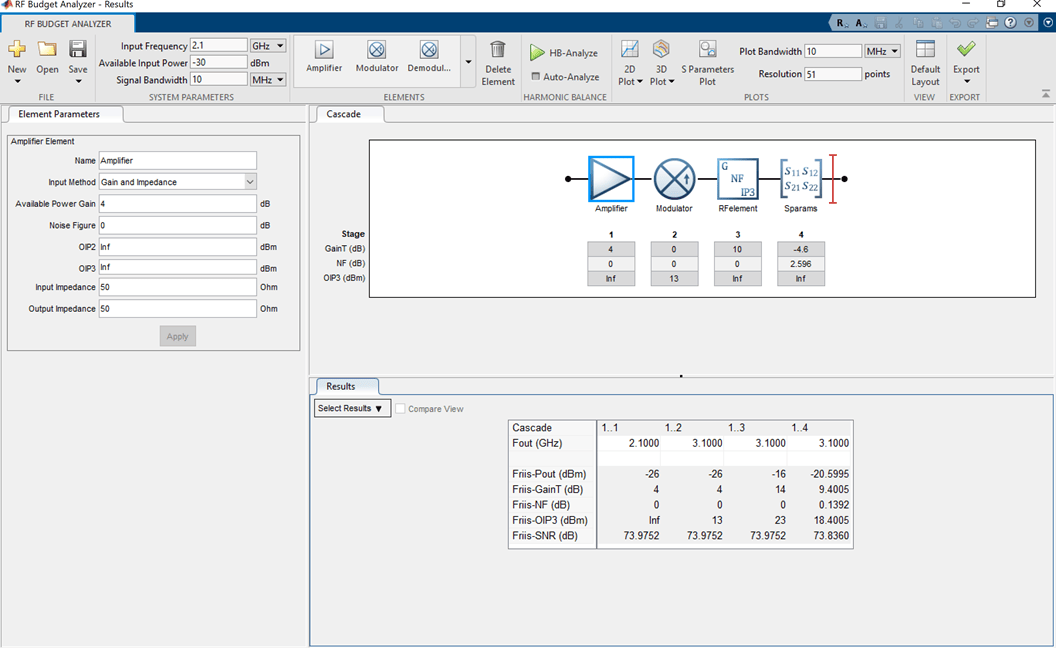
Calculate the RF budget of a series of RF elements at an input frequency of 2.1 GHz, an available input power of –30 dBm, and a bandwidth of 10 MHz.
b = rfbudget([a m r n],2.1e9,-30,10e6)
b =
rfbudget with properties:
Elements: [1x4 rf.internal.rfbudget.Element]
InputFrequency: 2.1 GHz
AvailableInputPower: -30 dBm
SignalBandwidth: 10 MHz
Solver: Friis
AutoUpdate: true
Analysis Results
OutputFrequency: (GHz) [ 2.1 3.1 3.1 3.1]
OutputPower: (dBm) [ -26 -26 -16 -20.6]
TransducerGain: (dB) [ 4 4 14 9.4]
NF: (dB) [ 0 0 0 0.1391]
IIP3: (dBm) [ Inf 9 9 9]
OIP3: (dBm) [ Inf 13 23 18.4]
SNR: (dB) [73.98 73.98 73.98 73.84]
Type the show command at the command window to display the analysis in the RF Budget Analyzer app.
show(b)
Version History
Introduced in R2017aYou can now specify OP1dB and OPsat values to model an rfelement
object.
Use the SystemData property to model an
rfelement object.
rfelement is recommended over rfdata.ip3
because it enables you to:
Create a generic RF element with third-order intercept points.
Build a
circuitobject with a generic RF element.Model an amplifier in an RF chain created using an
rfbudgetobject or the RF Budget Analyzer app, and then export this element to RF Blockset™ or torfsystemSystem object™ for circuit envelope analysis.
MATLAB Command
You clicked a link that corresponds to this MATLAB command:
Run the command by entering it in the MATLAB Command Window. Web browsers do not support MATLAB commands.
Seleccione un país/idioma
Seleccione un país/idioma para obtener contenido traducido, si está disponible, y ver eventos y ofertas de productos y servicios locales. Según su ubicación geográfica, recomendamos que seleccione: .
También puede seleccionar uno de estos países/idiomas:
Cómo obtener el mejor rendimiento
Seleccione China (en idioma chino o inglés) para obtener el mejor rendimiento. Los sitios web de otros países no están optimizados para ser accedidos desde su ubicación geográfica.
América
- América Latina (Español)
- Canada (English)
- United States (English)
Europa
- Belgium (English)
- Denmark (English)
- Deutschland (Deutsch)
- España (Español)
- Finland (English)
- France (Français)
- Ireland (English)
- Italia (Italiano)
- Luxembourg (English)
- Netherlands (English)
- Norway (English)
- Österreich (Deutsch)
- Portugal (English)
- Sweden (English)
- Switzerland
- United Kingdom (English)