FiniteGapFeed
R2026bDescription
Use the FiniteGapFeed object to specify the
FeedDefinitions property in a parent pcbComponent
object.
The FiniteGapFeed object represents a coplanar multi-ground edge feed
across a physically finite gap between conductors. This feed excites the finite gap directly,
modeling the structure more realistically. A delta-gap feed, by contrast, would require you to
make the gap infinitesimally small by adding more metal, which can introduce undesirable
parasitic effects.
Creation
Description
f1 = FiniteGapFeed creates a default
FiniteGapFeed object.
f1 = FiniteGapFeed(
sets object properties using one or more name-value arguments.
PropertyName=Value)PropertyName is the property name, and Value is
the corresponding value. You can specify several name-value arguments in any order as
PropertyName1=Value1,...,PropertyNameN=ValueN. Properties that you
do not specify retain their default values.
Properties
Examples
This example shows how to use a FiniteGapFeed object to define an internal port on a pcbComponent object.
Start with the Wilkinson splitter catalog element and convert it to a pcbComponent. Save its resistor length.
w = wilkinsonSplitter;
rL = w.ResistorLength;
p = pcbComponent(w);
The catalog element has a lumped load bridging the two output terminals. Save its location, replace it by the placeholder lumpedElement, and delete the leftover metal strip.
internalPortLocation = p.Load.Location;
p.Load = lumpedElement;
rectangleCut = traceRectangular('Center', internalPortLocation(1:2), 'Length', 0.5e-3, 'Width', rL);
p.Layers{1} = p.Layers{1} - rectangleCut;
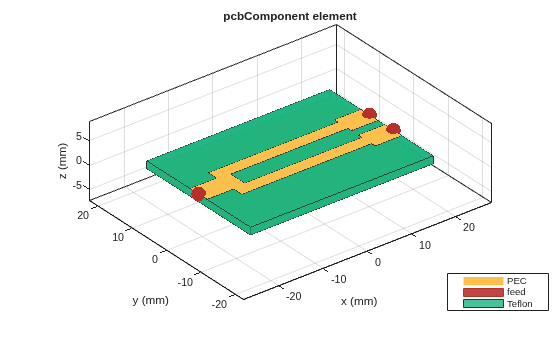
To expose the FeedDefinitions property switch the pcbComponent object's FeedFormat property to FeedDefinitions. Instantiate a FiniteGapFeed at the saved lumped load site and add it to the list of feeds.
p.FeedFormat = 'FeedDefinitions';
f = FiniteGapFeed('SignalLocations', internalPortLocation(1:2) + [0 rL/2], 'GroundLocations', internalPortLocation(1:2) + [0 -rL/2], 'SignalLayers', 1, 'SignalWidths', 0.5e-3);
p.FeedDefinitions(end+1) = f;
figure; show(p);
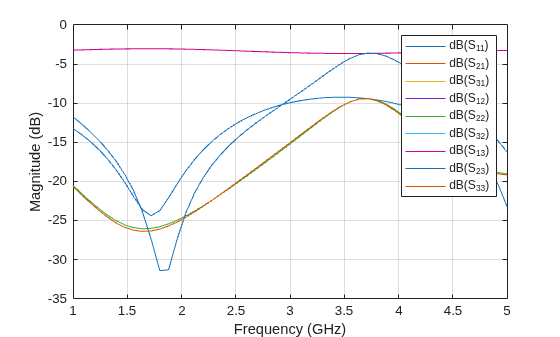
Calculate 4-port S-parameters for the splitter. Terminate the internal port into a 100-ohm resistance and plot the result.
s = sparameters(p, linspace(1e9, 5e9, 51));
s100 = snp2smp(s, 1:3, 100);
figure; rfplot(s100)
Version History
Introduced in R2024b

