slreportgen.report.MATLABFunction Class
Namespace: slreportgen.report
Superclasses: slreportgen.report.Reporter
MATLAB Function block or Stateflow MATLAB function reporter
Description
Use an object of the slreportgen.report.MATLABFunction class to report
on a Simulink®
MATLAB Function block or Stateflow®
MATLAB® function.
By default, a MATLABFunction reporter adds this information to a
report:
Simulink MATLAB Function block or Stateflow MATLAB function properties
A summary of the function input and output arguments
The MATLAB code used by the function to compute its outputs from its inputs
Use the reporter properties to include other information, such as detailed argument properties, function symbol properties, and supporting functions.
Note
To use a MATLABFunction reporter in a report, you must create the
report using the slreportgen.report.Report class.
The slreportgen.report.MATLABFunction class is a handle class.
Creation
Description
creates an empty reporter = slreportgen.report.MATLABFunctionMATLABFunction reporter based on the default
template. Use the Object property to specify the Simulink
MATLAB Function block or Stateflow
MATLAB function to report.
sets the reporter = slreportgen.report.MATLABFunction(mlfcnObj)Object property to the MATLAB Function block or
Stateflow
MATLAB function specified by mlfcnObj.
sets reporter = MATLABFunction(PropertyName=Value)MATLABFunction reporter properties using name-value arguments. You can specify multiple
name-value arguments in any order.
Properties
MATLAB function block or Stateflow MATLAB function to report, specified as one of these values:
Character vector or string scalar that contains the path to a MATLAB Function block
Handle to a MATLAB Function block or Stateflow MATLAB function
Note
If you use a finder to find a MATLAB Function block or
Stateflow
MATLAB function and add the result directly to a report, an
slreportgen.report.MATLABFunction reporter is used
instead of a Simulink object property reporter.
Attributes:
GetAccess | public |
SetAccess | public |
Data Types: char | string | function_handle
Whether to include object properties, specified as a logical 1
(true) or 0 (false). When you
specify:
1(true) — Include a table of the properties of the Simulink or Stateflow object that corresponds to the MATLAB Function block or Stateflow MATLAB function being reported.0(false) — Do not include a table of the object properties.
Attributes:
GetAccess | public |
SetAccess | public |
Object properties reporter, specified as an mlreportgen.report.BaseTable object. The
MATLABFunction reporter uses the specified reporter to
create a table of the properties of the Simulink or Stateflow object that corresponds to the MATLAB Function
block or Stateflow
MATLAB function being reported.
For a Simulink MATLAB Function block, these properties are reported:
Update Method
Sample Time
Support variable-size arrays
Saturate on integer overflow
Treat these inherited Simulink signal types as fi objects
MATLAB Function block fimath
Input fi math
Description
For a Stateflow MATLAB function, these properties are reported:
Saturate on integer overflow
MATLAB function fimath
Input fi math
Description
To customize the appearance of the function property table and its title,
customize the default BaseTable reporter or replace it with a
custom version of the BaseTable reporter. To customize the
title of the function property table, specify the contents in the
Title property of the default or replacement
reporter. The content you specify is placed at the front of the default
title.
Attributes:
GetAccess | public |
SetAccess | public |
Whether to include an argument summary table, specified as a logical 1
(true) or 0 (false). When you
specify:
1(true) — Include a summary table of the properties of the arguments of the reported function.0(false) — Do not include a summary table of the properties of the arguments of the reported function.
Attributes:
GetAccess | public |
SetAccess | public |
Argument properties to include in the argument summary table, specified as
a cell array of character vectors or a string array. If the model is not
already compiled, the MATLABFunction reporter compiles the
model to obtain Compiled Type, Compiled
Size, and Variable Size data. When the
report is closed, the model is uncompiled.
Specify any combination of these properties:
NameScopePortCompiled Type (Data Type)Compiled Size (Size)ComplexityDescriptionMaximum (Max Value)Minimum (Min Value)TunableVariable Size
Attributes:
GetAccess | public |
SetAccess | public |
Argument summary reporter, specified as an mlreportgen.report.BaseTable object. The
MATLABFunction reporter uses this reporter to create a
table of the arguments of the MATLAB function. The table includes a summary of the arguments and
the argument properties specified by the ArgumentSummaryProperties property.
To customize the appearance of the argument summary table and the content
of its title, customize the default BaseTable object or
replace it with a custom version of the BaseTable
object.
Attributes:
GetAccess | public |
SetAccess | public |
Whether to include a property table with detailed information for each
argument, specified as a logical 1
(true) or 0 (false). When you
specify:
1(true) — Include a property table for each argument of the MATLAB function. If the model is not already compiled, theMATLABFunctionreporter compiles the model. When the report is closed, the model is uncompiled.0(false) — Do not include a property table for each argument of the MATLAB function.
If the value is true, the report
Attributes:
GetAccess | public |
SetAccess | public |
Argument properties reporter, specified as an mlreportgen.report.BaseTable object. The
MATLABFunction reporter uses the specified reporter to
create a table of the properties of each argument of the MATLAB function. The default value of this property is a
BaseTable object with the
TableStyleName property set to the
MATLABFunctionArgumentPropertiesTable style, which is
defined in the default template for a MATLABFunction
reporter.
To customize the appearance of the argument property table, customize the
default BaseTable reporter or replace it with a custom
BaseTable reporter.
Attributes:
GetAccess | public |
SetAccess | public |
Whether to include the script of the MATLAB function, specified as a logical 1
(true) or 0 (false). When you
specify:
1(true) — Include the code that computes the output of the MATLAB function from its inputs.0(false) — Do not nclude the code that computes the output of the MATLAB function from its inputs.
Attributes:
GetAccess | public |
SetAccess | public |
Function code formatter, specified as an mlreportgen.dom.Paragraph
object. The Paragraph object controls the formatting, such as
the font family, font size, and alignment, of the code in the MATLAB function. It does not control whether the reporter highlights
code syntax. The default Style property is set to
mlreportgen.dom.WhiteSpace.
To control the highlighting, use the HighlightScriptSyntax property.
To customize the code appearance, modify the properties of the default
Paragraph reporter or replace the reporter with a custom
reporter. If you add content to the default or replacement
Paragraph reporter, the content is placed before the
MATLAB Function script in the generated report.
Attributes:
GetAccess | public |
SetAccess | public |
Function script section title, specified as an mlreportgen.dom.Paragraph
object. The Paragraph object contains the title for the
section that contains the MATLAB function code. The default title is the MATLAB
Function block name followed by Function
Script. For example, for a MATLAB Function block named Covariance Derivative,
the title is Covariance Derivative Function Script. The
properties of the paragraph specify the appearance of the title.
To customize the title appearance, modify the properties of the default
Paragraph object or replace it with another paragraph
object. If you add content to the default or replacement title paragraph,
the content you specify is placed at the front of the default title.
Attributes:
GetAccess | public |
SetAccess | public |
Whether to highlight script syntax keywords, specified as a logical 1
(true) or 0 (false). When you
specify:
1(true) — Use color to highlight the function code syntax keywords.0(false) — Do not use color to highlight the function code syntax keywords.
Attributes:
GetAccess | public |
SetAccess | public |
Whether to include function symbol data, specified as a logical 1
(true) or 0 (false). When you
specify:
1(true) — Include information about the symbols that appear in the main MATLAB function code. If theIncludeSupportingFunctionsproperty istrue, the report also contains information about symbols that appear in the code of the supporting functions. Function symbol data is reported only if theObjectproperty of specifies a MATLAB Function block.0(false) — Do not include information about the symbols that appear in the main MATLAB function code.
Note
If you include function symbol data, report generation can be slower than if you do not include it.
Attributes:
GetAccess | public |
SetAccess | public |
Function symbol data reporter, specified as an mlreportgen.report.BaseTable object. The
MATLABLFunction reporter uses this reporter to create
tables of the properties of each symbol that appears in the main MATLAB function code and optionally in the supporting functions code.
The symbols in the generated report are grouped by types, which are
variable, operation, and function-call site. The tables for each symbol type
appear after the function properties. The reported function and symbol
properties are listed in the following tables. The default value of this
property is a BaseTable object with the
TableStyleName property set to the
MATLABFunctionFunctionSymbolTable style, which is
defined in the default template for a MATLABFunction
reporter.
| Function Properties | Description |
|---|---|
| Function Name | Name of the function |
| Function ID | ID of the function. Simulink assigns a unique ID to every MATLAB Function in a model and to every supporting function. A built-in or user-defined supporting function uses its same ID, regardless of how many functions it supports in a given model. |
| Path | Path of the function, which is the model path of the MATLAB Function block or Stateflow block that contains it. The path of a supporting function is the path of the MATLAB file that defines it. |
| Variable Properties | Description |
|---|---|
| Name | Name of the variable |
| Data type | Data type and the size of the variable |
| Start position | Line and column number of the first character of the variable name in the script in which it appears |
| Operation Properties | Description |
|---|---|
| Name | Character or characters that represent the operation type. For example, + |
| Data type | Data type and size of the value produced by the operation |
| Start position | Line and column number of the first character of the operation in the script in which it appears |
| Function Call Site Properties | Description |
|---|---|
| Name | Name of the called function |
| Data type | Data type and the size of the value returned by the called function |
| ID | ID of the called function |
| Start position | Line and column number of the first character of the call site in the script in which it appears |
To customize the appearance of the function symbol data tables, customize
the default BaseTable reporter or replace it with a custom
BaseTable reporter. If you specify the
Title property in the default or replacement
BaseTable reporter, the content is placed at the front of
the default title in the generated report.
Attributes:
GetAccess | public |
SetAccess | public |
Whether to include a list of the user-defined functions called directly or
indirectly by the main function of the MATLAB Function block
being reported, specified as a logical 1
(true) or 0 (false). When you
specify:
1(true) — Include a list of the user-defined functions called directly or indirectly by the main function of the MATLAB Function block being reported.0(false) — Do not include a list of the user-defined functions called directly or indirectly by the main function of the MATLAB Function block being reported.
Attributes:
GetAccess | public |
SetAccess | public |
Supporting function types to be reported, specified as a cell array of character vectors or a string array. The cell array or string array can specify one or both of these types.
MATLAB— Include MATLAB supporting functionsuser-defined— Include user-defined supporting functions
Attributes:
GetAccess | public |
SetAccess | public |
Supporting functions reporter, specified as an mlreportgen.report.BaseTable object. The
BaseTable object reports the functions invoked directly
or indirectly by the main MATLAB function. The functions are sorted by function name. The
default value of this property is a BaseTable object with
the TableStyleName property set to the
MATLABFunctionSupportingFunctionsTable style, which
is defined in the default template for a MATLABFunction
reporter.
To customize the appearance of the supporting functions table, customize
the default BaseTable reporter or replace it with a
customized version of the BaseTable reporter.
Attributes:
GetAccess | public |
SetAccess | public |
Whether to include the code of user-defined supporting functions,
specified as a logical 1
(true) or 0 (false). When you
specify:
1(true) — Include the code of user-defined supporting functions.0(false) — Do not include the code of user-defined supporting functions.
If the value is true, the report includes
the code for the user-defined functions called directly or indirectly by the
main function.
Attributes:
GetAccess | public |
SetAccess | public |
User-defined supporting functions code formatter, specified as an mlreportgen.dom.Paragraph
object. The Paragraph object controls the formatting, such as
the font family, font size, and alignment, of the code in the report. The
MATLABFunction reporter highlights the syntax of the
function text (code) and appends the highlighted text to the paragraph
object.
To customize the code appearance, modify the properties of the default
Paragraph reporter or replace the reporter with a custom
reporter. If you add content to the default or replacement
Paragraph reporter, the content is placed before the
supporting function code in the generated report.
Attributes:
GetAccess | public |
SetAccess | public |
User-defined supporting function section title, specified as an mlreportgen.dom.Paragraph
object. The MATLABFunction reporter uses the formatter to
create a title for each user-defined supporting function. The default value
of this property is an empty paragraph with properties that specify the
appearance of the function title. By default, the
MATLABFunction reporter appends the supporting function
name to the paragraph. You can customize the title appearance by modifying
the properties of the default paragraph object or by replacing it with
another paragraph object. Any content that you add to the default or
replacement paragraph appears before each title in the generated
report.
Attributes:
GetAccess | public |
SetAccess | public |
Source of the template for this reporter, specified in one of these ways:
Character vector or string scalar that specifies the path of the file that contains the template for this reporter
Reporter or report whose template this reporter uses or whose template library contains the template for this reporter
Document Object Model (DOM) document or document part whose template this reporter uses or whose template library contains the template for this reporter
The specified template must be the same type as the report to which you
append this reporter. For example, for a Microsoft® Word report, TemplateSrc must be a Word reporter template.
If the TemplateSrc property is empty, this reporter uses the
default reporter template for the output type of the report.
Attributes:
GetAccess | public |
SetAccess | public |
NonCopyable | true |
Dependent | true |
Name of the template for this reporter, specified as a character vector or string scalar.
The template for this reporter must be in the template library of the template specified by
the TemplateSrc property of this reporter.
Attributes:
GetAccess | public |
SetAccess | public |
Data Types: char | string
Hyperlink target for this reporter, specified as a character vector or string scalar
that specifies the link target ID, or an mlreportgen.dom.LinkTarget object. A character vector or string scalar
value converts to a LinkTarget object. The link target immediately
precedes the content of this reporter in the output report.
Attributes:
GetAccess | public |
SetAccess | public |
Methods
| Method | Purpose |
|---|---|
slreportgen.report.MATLABFunction.createTemplate |
Create reporter template
Input Arguments
Return Values
For more information, see the method
for the |
slreportgen.report.MATLABFunction.customizeReporter |
Create reporter from
Input Arguments
Return Values
For more information, see the method
for the |
slreportgen.report.MATLABFunction.getClassFolder |
Get location of folder that contains
Return Values
For more information, see the method
for the |
copy |
Create copy of reporter object and make deep copies of property values
Input Arguments
Return Values
For more information, see the method
for the |
getImpl |
Get implementation of reporter
Note You cannot add content to the reporter after calling this method. Input Arguments
Return Values
For more information, see the method
for the |
Examples
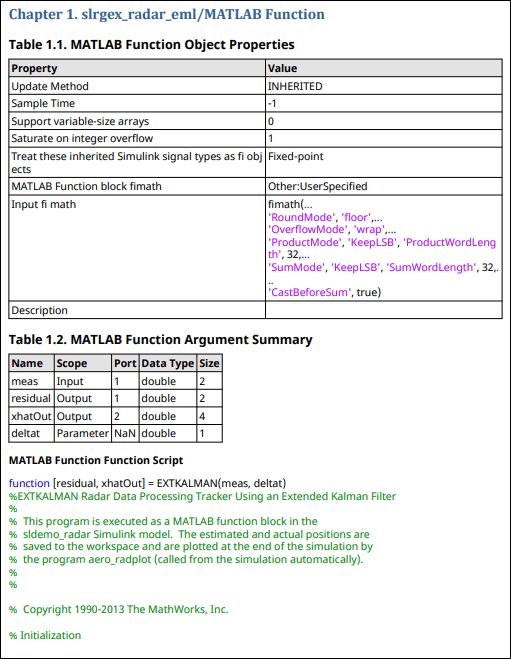
To include information about a MATLAB Function block in a report, use an slreportgen.report.MATLABFunction reporter. By default, the report includes a table of object properties, a table of input and output arguments, and the function script.
import slreportgen.report.* import mlreportgen.report.* model_name = "slrgex_radar_eml"; load_system(model_name); mlfcnObj = "slrgex_radar_eml/MATLAB Function"; rpt = slreportgen.report.Report("MyReport","pdf"); chapter = Chapter(mlfcnObj); rptr = MATLABFunction(mlfcnObj); add(chapter,rptr); add(rpt,chapter); close(rpt); close_system(model_name); rptview(rpt);
Here is the first page of the report:
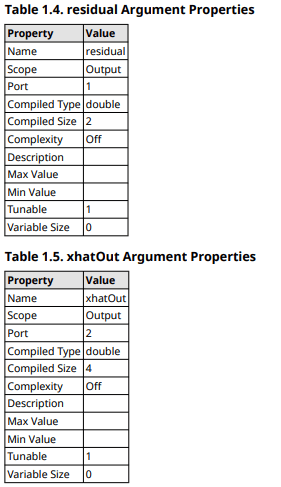
To include the MATLAB function argument details in a report, use the IncludeArgumentProperties property of the MATLABFunction reporter.
import slreportgen.report.* import mlreportgen.report.* model_name = "slrgex_radar_eml"; load_system(model_name); mlfcnObj = "slrgex_radar_eml/MATLAB Function"; rpt = slreportgen.report.Report("myReport","pdf"); chapter = Chapter(mlfcnObj); rptr = MATLABFunction(mlfcnObj); rptr.IncludeArgumentProperties = true; add(chapter,rptr); add(rpt,chapter); close(rpt); close_system(model_name); rptview(rpt);
Here are some of the argument detail tables in the generated report:
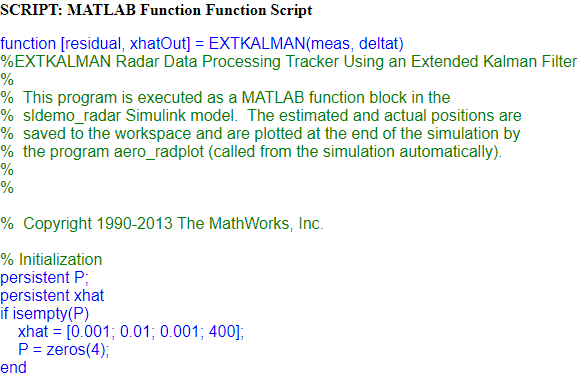
To customize the title of the function script section, use the FunctionScriptTitle property. To change the formatting of the code, create a DOM paragraph that specifies the font family, size, and color and assign the paragraph to the FunctionScript property.
import slreportgen.report.* import mlreportgen.report.* model_name = "slrgex_radar_eml"; load_system(model_name); mlfcnObj = "slrgex_radar_eml/MATLAB Function"; rpt = slreportgen.report.Report("myReport","html"); chapter = Chapter(mlfcnObj); rptr = MATLABFunction(mlfcnObj); paraTitle = mlreportgen.dom.Paragraph("SCRIPT: "); rptr.FunctionScriptTitle = paraTitle; paraScript = mlreportgen.dom.Paragraph; paraScript.FontFamilyName = "Arial"; paraScript.FontSize = "12pt"; paraScript.Color = "blue"; rptr.FunctionScript = paraScript; add(chapter,rptr); add(rpt,chapter); close(rpt); close_system(model_name); rptview(rpt);
Here is a portion of the function script section, which shows the title and some of the code:
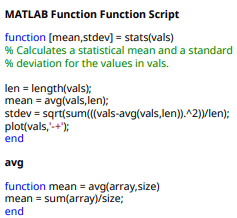
By default, a MATLABFunction reporter includes the code of the main function, but not the code of the user-defined supporting functions that the main function calls. To include the code of the user-defined functions, use the IncludeSupportingFunctionsCode property.
import slreportgen.report.* import mlreportgen.report.* model_name = "slrgex_stats"; load_system(model_name); mlfcnObj = "slrgex_stats/MATLAB Function"; rpt = slreportgen.report.Report("myReport","pdf"); chapter = Chapter(mlfcnObj); rptr = MATLABFunction(mlfcnObj); rptr.IncludeSupportingFunctionsCode = true; add(chapter,rptr); add(rpt,chapter); close(rpt); close_system(model_name); rptview(rpt);
Here is the MATLAB function script section, which shows the code for both the main function and the user-defined supporting function, avg.
Version History
Introduced in R2018a
See Also
Classes
slreportgen.report.Report|slreportgen.report.Reporter|slreportgen.finder.BlockFinder|slreportgen.finder.BlockResult|slreportgen.finder.DiagramElementFinder|slreportgen.finder.DiagramElementResult|slreportgen.finder.StateflowDiagramElementFinder|mlreportgen.report.BaseTable|mlreportgen.dom.Paragraph
Functions
Blocks
MATLAB Command
You clicked a link that corresponds to this MATLAB command:
Run the command by entering it in the MATLAB Command Window. Web browsers do not support MATLAB commands.
Seleccione un país/idioma
Seleccione un país/idioma para obtener contenido traducido, si está disponible, y ver eventos y ofertas de productos y servicios locales. Según su ubicación geográfica, recomendamos que seleccione: .
También puede seleccionar uno de estos países/idiomas:
Cómo obtener el mejor rendimiento
Seleccione China (en idioma chino o inglés) para obtener el mejor rendimiento. Los sitios web de otros países no están optimizados para ser accedidos desde su ubicación geográfica.
América
- América Latina (Español)
- Canada (English)
- United States (English)
Europa
- Belgium (English)
- Denmark (English)
- Deutschland (Deutsch)
- España (Español)
- Finland (English)
- France (Français)
- Ireland (English)
- Italia (Italiano)
- Luxembourg (English)
- Netherlands (English)
- Norway (English)
- Österreich (Deutsch)
- Portugal (English)
- Sweden (English)
- Switzerland
- United Kingdom (English)