Simulink.sdi.constraints.MatchesSignal Class
R2026bNamespace: Simulink.sdi.constraints
Superclasses: matlab.unittest.constraints.Constraint
Constraint that compares time series data with tolerances using the Simulation Data Inspector
Description
Use the Simulink.sdi.constraints.MatchesSignal constraint to compare
time series data against an expected value as part of a test. You can configure the constraint
to use a combination of absolute, relative, and time tolerance values for the comparison. You
can also specify additional options to configure the comparison behavior using a Simulink.sdi.constraints.MatchesSignalOptions object or using one or more name-value
arguments. For more information about how tolerances and alignment options affect
comparisons, see How the Simulation Data Inspector Compares Data.
Note
The MatchesSignal constraint uses the Simulation Data Inspector to perform comparisons
and requires a license for one of these products:
Simulink®
Signal Processing Toolbox™
MATLAB® Coder™
Fixed-Point Designer™
Creation
Description
MatchesSignal(expVal) creates a constraint that determines
whether time series data representing an actual value matches the data specified by the
expected value, expVal.
MatchesSignal(
creates a constraint with additional properties
specified by one or more name-value arguments.expVal,Name=Value)
Name-Value Arguments
Properties
Examples
To compare time series data using data generated in the workspace, use the Simulink.sdi.constraints.MatchesSignal constraint. You can use the MatchesSignal constraint to compare data from many sources, including measured test data in a file and logged simulation outputs.
When you use the MatchesSignal constraint, you can specify absolute, relative, and time tolerances to use in the comparison. The MatchesSignal constraint uses the Simulation Data Inspector comparison algorithm, which includes steps for alignment and synchronization. For more information about the algorithm, see How the Simulation Data Inspector Compares Data.
The MatchesSignal constraint uses the Simulation Data Inspector for the time series comparison and requires one of these products:
Simulink®
Signal Processing Toolbox™
MATLAB Coder™
Fixed-Point Designer™
Create Time Series Data
This example creates workspace data to use for illustrative purposes only. You can also use the MatchesSignal constraint to compare data from other sources, such as simulation outputs or a file containing test data. The constraint can compare time series data in any format supported by the Simulation Data Inspector.
Create two sine wave signals at the same frequency, but with a slight attenuation and sampled at different rates.
time1 = 0:0.1:20;
sig1vals = sin(2*pi/5*time1);
sig1_ts = timeseries(sig1vals,time1);
sig1_ts.Name = "Wave Data";

time2 = 0:0.1:22;
sig2vals = single(0.98*sin(2*pi/5*time2));
sig2_ts = timeseries(sig2vals,time2);
sig2_ts.Name = "Wave Data";
Because the comparison algorithm for the MatchesSignal constraint includes a synchronization step, comparing these two signals with different time vectors does not always result in a test failure. The second signal is also named Wave Data so the alignment algorithm can pair the signals for comparison.
Create a Test Case and Compare the Signals
This example uses an interactive test for illustrative purposes. You can use the MatchesSignal constraint with other types of unit tests in the MATLAB testing framework. For example, to write class-based unit tests, see Write Simple Test Case Using Classes.
Create a TestCase instance for interactive use.
import matlab.unittest.TestCase

testCase = TestCase.forInteractiveUse;
Compare sig1_ts and sig2_ts using the MatchesSignal constraint. Use sig1_ts for the expected value in the instance of the MatchesSignal constraint.
import Simulink.sdi.constraints.MatchesSignal

testCase.verifyThat(sig2_ts,MatchesSignal(sig1_ts));
Verification failed.
---------------------
Framework Diagnostic:
---------------------
MatchesSignal(<Value>) failed.
--> Data types do not match for the following aligned signals:
Name ActualSignals ActualDataType ExpectedSignals ExpectedDataType
_________ _____________ ______________ _______________ ________________
Wave Data <Actual>.Data single <Expected>.Data double
------------------
Stack Information:
------------------
In /tmp/Bdoc26b_3351752_2867162/Editor_izuip/LiveEditorEvaluationHelperE7cf3e9b9e9614aef9a3b9d6bdde431a1.m (LiveEditorEvaluationHelperE7cf3e9b9e9614aef9a3b9d6bdde431a1) at 32
In /mathworks/devel/bat/filer/batfs2566-0/Bdoc26b.3351752/build/runnable/matlab/toolbox/matlab/codetools/+matlab/+internal/+liveeditor/@LiveEditorUtilities/doExecute.m (doExecute) at 79
In /mathworks/devel/bat/filer/batfs2566-0/Bdoc26b.3351752/build/runnable/matlab/toolbox/matlab/codetools/+matlab/+internal/+liveeditor/@LiveEditorUtilities/execute.m (execute) at 27
In /mathworks/devel/bat/filer/batfs2566-0/Bdoc26b.3351752/build/matlab/tools/examples/exampletools/+mwtools/liveCodeToDocbook.m (doRun) at 465
In /mathworks/devel/bat/filer/batfs2566-0/Bdoc26b.3351752/build/matlab/tools/examples/exampletools/+mwtools/liveCodeToDocbook.m (doRunConvert) at 377
In /mathworks/devel/bat/filer/batfs2566-0/Bdoc26b.3351752/build/matlab/tools/examples/exampletools/+mwtools/liveCodeToDocbook.m (liveCodeToDocbook) at 167
In /mathworks/devel/bat/filer/batfs2566-0/Bdoc26b.3351752/build/matlab/tools/build_using_matlab/BML.m (BML) at 13
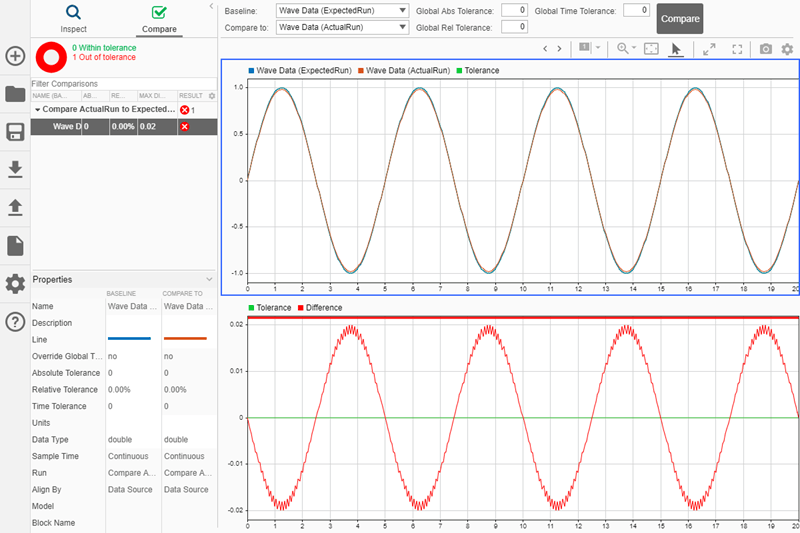
The diagnostic information shows that the verification failed. When a test fails, the comparison results and original run data are saved in a Simulation Data Inspector session file. Click the link for the MLDATX file to open the session in the Simulation Data Inspector, where you can investigate the data compared by the test and the comparison results. When you inspect the results, you can see the attenuation creates the difference and causes the comparison to fail.
Specify an absolute tolerance of 0.02 for the instance of the MatchesSignal constraint to use in the comparison.
testCase.verifyThat(sig2_ts,MatchesSignal(sig1_ts,AbsTol=0.02));
Verification failed.
    ---------------------
    Framework Diagnostic:
    ---------------------
    MatchesSignal(<Value>,'AbsTol',0.02) failed.
    --> Data types do not match for the following aligned signals:

              Name       ActualSignals    ActualDataType    ExpectedSignals    ExpectedDataType
            _________    _____________    ______________    _______________    ________________

            Wave Data    <Actual>.Data        single        <Expected>.Data         double

    ------------------
    Stack Information:
    ------------------
    In /tmp/Bdoc26b_3351752_2867162/Editor_izuip/LiveEditorEvaluationHelperE7cf3e9b9e9614aef9a3b9d6bdde431a1.m (LiveEditorEvaluationHelperE7cf3e9b9e9614aef9a3b9d6bdde431a1) at 36
    In /mathworks/devel/bat/filer/batfs2566-0/Bdoc26b.3351752/build/runnable/matlab/toolbox/matlab/codetools/+matlab/+internal/+liveeditor/@LiveEditorUtilities/doExecute.m (doExecute) at 79
    In /mathworks/devel/bat/filer/batfs2566-0/Bdoc26b.3351752/build/runnable/matlab/toolbox/matlab/codetools/+matlab/+internal/+liveeditor/@LiveEditorUtilities/execute.m (execute) at 27
    In /mathworks/devel/bat/filer/batfs2566-0/Bdoc26b.3351752/build/matlab/tools/examples/exampletools/+mwtools/liveCodeToDocbook.m (doRun) at 465
    In /mathworks/devel/bat/filer/batfs2566-0/Bdoc26b.3351752/build/matlab/tools/examples/exampletools/+mwtools/liveCodeToDocbook.m (doRunConvert) at 377
    In /mathworks/devel/bat/filer/batfs2566-0/Bdoc26b.3351752/build/matlab/tools/examples/exampletools/+mwtools/liveCodeToDocbook.m (liveCodeToDocbook) at 167
    In /mathworks/devel/bat/filer/batfs2566-0/Bdoc26b.3351752/build/matlab/tools/build_using_matlab/BML.m (BML) at 13
To configure the comparison behavior of a Simulink.sdi.constraints.MatchesSignal constraint, use a Simulink.sdi.constraints.MatchesSignalOptions object.
Create Time Series Data
This example creates workspace data to use for illustrative purposes only. You can also use the MatchesSignal constraint to compare data from other sources, such as simulation outputs or a file containing test data. The constraint can compare time series data in any format supported by the Simulation Data Inspector.
Create two sine wave signals at the same frequency, but with a slight attenuation and sampled at different rates.
time1 = 0:0.1:20;
sig1vals = sin(2*pi/5*time1);
sig1_ts = timeseries(sig1vals,time1);
sig1_ts.Name = "Wave Data";

time2 = 0:0.1:22;
sig2vals = single(0.98*sin(2*pi/5*time2));
sig2_ts = timeseries(sig2vals,time2);
sig2_ts.Name = "Wave Data";
Because the comparison algorithm for the MatchesSignal constraint includes a synchronization step, comparing these two signals with different time vectors does not necessarily result in a test failure. The second signal is cast to single data type and also named Wave Data so the alignment algorithm can pair the signals for comparison.
Configure a MatchesSignal Instance and Compare the Data
You can use a MatchesSignalOptions object to specify how an instance of the MatchesSignal constraint handles conditions such as mismatched data types and how signals are aligned between the actual and expected data sets. You can specify the properties of the MatchesSignalOptions object to suit the test you want to write. For example, if you want your test to compare data of varying types and a data type match is not functionally relevant, you could set the IgnoreDataTypes property to true.
Create a MatchesSignalOptions object to create a MatchesSignal instance that ignores data type mismatches and data samples outside the time interval the actual and expected signals share.
import Simulink.sdi.constraints.MatchesSignalOptions
opts = MatchesSignalOptions(IgnoringDataTypes=true, IgnoringExtraData=true);
Create a TestCase instance for interactive use and compare sig1_ts and sig2_ts using the MatchesSignal constraint, the MatchesSignalOptions object, and an absolute tolerance of 0.02.
import matlab.unittest.TestCase
testCase = TestCase.forInteractiveUse;

import Simulink.sdi.constraints.MatchesSignal
testCase.verifyThat(sig2_ts,MatchesSignal(sig1_ts, AbsTol=0.02, WithOptions=opts))
Verification passed.
The test passes. When you run the same test again without the options defined by the MatchesSignalOptions object, the test fails due to the mismatched data types.
testCase.verifyThat(sig2_ts,MatchesSignal(sig1_ts,AbsTol=0.02))
Verification failed.
    ---------------------
    Framework Diagnostic:
    ---------------------
    MatchesSignal(<Value>,'AbsTol',0.02) failed.
    --> Data types do not match for the following aligned signals:

              Name       ActualSignals    ActualDataType    ExpectedSignals    ExpectedDataType
            _________    _____________    ______________    _______________    ________________

            Wave Data    <Actual>.Data        single        <Expected>.Data         double

    ------------------
    Stack Information:
    ------------------
    In /tmp/Bdoc26b_3351752_2869049/Editor_ijaai/LiveEditorEvaluationHelperE41bd46d9f6b741efacbf54205d9ba634.m (LiveEditorEvaluationHelperE41bd46d9f6b741efacbf54205d9ba634) at 31
    In /mathworks/devel/bat/filer/batfs2566-0/Bdoc26b.3351752/build/runnable/matlab/toolbox/matlab/codetools/+matlab/+internal/+liveeditor/@LiveEditorUtilities/doExecute.m (doExecute) at 79
    In /mathworks/devel/bat/filer/batfs2566-0/Bdoc26b.3351752/build/runnable/matlab/toolbox/matlab/codetools/+matlab/+internal/+liveeditor/@LiveEditorUtilities/execute.m (execute) at 27
    In /mathworks/devel/bat/filer/batfs2566-0/Bdoc26b.3351752/build/matlab/tools/examples/exampletools/+mwtools/liveCodeToDocbook.m (doRun) at 465
    In /mathworks/devel/bat/filer/batfs2566-0/Bdoc26b.3351752/build/matlab/tools/examples/exampletools/+mwtools/liveCodeToDocbook.m (doRunConvert) at 377
    In /mathworks/devel/bat/filer/batfs2566-0/Bdoc26b.3351752/build/matlab/tools/examples/exampletools/+mwtools/liveCodeToDocbook.m (liveCodeToDocbook) at 167
    In /mathworks/devel/bat/filer/batfs2566-0/Bdoc26b.3351752/build/matlab/tools/build_using_matlab/BML.m (BML) at 13

