Run Simulink Real-Time Application
When you run the real-time application, you can start and stop execution; observe signals and log signal data; and tune real-time application parameters.
You can use the following interfaces to run the application:
Simulink® Real-Time™ Explorer and Simulink external mode. See Create and Run Real-Time Application from Simulink Model.
MATLAB® language. See Create and Execute Real-Time Application by Using MATLAB Language.
Simulink Real-Time RTOS commands from the target computer command line. See Control Real-Time Application at Target Computer Command Line.
Apps
| Simulink Real-Time | Generate real-time applications for simulations that run on a target computer and interface with I/O devices in the target computer |
| Simulink Real-Time Explorer | Interact with target computer and real-time application running on target computer |
| Simulink Real-Time TET Monitor | Observe task execution time for the real-time application running on target computer |
| Simulink Real-Time App Generator | Generate instrument panel app to interact with target computer and real-time application running on target computer (Since R2022a) |
| Simulink Real-Time Application Property Inspector | View and modify application properties (Since R2023b) |
Tools
| Simulation Data Inspector | Inspect and compare data and simulation results to validate and iterate model designs |
Objects
Target | Represent real-time application and target computer status |
Application | Represent application files on development computer |
Instrument | Create real-time instrument object |
slrealtime.instrument.LineStyle | Create real-time instrument LineStyle object (Since R2022b) |
Properties
| Target Object Properties | slrealtime Target object properties for configuration and status |
Functions
Topics
From Development Computer
- Execution Modes for Real-Time Applications
Learn about the behavior of the interrupt and polling execution modes. - Define and Update Inport Data by Using Root Inport Mapper
Map root inports to source data. - Target Computer CPU Overload
Eliminate CPU overloads during real-time application execution.
From Target Computer
- Control Real-Time Application at Target Computer Command Line
Load, start, stop, or check status of real-time applications on the target computer by using the command-line interface. - Target Computer Command Line
Controlling the real-time application from the target computer command line. - Target Computer Command-Line Interface
Control standalone real-time applications with the target computer command-line interface.
Troubleshooting
Troubleshooting in Simulink Real-Time
Troubleshoot problems that you encounter while using the Simulink Real-Time product
Related Information
Featured Examples

Create and Run Real-Time Application from Simulink Model
Adapt a Simulink model to run as a real-time model on a target computer.

Create Listeners for Target Computer Events
Create listeners to observe target computer events.
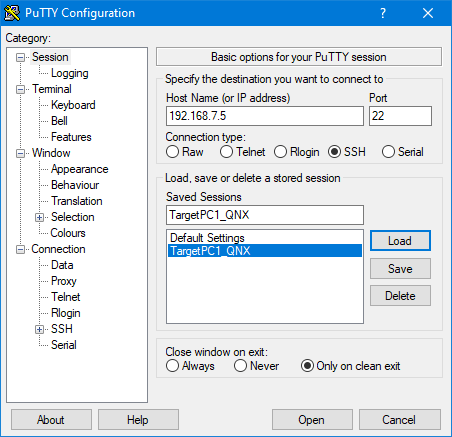
Execute Target Computer Command-Line Commands Via Console or SSH
Run system commands on the target computer from the development computer by using an SSH utility.

