findPointsInCylinder
Description
indices = findPointsInCylinder(___,Name=Value)Height=10, sets the height of the cylinder to 10.
Examples
Load a point cloud from a saved MAT file.
load("drivingLidarPoints.mat","ptCloud")
Specify a hollow cylindrical neighborhood with an inner radius of 2 meters and an outer radius of 15 meters, and find the points in the point cloud within the neighborhood.
minRadius = 2;
maxRadius = 15;

indices = findPointsInCylinder(ptCloud,[minRadius maxRadius]);
Select the cylindrical neighborhood in the point cloud, preserving the organized format.
ptCloudCylinder = select(ptCloud,indices,OutputSize="full");Visualize the selected points.
figure
pcshow(ptCloudCylinder)

Load a point cloud from a saved MAT file.
load("object3d.mat","ptCloud")
maxRadius = 0.1;
cylinderHeight = 0.5;
Offset the center of the cylinder 0.6 units in the X-direction and 0.2 units in the Z-direction. Then, find and select the points of the point cloud within the cylinder.
shiftedCenter = [0.6 0 0.2];
indices = findPointsInCylinder(ptCloud,maxRadius,Height=cylinderHeight,Center=shiftedCenter,VerticalAxis="Z");
ptCloudCylinder = select(ptCloud,indices);
Visualize the selected points.
figure
pcshow(ptCloudCylinder)

Input Arguments
Name-Value Arguments
Specify optional pairs of arguments as
Name1=Value1,...,NameN=ValueN, where Name is
the argument name and Value is the corresponding value.
Name-value arguments must appear after other arguments, but the order of the
pairs does not matter.
Example:
Height=10 sets the height of the cylinder to 10.
Total height of cylinder, specified as a positive scalar. The height is measured
along the cylinder’s vertical axis, VerticalAxis. The cylinder is
centered at its midpoint, the Center, with half of the height
extending in one direction along the vertical axis and the other half extending in the
opposite direction.
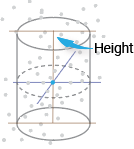
Center of the cylinder, specified as a 3-element vector of the form [x y z] in Cartesian coordinates. The center point is halfway between the top and bottom of the cylinder, and the axis of the cylinder passes through it.

Vertical axis of the cylinder, specified as "X",
"Y", or "Z".
Output Arguments
Extended Capabilities
Version History
Introduced in R2023a

