Generate HDL Code from MATLAB
R2026bThis page shows you how to generate HDL code from the design in the Design Hardware-Targeted Image Filters in MATLAB example.
To generate HDL code, you must have an HDL Coder™ license.
Generate HDL Code
Start from a working folder that contains a design-under-test (DUT) function and a
test bench MATLAB® script file. You can use this openExample command to
get a working folder with the files from the Design Hardware-Targeted Image Filters in MATLAB example.
openExample('visionhdl/VisionHDLMATLABTutorialExample')Open the HDL Coder app and create a new project. Enter the name for your project and select your working folder.
hdlcoder
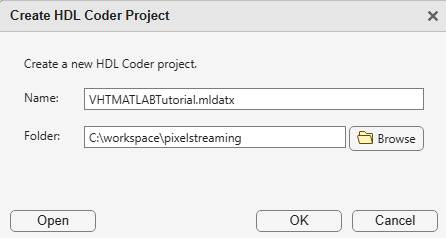
When you click OK, the HDL Workflow Advisor tool opens. Click the Define
Input Types step. Set the MATLAB Function to
HDLTargetedDesign.m, and click the + button to set the
MATLAB Test Bench to
VisionHDLMATLABTutorialExample.m. The tool determines data types
from the code in your files. The control signals are a struct of five
logical scalars. The pixel data type is uint8.
The pixel input is a scalar.
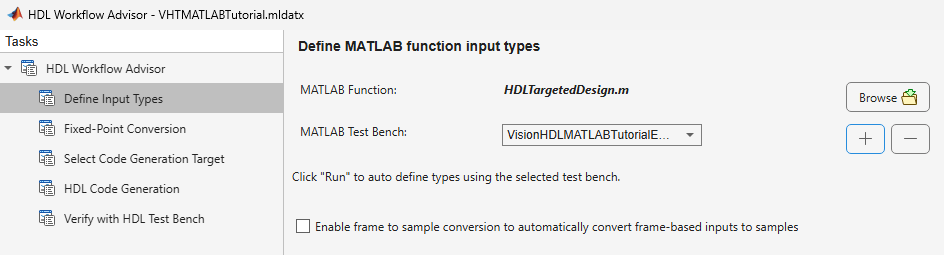
Now, right-click the HDL Code Generation step. Choose Run to selected task to run all the steps from the beginning through HDL code generation.
Examine the log window and click the links to view the generated code and the reports. You can run the generated test bench in your HDL simulator, or integrate the generated HDL code into a larger design you already have.
For more detail about the HDL Workflow Advisor tool, see Workflow Advisor (HDL Coder).

