Detect Objects Using YOLOX Deep Learning Network
R2026bYou Only Look Once X (YOLOX) object detectors support visual inspection applications that require fast object localization, such as detecting defects, parts, or other small objects in high-resolution images. You can use a pretrained YOLOX detector for inference, train a YOLOX detector on custom inspection data, or use tiled training to train on image patches and perform inference on full-size images. You can also deploy YOLOX detectors by exporting them to ONNX, deploying to FPGA, generating C or C++ code, or packaging applications using MATLAB® Compiler™.
This functionality requires Deep Learning Toolbox™ and the Visual Inspection Toolbox™ Model for YOLOX Object Detection. You can install the Visual Inspection Toolbox Model for YOLOX Object Detection from Add-On Explorer. For more information about installing add-ons, see Get and Manage Add-Ons. Processing image data on a GPU requires a supported GPU device and Parallel Computing Toolbox™.
What Is YOLOX?
YOLOX is a one-stage, anchor-free object detector that supports fast object localization for inspection applications [1]. Instead of using memory-intensive predefined anchor boxes, YOLOX localizes objects directly by finding object centers. To predict bounding box dimensions, the network splits the input image into a grid of three different scales, and uses the grid points as the top-left offsets of the bounding boxes. Because YOLOX recomputes grids based on image size, you can use tiled training for small-object detection: train the detector on full-resolution image patches, then perform inference on full-size images.
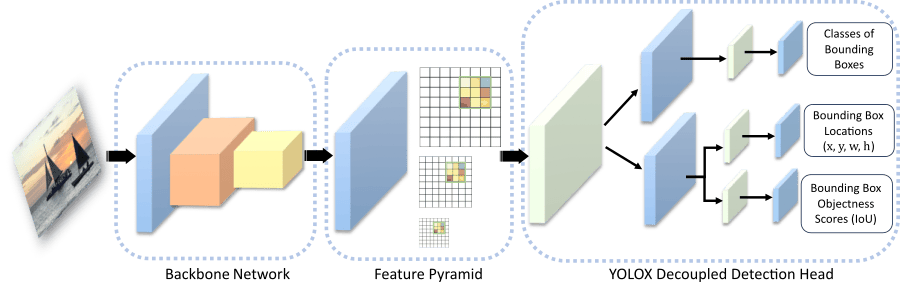
The YOLOX network consists of three parts: the backbone, the neck, and the head.
The backbone of the YOLOX network is a pretrained convolutional neural network CSP-DarkNet-53, trained on the COCO data set. The backbone acts as the feature extraction network that computes feature maps from the input images.
The neck connects the backbone and the head. It is composed of a feature pyramid network (FPN), which generates feature maps and corresponding grids at multiple scales, and a path aggregation network which combines the low-level and high-level features. The neck concatenates the feature maps from the backbone layers and feeds them as inputs to the head at three different scales (1024, 512, and 256 channels).
The decoupled detection head processes the aggregated features into three feature channels, which contain:
Classification scores – Classes of each bounding box
Regression scores – Locations and dimensions of each bounding box
Objectness scores (IoU) – Confidence scores that each bounding box contains an object
The figure shows the basic YOLOX architecture with a decoupled head at only one of the three scales for simplicity.
Detect Objects in Image Using Pretrained YOLOX Network
To detect objects in a test image using a pretrained YOLOX network with default settings, follow these steps.
Load a test image from the workspace. The YOLOX model supports RGB or grayscale images.
I = imread("boats.png");Create a
yoloxObjectDetectorobject to configure a pretrained YOLOX network with a CSP-DarkNet-53 backbone as the feature extractor.detector = yoloxObjectDetector("small-coco");To increase inference speed at the possible cost of detecting less objects, alternatively specify the lightweight CSP-DarkNet-53 backbone with a reduced number of features (
"tiny-coco").Perform object detection using the
detectfunction on the pretrained network, specifying that the function return bounding boxes, detection scores, and labels.[bboxes,scores,labels] = detect(detector,I);
Display the results overlaid on the input image using the
insertObjectAnnotationfunction.detectedImg = insertObjectAnnotation(I,"Rectangle",bboxes,labels); figure imshow(detectedImg)
To perform inference on a test image using a trained YOLOX network, use the same
process but specify the trained YOLOX network in the detector
variable.
To interactively detect objects in images using the YOLOX object detector and analyze detection results, use the Object Detector Analyzer app.
Train YOLOX Network and Perform Transfer Learning
To train a YOLOX object detection network on a labeled data set, use the trainYOLOXObjectDetector function. You must specify the class names for
the data set you use to train the network. Then, train an untrained or pretrained
network by using the trainYOLOXObjectDetector function. The training function returns the
trained network as a yoloxObjectDetector object.
To learn how to configure and train a YOLOX object detector for transfer learning to detect small objects, see these examples:
Label Training Data for Deep Learning
To generate ground truth data, you can interactively label pixels and export label
data by using apps such as Image
Labeler or Video
Labeler. You can also use the apps to label rectangular regions of
interest (ROIs) for object detection, scene labels for image classification, and
pixels for semantic segmentation. To create training data from a ground truth object
exported by any of the labelers, use the objectDetectorTrainingData or
pixelLabelTrainingData functions. For more details, see Training Data for Object Detection and Semantic Segmentation.
Deploy YOLOX Detectors
You can deploy YOLOX detectors by exporting them to ONNX, deploy to FPGA, generate C or C++ code, or package applications using MATLAB Compiler. For ONNX workflows, use preprocessing and postprocessing functions to prepare input images and convert raw network predictions into bounding boxes, scores, and labels. To for more information, see Deploy Visual Inspection Code, Models, and Applications.
For examples of YOLOX detector deployment, see:
Localize Defects at Pixel Level
When your inspection task requires more precise localization than bounding boxes
provide, use segmentation networks to identify defect boundaries or region masks. Use
semantic segmentation networks such as deeplabv3plus or bisenetv2
for pixel-level region labeling, or instance segmentation networks such as solov2 for
object-level masks.
References
[1] Ge, Zheng, Songtao Liu, Feng Wang, Zeming Li, and Jian Sun. “YOLOX: Exceeding YOLO Series in 2021.” arXiv, August 5, 2021. http://arxiv.org/abs/2107.08430.
See Also
Apps
Objects
Functions
Topics
- Detect Defects on Printed Circuit Boards Using YOLOX Network
- Detect Small Objects Using Tiled Training of YOLOX Network
- Evaluate Object Detector Performance
- Choose an Object Detector
- Get Started with Image Preprocessing and Augmentation for Deep Learning
- Pretrained Deep Neural Networks (Deep Learning Toolbox)
- Data Sets for Deep Learning (Deep Learning Toolbox)

