Pully system in simulink

Mostrar comentarios más antiguos
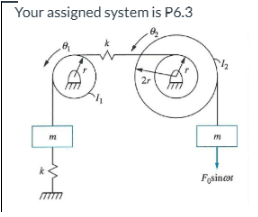
I am really struggling to create this system in simulink. I know it is fairly simple, but I just started using simulink this week, and I do not understand everything needed for this yet. Can anyone help out/show me how it's done?
Respuestas (1)

Karan Singh
el 25 de Feb. de 2025
0 votos
From the image you have provided, here is the short list of basic Simulink blocks you need to model a simple pulley/mass/spring system in a “classical” block‐diagram approach, rather than Simscape:
- Sine wave Block to generate the external force. https://in.mathworks.com/help/simulink/slref/sinewave.html
- Sum/ Add block to sum forces/ torques. https://in.mathworks.com/help/simulink/slref/sum.html
- Gain Block to multiply by constants. https://in.mathworks.com/help/simulink/slref/gain.html
- Integrator Bock. You need two integrators in series per second‐order equation: The first integrator to go from acceleration to velocity. The second integrator to go from velocity to displacement. https://in.mathworks.com/help/simulink/slref/integrator.html
- Scope Block to visualize displacement, velocity, or any other signals you care about. https://in.mathworks.com/help/simulink/slref/scope.html
Karan
1 comentario

Sam Chak
el 25 de Feb. de 2025
Hi @Karan Singh
Based on what you have suggested, could you describe how to use certain Simulink blocks to model both the small pulley and the large pulley, as well as the connection between them, without knowing the differential equations (as not shown in the image)?
Categorías
Más información sobre Simulink en Centro de ayuda y File Exchange.
el 24 de Feb. de 2025
el 25 de Feb. de 2025
Community Treasure Hunt
Find the treasures in MATLAB Central and discover how the community can help you!
Start Hunting!
Translated by 

