Contenido principal

nrPhaseNoise

Add NR phase noise to signal

Since R2026a

Description

The nrPhaseNoise System object™ adds NR phase noise to a signal by using a multi-pole/zero model, as defined in TR 38.803 [1] and TR 38.808 [2]. The object enables you to explore fully customized multi-pole/zero models or you can choose from a set of multi-pole/zero models with fixed parameters.

To add NR phase noise:

  1. Create the nrPhaseNoise object and set its properties.

  2. Call the object with arguments, as if it were a function.

To learn more about how System objects work, see What Are System Objects?

Creation

Description

phasenoise = nrPhaseNoise creates an NR phase noise System object with default values.

phasenoise = nrPhaseNoise(PropertyName=Value) creates the object with writable properties set by one or more name-value arguments. For example, CarrierFrequency=40e9 specifies the carrier frequency in Hz.

example

Properties

expand all

Unless otherwise indicated, properties are nontunable, which means you cannot change their values after calling the object. Objects lock when you call them, and the release function unlocks them.

If a property is tunable, you can change its value at any time.

For more information on changing property values, see System Design in MATLAB Using System Objects.

Carrier frequency in Hz, specified as a positive real number.

Data Types: single | double

Multi-pole/zero model in the simulation, specified as one of these values:

  • "TR38.803-auto" — The object automatically selects the model parameters based on the CarrierFrequency property

    • If CarrierFrequency is nearest to 29.55 GHz, the object uses the model parameters specified in TR 38.803 ([1]) Table 6.1.10-1.

    • If CarrierFrequency is nearest to 45 GHz, the object uses the model parameters specified in TR 38.803 Table 6.1.10-2.

    • If the CarrierFrequency property value is nearest to 70 GHz, the object uses model parameters specified TR 38.803 Table 6.1.10-3.

  • "TR38.803-29.55GHz" — The object uses the multi-pole/zero model parameters specified in TR 38.803 Table 6.1.10-1 for 29.55 GHz.

  • "TR38.803-45GHz" — The object uses the multi-pole/zero model parameters specified in TR 38.803 Table 6.1.10-2 in for 45 GHz.

  • "TR38.803-70GHz" — The object uses the multi-pole/zero model parameters specified in TR 38.803 Table 6.1.10-3 for 70 GHz.

  • "TR38.808-set1" — The object uses the model parameters specified in TR 38.808 Table 4.4.31-1. Use the DesignMargin property to configure the design margin of the model.

  • "TR38.808-set2" — The object uses the model parameters specified in TR 38.808 Table 4.4.31-2.

  • "custom" — The object uses a custom multi-pole/zero model. To configure the model, use the PSD0, ZerosFrequency, ZerosOrder, and PolesFrequency properties.

Data Types: char | string

Design margin in dB, specified as a finite real number.

Dependencies

To enable this property, set PoleZeroModel to "TR38.808-set1".

Data Types: single | double

Power spectral density (PSD) at zero frequency in dB, specified as a finite real number.

Dependencies

To enable this property, set PoleZeroModel to "custom".

Data Types: single | double

Zero frequencies in the frequency response in Hz, specified as a positive real-valued row vector. The size of ZerosFrequency property and ZerosOrder property must be the same.

Dependencies

To enable this property, set PoleZeroModel to "custom".

Data Types: single | double

Order of zero frequencies, specified as a positive real-valued row vector. The size of ZerosFrequency property and ZerosOrder property must be the same.

Dependencies

To enable this property, set PoleZeroModel to "custom".

Data Types: single | double

Pole frequencies in the frequency response in Hz, specified as a positive real-valued row vector. The size of PolesFrequency property and PolesOrder property must be the same.

Dependencies

To enable this property, set PoleZeroModel to "custom".

Data Types: single | double

Order of pole frequencies, specified as a positive real-valued row vector. The size of PolesFrequency property and PolesOrder property must be the same.

Dependencies

To enable this property, set PoleZeroModel to "custom".

Data Types: single | double

Sample rate in Hz, specified as a positive real number.

Data Types: single | double

Minimum frequency offset in Hz, specified as a positive real number.

The object applies the multi-pole/zero model starting at the specified frequency offset and up to half the sample rate. For frequencies less than MinFrequencyOffset property, the object uses the 1/f3 characteristic to define the phase noise, where f is the specified frequency.

Data Types: single | double

Random stream for numerical repeatability, specified as 'global' or 'mt19937ar'.

Data Types: string | char

Random stream seed, specified as a positive real numeric scalar.

Dependencies

To enable this property, set RandomStream to 'mt19937ar'.

Data Types: double

Usage

Description

out = phasenoise(in) adds NR phase noise, specified by the phasenoise System object, to the input signal. To correlate the added phase noise across all ports in the input signal, the objects adds the same phase noise to each port. The result is returned in out.

example

Input Arguments

expand all

Input signal, specified as an M-by-N complex-valued matrix where:

  • M is the number of time-domain samples in the waveform for each port. You can vary M each time you call the object, even when the object is locked. For more information, see Variable-Size Signal Support.

  • N is the number of ports in the waveform.

This object accepts variable-size inputs. After the object is locked, you can change the size of each input port, but you cannot change the number of ports. For more information, see Variable-Size Signal Support with System Objects for this input.

Data Types: single | double
Complex Number Support: Yes

Output Arguments

expand all

Output signal with added phase noise, returned as a complex-valued matrix with the same data type and size as the input signal. Each port in the output waveform, corresponding to a matrix column, has the same phase noise.

Object Functions

To use an object function, specify the System object as the first input argument. For example, to release system resources of a System object named obj, use this syntax:

release(obj)

expand all

visualizeVisualize spectrum mask of NR phase noise
stepRun System object algorithm
cloneCreate duplicate System object
isLockedDetermine if System object is in use
releaseRelease resources and allow changes to System object property values and input characteristics
resetReset internal states of System object

Examples

collapse all

Create an nrPhaseNoise object with default properties.

phasenoise = nrPhaseNoise
phasenoise = 
  nrPhaseNoise with properties:

      CarrierFrequency: 3.0000e+10
         PoleZeroModel: "TR38.803-auto"
            SampleRate: 61440000
    MinFrequencyOffset: 1000
          RandomStream: "global"

Visualize the characteristics of the default NR multi-pole/zero model.

visualize(phasenoise)
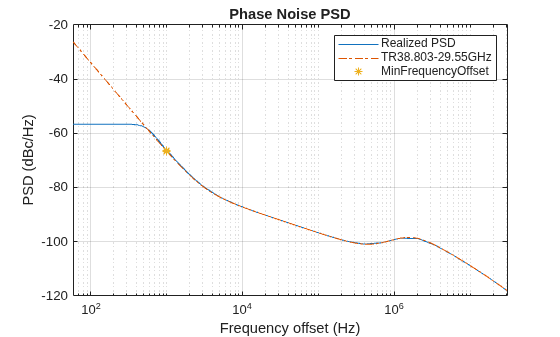
Figure Phase Noise PSD contains an axes object. The axes object with title Phase Noise PSD, xlabel Frequency offset (Hz), ylabel PSD (dBc/Hz) contains 3 objects of type line. One or more of the lines displays its values using only markers These objects represent Realized PSD, TR38.803-29.55GHz, MinFrequencyOffset.

Generate a 64-QAM signal.

M = 64;
data = randi([0 M-1],1000,1);
modData = qammod(data,64);

Apply the phase noise to the signal.

y = phasenoise(modData);

Plot the impaired signal.

scatterplot(y)
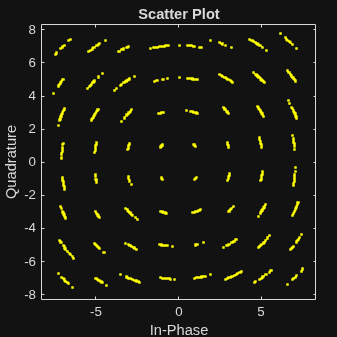
Figure Scatter Plot contains an axes object. The axes object with title Scatter plot, xlabel In-Phase, ylabel Quadrature contains a line object which displays its values using only markers. This object represents Channel 1.

Create an nrPhaseNoise System object with a custom multi-pole/zero model.

phasenoise = nrPhaseNoise( ...
    CarrierFrequency=24.25e9, ...
    PoleZeroModel= "custom", ...
    ZerosFrequency= [3e3 550e3 280e6], ...
    ZerosOrder=[2.37 2.7 2.53], ...
    PolesFrequency=[10 2e6 32e6], ...
    PolesOrder=[2.7 2.9 1.2], ...
    SampleRate=4000000)
phasenoise = 
  nrPhaseNoise with properties:

      CarrierFrequency: 2.4250e+10
         PoleZeroModel: "custom"
                  PSD0: 32
        ZerosFrequency: [3000 550000 280000000]
            ZerosOrder: [2.3700 2.7000 2.5300]
        PolesFrequency: [10 2000000 32000000]
            PolesOrder: [2.7000 2.9000 1.2000]
            SampleRate: 4000000
    MinFrequencyOffset: 1000
          RandomStream: "global"

Visualize the characteristics of the custom multi-pole/zero model.

visualize(phasenoise)
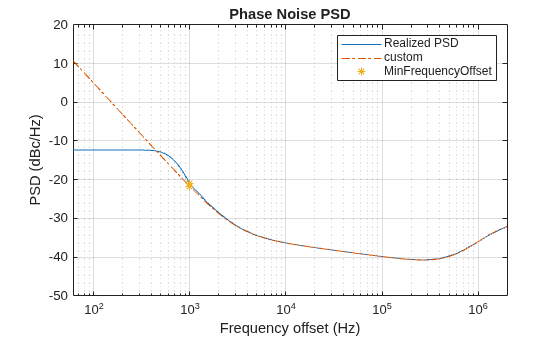
Figure Phase Noise PSD contains an axes object. The axes object with title Phase Noise PSD, xlabel Frequency offset (Hz), ylabel PSD (dBc/Hz) contains 3 objects of type line. One or more of the lines displays its values using only markers These objects represent Realized PSD, custom, MinFrequencyOffset.

References

[1] 3GPP TR 38.803. “Study on new radio access technology: Radio Frequency (RF) and co-existence aspects.” 3rd Generation Partnership Project; Technical Specification Group Radio Access Network.

[2] 3GPP TR 38.808. “Study on supporting NR from 52.6 GHz to 71 GHz.” 3rd Generation Partnership Project; Technical Specification Group Radio Access Network.

Extended Capabilities

expand all

Version History

Introduced in R2026a