solver
R2026bSpecify FMM and FEM solver settings during electromagnetic analysis
Description
Use the solver object to configure solver-specific settings
for the fast multipole method (FMM) and finite element method (FEM) solvers during
electromagnetic (EM) analysis. Egg-crate-array, platform-installed, and curved-reflector
antennas, as well as plane wave excitation environments support the FMM solver while PCB
antennas support the FEM solver for the analysis.
Creation
Syntax
Description
s = solver( returns the solver used in the
antenna defined in obj)obj for EM analysis. For more information on EM
analysis, see Full-Wave Analysis. After you
create a solver object, you can modify the object properties using dot notation.
Note
You must set the SolverType property of the antenna ,
array, or plane wave excitation environment object to "FMM" or
"FEM" to access the solver object.
Input Arguments
Properties
Object Functions
convergence | Calculate and plot convergence of FMM solver |
Examples
Design a default parabolic reflector antenna.
m = reflectorParabolic;
Set the solver type of the parabolic reflector antenna to FMM.
m.SolverType = "FMM";Calculate the impedance of the parabolic reflector antenna at 10 GHz.
Z = impedance(m,10e9);
Access the FMM solver and set the relative residual to 1e-3.
s = solver(m);
s.RelativeResidual = 1e-3;
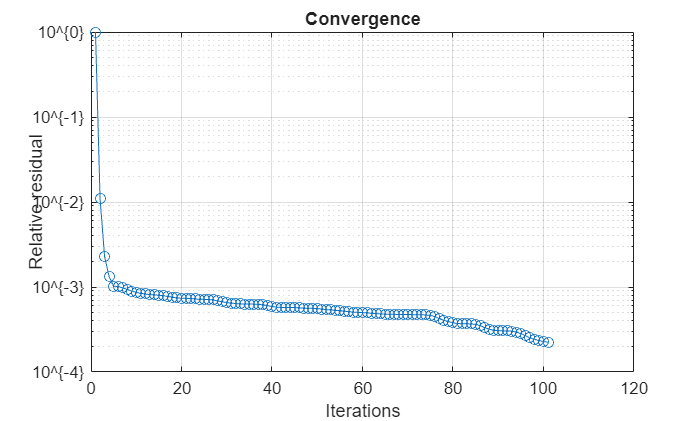
Calculate and plot the convergence of the FMM solver for the parabolic reflector antenna.
convergence(s)
Create a pcbStack object with its SolverType property set to "FEM".
p = pcbStack(SolverType="FEM")p =
pcbStack with properties:
Name: 'MyPCB'
Revision: 'v1.0'
BoardShape: [1×1 antenna.Rectangle]
BoardThickness: 0.0100
Layers: {[1×1 antenna.Rectangle] [1×1 antenna.Rectangle]}
FeedLocations: [-0.0187 0 1 2]
ViaLocations: []
ViaDiameter: []
FeedVoltage: 1
FeedPhase: 0
Conductor: [1×1 metal]
Tilt: 0
TiltAxis: [1 0 0]
Load: [1×1 lumpedElement]
SolverType: 'FEM'
Connector: [1×1 RFConnector]
Create the solver object.
s = solver(p)
s =
  FEM with properties:

    BoundaryCondition: 'perfectly-matched-layer'
Specify the boundary condition as "absorbing".
s.BoundaryCondition = "absorbing"s =
FEM with properties:
BoundaryCondition: "absorbing"

