Generate C Code from Quantized Networks in MATLAB
R2026bThis example shows how to generate C code for a quantized neural network in MATLAB® using MATLAB® Coder™.
First, you train a simple convolutional deep neural network to classify handwritten digits from 0 to 9. You then quantize the network and generate C code for the quantized network using codegen.
If you are already familiar with training and quantization, skip to the Analyze Network for Code Generation Compatibility section.
To see a similar workflow for a nonquantized network, see Generate Generic C Code for Sequence-to-Sequence Regression Using Deep Learning.
Load Data and Train Network
Load the training and validation data. Train a convolutional neural network for the classification task. For more information on setting up the data used for training and validation, see Create Simple Deep Learning Neural Network for Classification.
[imdsTrain, imdsValidation] = loadDigitDataset;
net = trainDigitDataNetwork(imdsTrain,imdsValidation);
trueLabels = imdsValidation.Labels;
classes = categories(trueLabels);
Quantize Network
Split the data into calibration and validation data sets.
calibrationDataStore = splitEachLabel(imdsTrain,0.1,"randomize");
validationDataStore = imdsValidation;
Create a dlquantizer object and specify the network to quantize. Set the execution environment to MATLAB. When you use the MATLAB execution environment, quantization is performed using the fi fixed-point data type. Using this data type requires a Fixed-Point Designer™ license.
quantObj = dlquantizer(net,ExecutionEnvironment="MATLAB");Prepare the network for quantization using prepareNetwork. The prepareNetwork function modifies the neural network to improve accuracy and avoid error conditions in quantization. To export your quantized network to Simulink later, the network must be a dlnetwork object quantized for the MATLAB execution environment using MATLAB R2024b or later.
prepareNetwork(quantObj)
Use the calibrate function to exercise the network with the calibration data and collect range statistics for the weights, biases, and activations at each layer.
calResults = calibrate(quantObj,calibrationDataStore);
Use the quantize method to quantize the network object and return a simulatable quantized network.
qNet = quantize(quantObj);
You can use the quantizationDetails function to see that the network is now quantized.
qDetails = quantizationDetails(qNet)
qDetails = struct with fields:
                     IsQuantized: 1
                   TargetLibrary: "none"
             QuantizedLayerNames: [8×1 string]
             QuantizedLearnables: [6×3 table]
    NetworkInputEmbeddedDataType: [1×2 table]
     LayerOutputEmbeddedDataType: [8×2 table]
Compare the accuracy of the quantized network to the original network.
accuracyQuantized = testnet(qNet,imdsValidation,"accuracy")accuracyQuantized = 99.7600
accuracyOriginal = testnet(net,imdsValidation,"accuracy")accuracyOriginal = 99.6800
The quantized network has a similar accuracy to the original, floating-point network.
Analyze Network for Code Generation Compatibility
Verify the quantized network is compatible with code generation by using the analyzeNetworkForCodegen (MATLAB Coder) function. Analyze the network for the "TargetLibrary" value set to "none", which corresponds to generating code that does not use any third-party library. For a list of supported layers, see Supported Layers for C Code Generation of Quantized Networks.
analyzeNetworkForCodegen(qNet,TargetLibrary="none") Supported
_________
none "Yes"
Define Entry-Point Function for Code Generation
Save the quantized network to a MAT file for use in the code generation entry-point function.
save("quantizedDigitNet.mat","qNet");
Write an entry-point function in MATLAB. The function should:
Use the
coder.loadDeepLearningNetwork(GPU Coder) function to construct and set up a network object. For more information, see Load Pretrained Networks for Code Generation (MATLAB Coder).Call the
predictmethod of the network on the entry-point function input.
Save the entry-point function in a local file.
function out = digitPredict(in) %#codegen
% Entry-point function to perform inference using a quantized network.

persistent qNet;
if isempty(qNet)
    qNet = coder.loadDeepLearningNetwork("quantizedDigitNet.mat");
end

out = predict(qNet,in);
end
Create Code Generation Configuration Object
Create a deep learning configuration object, dlconfig, that is configured for generating generic C/C++ code by using the coder.DeepLearningConfig (MATLAB Coder) function.
dlconfig = coder.DeepLearningConfig(TargetLibrary="none");Create a code generation configuration object for MEX. By default, the code generator produces generic C code. Set the DeepLearningConfig parameter to the previously created object dlconfig.
cfg = coder.config('mex');
cfg.DeepLearningConfig = dlconfig;
Generate Code
Run the codegen (MATLAB Coder) command. Use the -config option to specify the configuration object. Use the -args option to specify the input type as a 28-by-28 unsigned 8-bit integer precision image. This option matches the dimensions and data type of a single image from the validation data set.
codegen -config cfg digitPredict -args {ones(28,28,"uint8")} -report
Code generation successful: View report
Evaluate MEX Accuracy
Compare the prediction of the simulatable quantized network in MATLAB and the MEX function for a single validation image. Read a test image from the validation data set.
testImage = readimage(imdsValidation,1);
Predict the label using the quantized network in MATLAB.
scoresMATLAB = predict(qNet,testImage);
labelMATLAB = scores2label(scoresMATLAB,classes)
labelMATLAB = categorical
     0
Predict the label using the generated MEX function.
scoresMEX = digitPredict_mex(testImage);
labelMEX = scores2label(scoresMEX,classes)
labelMEX = categorical
     0
Both the simulatable quantized network and the MEX function predict the image is the digit zero. Display the test image to verify the predictions.
figure
imshow(testImage)
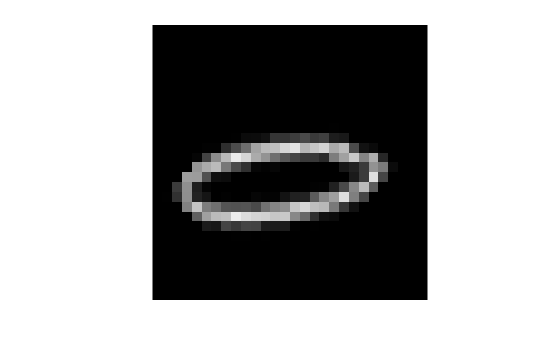
Evaluate the accuracy of the MEX function on the entire validation set.
numImages = numel(imdsValidation.Files);
predictedLabels = strings(numImages,1);
for i = 1:numImages
    image = readimage(imdsValidation,i);
    scores = digitPredict_mex(image);
    predictedLabels(i) = scores2label(scores,classes);
end
accuracyMEX = mean(predictedLabels == string(trueLabels)) * 100
accuracyMEX =
99.7600
The MEX function has the same accuracy as the simulatable quantized network.
Supporting Functions
Load Digits Data Set Function
The loadDigitDataset function loads the Digits data set and splits the data into training and validation data.
function [imdsTrain, imdsValidation] = loadDigitDataset
digitDatasetPath = fullfile(matlabroot,"toolbox","nnet","nndemos", ...
    "nndatasets","DigitDataset");
imds = imageDatastore(digitDatasetPath, ...
    IncludeSubfolders=true,LabelSource="foldernames");
[imdsTrain, imdsValidation] = splitEachLabel(imds,0.75,"randomized");
end
Train Digit Recognition Network Function
The trainDigitDataNetwork function trains a convolutional neural network to classify digits in grayscale images.
function net = trainDigitDataNetwork(imdsTrain,imdsValidation)
layers = [
    imageInputLayer([28 28 1],"Normalization","rescale-zero-one")
    convolution2dLayer(3,8)
    batchNormalizationLayer
    reluLayer
    maxPooling2dLayer(2,'Stride',2)

    convolution2dLayer(3,16)
    batchNormalizationLayer
    reluLayer

    fullyConnectedLayer(10)
    softmaxLayer];

% Specify the training options
options = trainingOptions('adam', ...
    InitialLearnRate=0.01, ...
    MaxEpochs=5, ...
    Shuffle="every-epoch", ...
    ValidationData=imdsValidation, ...
    ValidationFrequency=30, ...
    Verbose=false, ...
    Plots="none", ...
    ExecutionEnvironment="auto");

% Train network
net = trainnet(imdsTrain,layers,"crossentropy",options);
end

